That new blog post is related to start with development of operators using the GO API. I want to point to some resources which are from my personal perspective are an incredible combination to start and I want to highlight some major points which are relevant in that context.
FATA[0009] failed to create API: unable to run post-scaffold tasks of “base.go.kubebuilder.io/v3”: exit status 2
This blog post is about how you could save time, when you are starting to setup your development environment for a GO operator with the Operator SDK on a macOS, in combination with Visual Studio Code.
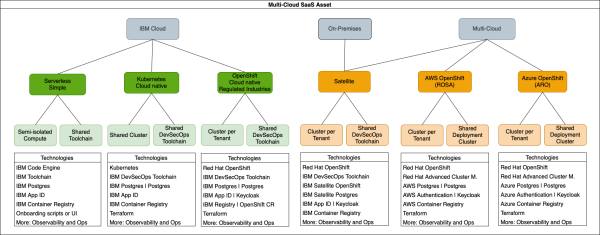
New Open-Source Multi-Cloud Asset to build SaaS
When software is provided as a managed service (SaaS), using a multi-tenant approach helps minimise costs for the deployments and operations of each tenant. In order to leverage these advantages, applications need to be designed so that they can be deployed to support multiple tenants, while maintaining isolation for security reasons. At the same time, common deployment and operation models are required so that new SaaS versions can be deployed to existing tenants, or to onboard new tenants, in a reliable and efficient way.
Instantiation of a Red Hat OpenShift cluster in a Multizone VPC IBM Cloud environment using the free IBM Cloud Schematics (“Terraform as a Service”)
In this blog post we will look at the steps we need to do, when we use IBM Cloud Schematics service with Terraform to instantiate a Red Hat OpenShift cluster in a "Multizone VPC IBM Cloud environment".
Create a ssh key for your GitLab project on IBM Cloud
This blog post is a short cheat sheet to remember how to configure the access to a GitLab project on IBM Cloud from a local computer. An important part in that situation is you need to configure a ssh key for your computer and save this key in GitLab on IBM Cloud. The remaining parts is how... Continue Reading →
Example usage of the internal IBM Cloud GitLab instance
This is a simple cheat sheet which has these two simple objectives: How to create a group in this GitLab instance and add a member.How to create a project for that group. You need an IBM Cloud Account to access the internal IBM Cloud GitLab and you need to see this in context with the... Continue Reading →
Update a master node of an OpenShift cluster on IBM Cloud
This small cheat sheet is about "how you update a master node of an IBM Cloud OpenShift cluster" and it is also related to an older blog post I wrote called Using a Red Hat OpenShift cluster on IBM Cloud some basic thoughts. (Link to the IBM Cloud documentation) Step 1: Login to your IBM Cloud account where... Continue Reading →
Where to get free OpenShift training on IBM Developer?
This short cheat sheet is about how to get free OpenShift trainings on IBM Developer.This can be useful when you want to get started with OpenShift on IBM Cloud or even when you get started with OpenShift only. In these hands-on labs you will get a free OpenShift cluster on IBM Cloud to run your... Continue Reading →
An alternative way for access the example application on OpenShift in VPC
alancer on the Virtual Service Instance (VSI) from the last blog post titled Use a Ngnix load balancer on a VSI to access an application on OpenShift in VPC.
Use a Ngnix load balancer on a VSI to access an application on OpenShift in VPC
This blog post is a (bigger) cheat sheet about: - How to setup a simple Ngnix as a load balancer on a Virtual Server Instance (VSI) that runs in a Virtual Private Cloud (VPC)? - How to configure a Red Hat OpenShift project, to allow a REST endpoint invocation of an application inside the OpenShift project from a VSI instance that runs in the same VPC as the Red Hat OpenShift cluster?