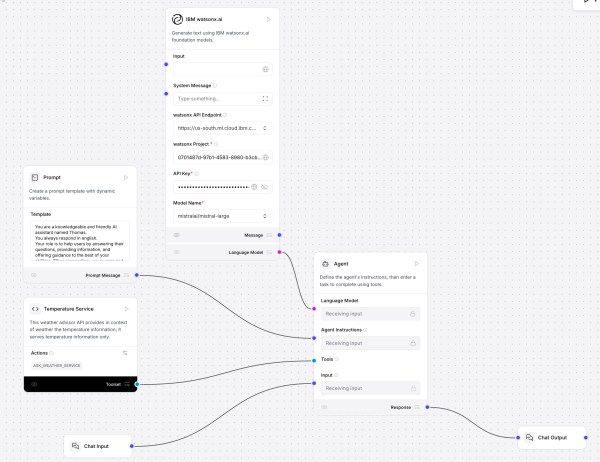
This post shows how to use Langflow with watsonx.ai and a custom component for a “Temperature Service” that fetches and ranks live city temperatures. It covers installation, flow setup, agent prompting, tool integration, and interactive testing. Langflow’s visual design, MCP support, and extensibility offer rapid prototyping; future focus includes DevOps and version control.
Getting Started with Local AI Agents in the watsonx Orchestrate Development Edition
The blog post outlines the process of setting up the Agent Developer Kit (ADK) to build and run AI agents locally using WatsonX Orchestrate Developer Edition. It involves setting up prerequisites, installing the necessary software, and loading an example agent—optional integration with Langfuse for observability.
The Rise of Agentic AI and Managing Expectations
This blog discusses the emergence of agentic AI, capable of planning and executing complex tasks autonomously, contrasting with traditional generative AI. The post emphasizes the importance of managing expectations, oversight, and ensuring transparency due to the unpredictability, including potential hallucinations associated with these systems. LangGraph is highlighted as a powerful tool for developing agentic workflows.
Supercharge Your Support: Example Build & Orchestrate AI Agents with watsonx.ai and watsonx Orchestrate
This post explains how to create, test, and integrate AI support agents using IBM's watsonx.ai and watsonx Orchestrate. It describes an example to integrate a Specialist Support Agent for DB2, into multi-agent orchestration, and highlights best practices for creating efficient agent workflows and accurate responses while anticipating potential complexities.
Implementing Independent Bee Agents with TypeScript
This blog post discusses the creation of a custom Bee Agent that operates independently from the Bee Stack and interacts in German. It explores requirements, agent examples, coding in TypeScript, and GitHub references. The author implements an agent using a specific system prompt while addressing the challenges of ensuring consistent output in German.
Create a Custom Bee Agent with a Custom Python Weather Tool: A Step-by-Step Guide
This blog post explains how to integrate a custom Python tool into the Bee Agent using the Bee UI, focusing on real-time weather data retrieval. It outlines the setup process, agent customization, and testing to ensure functionality. Clear descriptions and agent interactions enhance the tool's efficacy and future applications.
My Bee Agent Framework and watsonx.ai development Learning Journey
The content shows my Bee Agent Framework and Bee Stack development learning journey, focusing on their integration with the watsonx.ai. It covers the setup process for different agent applications, including a weather retrieval agent and a travel assistant. It also provides guidance for contributing to the development of Bee API and UI and configuring Podman.
A Bee API and Bee UI development example for adding a TypeScript tool made for the Bee Agent Framework
The blog post explains the integration of a custom TypeScript tool, TravelAgentTool, into the Bee API and UI to extend the Bee Framework's functionality. It details the steps for setup, including modifying source files, configuring environment variables, and demonstrating its use in travel inquiries. Code instructions for implementation are provided throughout.
CheatSheet “Ready to Go” for Bee API and UI development
The content outlines the setup process for a development environment aimed at contributing to the Bee API and Bee UI repositories within the broader Bee Stack. It details the steps of cloning repositories, starting infrastructure, configuring .env files, and launching both the Bee API and UI servers, ensuring readiness for development.
Bee Agent example for a simple travel assistant using a custom tool and observe the agent behavior in detail (Bee Framework 0.0.34 and watsonx.ai)
This blog post explains the implementation of a custom travel assistant agent using the Bee Agent Framework. It covers creating a tool to suggest vacation locations and utilizing weather data, integrating with MLFlow for observability. The article emphasizes practical execution steps, system requirements, and the motivation behind combining location and weather insights for user queries.