This blog post outlines a bash automation for setting up and testing Text Generation Inference (TGI) using a container. It provides instructions for creating a Python test client, starting the TGI server, and troubleshooting common issues. The post emphasizes the benefits of using containers and references the Hugging Face and Nvidia technologies.
How to create a FastAPI server to use OpenAI models
Last time, I wrote a blog post about "IBM Watsonx.ai and a simple question-answering pipeline using Python and FastAPI", and I had an exchange with my family about an OpenAI sample for a FastAPI application, so I created a small FastAPI server to access OpenAI with Python.
An example for a Functional Performance Test Plan in JMeter
This longer blog post is about an example of a "Functional Performance Test Plan" in the JMeter test tool. The example contains configuration of the Test Plan and the execution from the UI and the command line using a simple Node.js application as System Under Test. I would say the content is from the beginner to intermediate level.
CheatSheet: How to loop an endpoint of an application running on “IBM Cloud Code Engine” with a bash automation
This blog post is a CheatSheet about how to loop an endpoint of an application running on IBM Cloud Code Engine with a bash automation.
Build and push a container image to IBM Cloud Container Registry using bash automation
This extract is from a bash automation script in the question-answering GitHub project. The bash script automates the deployment to IBM Cloud Code Engine. The extraction is about the building and pushing a container to the IBM Cloud Container Registry.
Standard config files to save PATH settings for shell scripting
These are the standard config files that save PATH settings for shell scripting. There is an appropriate Stackoverflow entry: What's the difference between .bashrc, .bash_profile, and .environment?
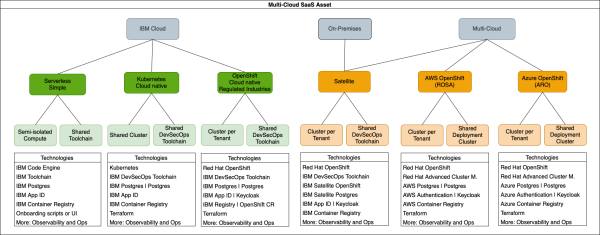
New Open-Source Multi-Cloud Asset to build SaaS
When software is provided as a managed service (SaaS), using a multi-tenant approach helps minimise costs for the deployments and operations of each tenant. In order to leverage these advantages, applications need to be designed so that they can be deployed to support multiple tenants, while maintaining isolation for security reasons. At the same time, common deployment and operation models are required so that new SaaS versions can be deployed to existing tenants, or to onboard new tenants, in a reliable and efficient way.

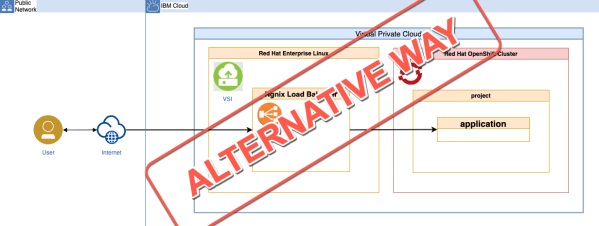
An alternative way for access the example application on OpenShift in VPC
alancer on the Virtual Service Instance (VSI) from the last blog post titled Use a Ngnix load balancer on a VSI to access an application on OpenShift in VPC.
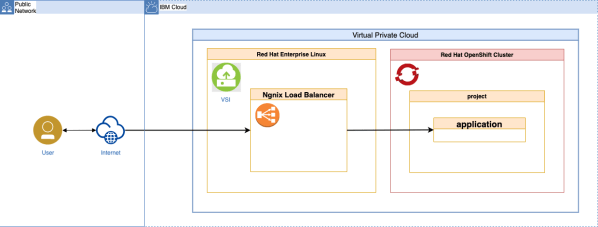
Use a Ngnix load balancer on a VSI to access an application on OpenShift in VPC
This blog post is a (bigger) cheat sheet about: - How to setup a simple Ngnix as a load balancer on a Virtual Server Instance (VSI) that runs in a Virtual Private Cloud (VPC)? - How to configure a Red Hat OpenShift project, to allow a REST endpoint invocation of an application inside the OpenShift project from a VSI instance that runs in the same VPC as the Red Hat OpenShift cluster?
Automated setup of an IBM Cloud App ID instance using a Bash script
This blog post contains some of the implementation details of an example Bash script to automate the setup for an IBM Cloud App ID service instance. For details, visit this GitHub project.