The post discusses integrating Knowledge Graphs with Retrieval-Augmented Generation (RAG), specifically using Neo4j and LangGraph. It outlines an example setup where extracted document data forms a structured graph for querying. The system enables natural question-and-answer interactions through AI, enhancing information retrieval with graph relationships and embeddings.
Testing AI Agents with the watsonx Orchestrate Agent Developer Kit (ADK)- Evaluation Framework – A Hands-on Example
The post outlines using the Evaluation Framework in watsonx Orchestrate ADK to verify AI Agent behavior through a practical example: Galaxium Travels, a fictional booking system. It details setting up the environment, defining user Stories, generating synthetic Test Cases, and running evaluations, crucial for ensuring AI reliability and transparency.
Integrating watsonx Orchestrate Agent Chat in Web Apps
This blog post demonstrates the usage of the web channel functionality in watsonx Orchestrate, enabling the embedding of conversational AI agents into custom web applications. It guides users through setting up a remote environment, generating source code, and running a web server to invoke chat features, emphasizing ease of use and customization options.
Create Your First AI Agent with Langflow and watsonx
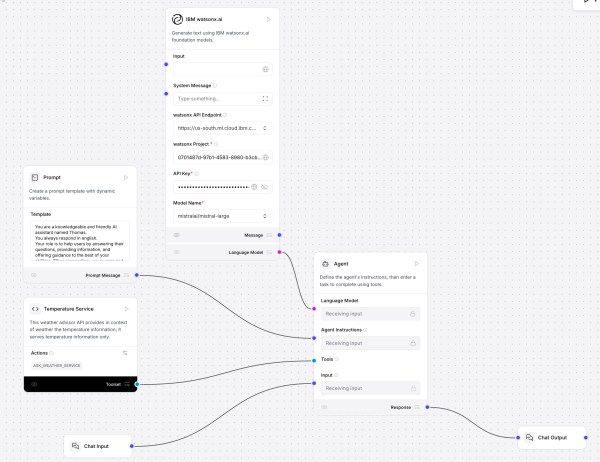
This post shows how to use Langflow with watsonx.ai and a custom component for a “Temperature Service” that fetches and ranks live city temperatures. It covers installation, flow setup, agent prompting, tool integration, and interactive testing. Langflow’s visual design, MCP support, and extensibility offer rapid prototyping; future focus includes DevOps and version control.
Getting Started with Local AI Agents in the watsonx Orchestrate Development Edition
The blog post outlines the process of setting up the Agent Developer Kit (ADK) to build and run AI agents locally using WatsonX Orchestrate Developer Edition. It involves setting up prerequisites, installing the necessary software, and loading an example agent—optional integration with Langfuse for observability.
(outdated) Develop and Deploy Custom AI Agents to watsonx.ai on IBM Cloud
This blog post details the development and deployment of a customizable AI Agent using watsonx.ai. It covers motivations, architecture, and code for a weather query tool, explaining local execution, testing with pytest, and deployment via scripts. The integration with Streamlit UI is emphasized, showcasing seamless deployment processes and enhanced functionality for developers.
Deploying an InstructLab Fine-Tuned Model on IBM watsonx Inference: A SaaS Guide
This blog post explains how to deploy a fine-tuned model to IBM watsonx on IBM Cloud. It highlights the advantages of using this platform, such as avoiding infrastructure management and ensuring enterprise security, as well as detailed steps for configuration, deployment, and accessing the model from IBM watsonx.
Implementing Independent Bee Agents with TypeScript
This blog post discusses the creation of a custom Bee Agent that operates independently from the Bee Stack and interacts in German. It explores requirements, agent examples, coding in TypeScript, and GitHub references. The author implements an agent using a specific system prompt while addressing the challenges of ensuring consistent output in German.
Simplified Example to build a Web Chat App with watsonx and Streamlit
This blog post describes a web chat application using a large language model on watsonx, with the interface built in Streamlit.io. It focuses on motivation, architecture, code sections, and local setup, featuring basic authentication and options for user interaction. The author highlights Streamlit’s rapid prototyping capabilities and ease of use with Python.
Create a Custom Bee Agent with a Custom Python Weather Tool: A Step-by-Step Guide
This blog post explains how to integrate a custom Python tool into the Bee Agent using the Bee UI, focusing on real-time weather data retrieval. It outlines the setup process, agent customization, and testing to ensure functionality. Clear descriptions and agent interactions enhance the tool's efficacy and future applications.