Hi, this is a very short blog post. When you use Podman and you are going to build a container with this command: podman build -t "quay.io/$REPOSITORY/mycontainer:v1" -f Dockerfile . You maybe get this error: Error: error getting default registries to try: short-name resolution enforced but cannot prompt without a TTY The reason for that... Continue Reading →

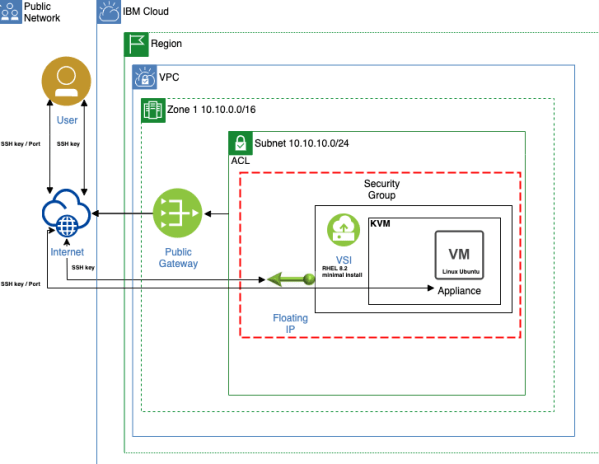
How to setup a virtual machine or virtual appliance in an IBM Cloud virtual private cloud (vpc) environment on a virtual server instance (vsi)? (nested Hypervisor)
This is a cheat sheet about, how to setup a virtual machine or virtual appliance in an IBM Cloud virtual private cloud (vpc) on a virtual server instance (vsi) with Red Hat Enterprise Linux 8 minimal install (RHEL8) as host operating system and a Ubuntu Linux operating system for the virtual machine or virtual appliance.
Run a Java Web Start (javaws) application on a Mac OS with AdoptOpenJDK-11 runtime
I had the situation that I needed to run a Java Web Start (javaws) application on a mac BigSur OS and AdoptOpenJDK-11 runtime. The OpenWebStart project provided me what I needed in that situation. I didn't want to install an older runtime like Java 8 and manage different runtimes only for the execution of the... Continue Reading →
(Outdated) Some Information about the current IBM Cloud Lite Account
This content is outdated! Please follow the links inside the blog post to get the actual information about current definition of an IBM Cloud Lite Account.
Create a Virtual Private Cloud (VPC), Virtual Server Instance (VSI) on IBM Cloud with Terraform
This is a "simple" cheat sheet, how to create a single virtual server instance (VSI) in the virtual private cloud (VPC) infrastructure on IBM Cloud using Terraform.
10 Hours of Live Recordings, which are built on Experience, about Application Security
It’s awesome we just created 10 hours of live recordings, which are built on experience, about application security. That learning journey was made by the IBM Developer Hybrid Cloud Build Team from IBM and I am a part of that team. We put together great content for you. By the way, I was responsible for the content ;-). I also has been the moderator for most of the sessions and I also gave sessions by myself. The learning journey is called #ApplicationSecurityLearningJourney.
How to create a single virtual server instance (VSI) in a virtual private cloud (VPC) infrastructure on IBM Cloud
This is a “simple” cheat sheet, how to create a single virtual server instance (VSI) in the virtual private cloud (VPC) infrastructure on IBM Cloud. The blog post has four major sections: - Example architecture - Setup of a VPC network - Setup and configure the virtual server instance inside the VPC network - Access the virtual server instance from a local machine
Creating and Destroying an Instance using IBM Cloud Virtual Servers (Classic Infrastructure)
Here is a good 10 min video about “Creating and Destroying an Instance using IBM Cloud Virtual Servers” by using the IBM Cloud classic infrastructure. The video contains essential practical basics and is created by LearnToday. The screen resolution is not the best, but it's ok.
Use environment variables to make a containerized Vue.js frontend application more flexible and deploy it to Code Engine
This blog post addresses the topic, how to use environment variables to make a containerized Vue.js frontend application more flexible. We will touch following technologies Vue.js, NGINX, JavaScript, Dockerfile and Code Engine.
How to use environment variables to make a containerized Quarkus application more flexible
When you run a containerized application on a container orchestration platform like Kubernetes, Open Shift or with a serverless framework like Knative or Code Engine or on other platforms, it is helpful to pass endpoints to other applications to the containerized application by using environment variables. When the container will be restarted, these variables can be provided to the container and no adjustment in the source code is necessary. You can use configmaps or in Code Engine simple the environment variable itself.