CheatSheet: Essential Steps to Configure Podman Machines

Podman is enhancing its capabilities in managing containers, allowing seamless integration with Kubernetes. This blog outlines how to configure a Podman machine, including creating a machine with specific resources and modifying configurations without deletion. It highlights essential commands like podman machine init and podman machine set.

Unleash your creativity and design a custom visualization for the Shelly 3EM device with Grafana

The blog post details an example implementation of a connection server using Shelly 3EM, IBM Cloud Cloudant, and Grafana. It aims to store historical data for visualizing electricity consumption. The project involves detailed architecture, environment setup, Python, FastAPI, Podman, and more usage. The setup covers Raspberry Pi, Podman Compose, and IBM Cloud Code Engine environments, with prerequisites and detailed configurations. The approach allows users to monitor and visualize power consumption efficiently and cost-effectively using Grafana.

Using the internal OpenShift container registry to deploy an application

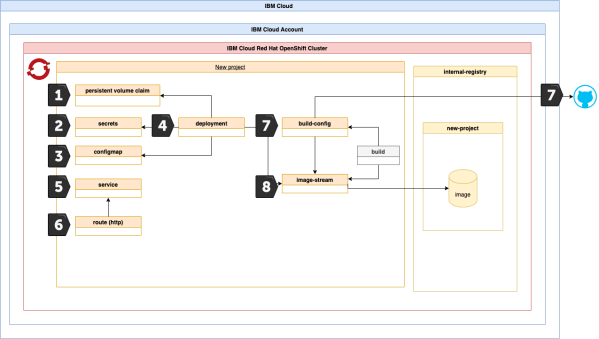
This cheat sheet is an extension to a blog post I made which is called: Configure a project in an IBM Cloud Red Hat OpenShift cluster to access the IBM Cloud Container Registry . In that related blog post we used the IBM Cloud Container registry to get the container images to run our example application. Now in this cheat sheet we will use the Red Hat OpenShift internal container registry and the Docker build strategy to deploy the same example application to OpenShift.

How to use environment variables to make a containerized Quarkus application more flexible

When you run a containerized application on a container orchestration platform like Kubernetes, Open Shift or with a serverless framework like Knative or Code Engine or on other platforms, it is helpful to pass endpoints to other applications to the containerized application by using environment variables. When the container will be restarted, these variables can be provided to the container and no adjustment in the source code is necessary. You can use configmaps or in Code Engine simple the environment variable itself.

Blog at WordPress.com.

Up ↑