Open the door wide open for Watson Assistant with “custom extensions” – an awesome progression

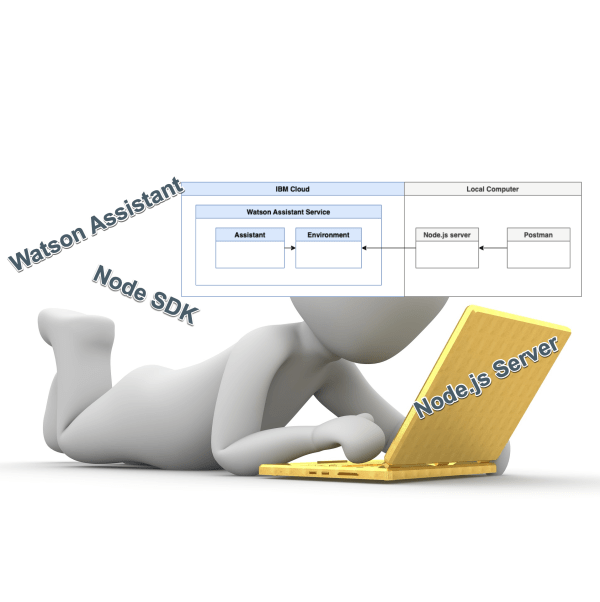
IBM Watson Assistant is a SaaS offering from IBM to build conversational assistants. IBM Watson Assistant is using artificial intelligence which helps to understand users in context, to provide them easy and fast, consistent, and accurate answers across various applications, devices, or channels. IBM Watson Assistant is built on natural language understanding (NLU), natural language processing (NLP) and machine learning (ML). The first version was already very good, and IBM clients and partners were starting to take these advantages; for example Watson Assistant was used at the International Space Station. Here you can find some more details: CIMON brings AI to the International Space Station. Based on the feedback from clients, the IBM development and design team has created a brand new experience and added new functionalities to the service for example they expanded the integration possibilities with extensions. In this blog post I focus especially on custom extensions development and setup.

Bash scripting: How to create a new custom resource file from a template file using sed?

In this blog post we use an existing template file, that we created for a custom resource to insert the needed value for an URL to point to a container image in a container registry, to create custom resource yaml file we use to deploy that custom resource . The template file contains a string which we will replace with the content of URL to the container image. We haven't used helm, kustomize to do that in this situation.

How to deploy an application with Argo CD using a Helm repository

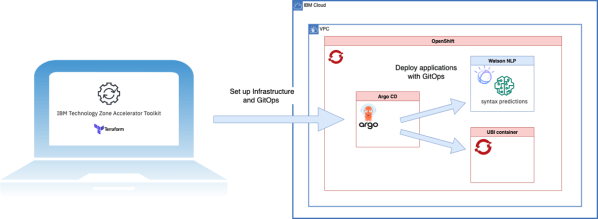
In this blog post I will cover the topic, how to use an existing Helm Chart project and an existing Argo CD instance on OpenShift to deploy an example application. The example application is a Node.js server application I used in several blog posts related to OpenShift. This blog post is in the context of my last blog posts using IasCable and Software Everywhere to setup GitOps. In this last blog post I showed how to setup Red Hat OpenShift and Argo CD and an initial GitOps repository on IBM Cloud and in this blog post we reuse the created environment with IasCable GitOps to create a new application inside Argo CD manually.

Blog at WordPress.com.

Up ↑