

This blog post contains an extract of a Jupyter Notebook and shows a way how to create a new DataFrame by building an extraction of two specific columns and their values of an existing DataFrame.
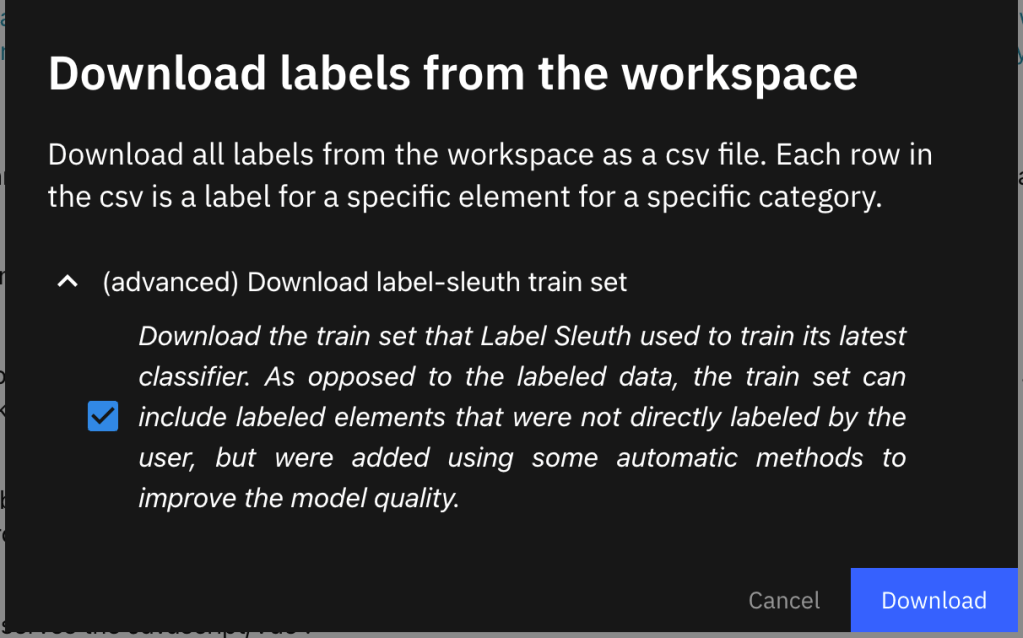
The background is that I labeled data with Label Sleuth. Label Sleuth is an open-source no-code system for text annotation and building text classifiers, and to export the labeled train set. The image below shows the export dialog.
Here is an extract of the loaded data in a DataFrame inside a Jupyter Notebook for the exported data from Label Sleuth.
import pandas as pd
df_input_data = pd.read_csv(input_csv_file_name)
df_input_data.head()
| workspace_id | category_name | document_id | dataset | text | uri | element_metadata | label | label_type | |
|---|---|---|---|---|---|---|---|---|---|
| 0 | Blog_post_01 | kubernetes_true | “#doc_id194” | pre_proce_level_2_v2 | “There is an article called Let’s embed AI int… | pre_proce_level_2_v2-“#doc_id194”-5 | {} False | Standard | |
| 1 | Blog_post_01 | kubernetes_true | “#doc_id6” | pre_proce_level_2_v2 | “For example; to add my simple git and cloud h… | pre_proce_level_2_v2-“#doc_id6”-10 | {} | False | Standard |
| 2 | Blog_post_01 | kubernetes_true | “#doc_id2” | pre_proce_level_2_v2 | “The enablement of the two models is availabl… | pre_proce_level_2_v2-“#doc_id2”-14 | {} False | Standard | |
| 3 | Blog_post_01 | kubernetes_true | “#doc_id47” | pre_proce_level_2_v2 | “Visit the hands-on workshop Use a IBM Cloud t… | pre_proce_level_2_v2-“#doc_id47”-10 | {} | True | Standard |
| 4 | Blog_post_01 | kubernetes_true | “#doc_id1” | pre_proce_level_2_v2 | “This is a good starting point to move on to t… | pre_proce_level_2_v2-“#doc_id1”-58 | {} | False | Standard |
In this example, we want to find all the values for the column category_name which are equal to kubernetes_true and the column label contains the value True at the same index position.
The following Python function verify_and_append_data does the job to build a DataFrame by an extract of these two specific columns and their values of an existing DataFrame.
This function verify_and_append_data will be used during an iteration of the input DataFrame.
The function is tailored for this column data structure ['workspace_id', 'category_name', 'document_id', 'dataset', 'text', 'uri', 'element_metadata', 'label', 'label_type'] and contains the parameters:
- The
search_column_1andsearch_column_2for the definition of columns to be used to get the search values. - The
search_val_1andsearch_val_2that does specify the values you are searching for in the columns. - The
indexto define the current index position of the input DataFrame. - The
input_dataframeis the DataFrame that contains the input data. - The
output_dataframeis the DataFrame which does contain the extracted data.
# The function uses the following data structure  ['workspace_id', 'category_name', 'document_id', 'dataset', 'text', 'uri', 'element_metadata', 'label', 'label_type']
def verify_and_append_data ( search_column_1, search_column_2, search_val_1, search_val_2, index, input_dataframe, output_dataframe):

    reference_1 = input_dataframe.loc[index, search_column_1]
    reference_2 = str(input_dataframe.loc[index, search_column_2])

    if ((reference_1 == search_val_1) and (reference_2 == search_val_2)):

        # get the existing data from the input dataframe
        workspace_id     = input_dataframe._get_value(index, 'workspace_id', takeable=False)
        category_name    = input_dataframe._get_value(index, 'category_name', takeable=False)
        document_id      = input_dataframe._get_value(index, 'document_id', takeable=False)
        dataset          = input_dataframe._get_value(index, 'dataset', takeable=False)
        text             = input_dataframe._get_value(index, 'text', takeable=False)
        uri              = input_dataframe._get_value(index, 'uri', takeable=False)
        element_metadata = input_dataframe._get_value(index, 'element_metadata', takeable=False)
        label            = input_dataframe._get_value(index, 'label', takeable=False)
        label_type       = input_dataframe._get_value(index, 'label_type', takeable=False)

        # save the data for insertion
        data_row = {'workspace_id':workspace_id ,'category_name':category_name,'document_id':document_id ,'dataset':dataset ,'text':text ,'uri':uri ,'element_metadata':element_metadata,'label':label ,'label_type':label_type}

        # Create a temporary data frame that will be combined with output data frame
        temp_df = pd.DataFrame([data_row])

        # Combine the temporary data frame with the output data frame
        output_dataframe = pd.concat([output_dataframe, temp_df], axis=0, ignore_index=True)

        # Returns the status and the manipulated data frame
        return True, output_dataframe
    else:
        return False,  output_dataframe
The usage for the function.
columns = ['workspace_id', 'category_name', 'document_id', 'dataset', 'text', 'uri', 'element_metadata', 'label', 'label_type']
df_train_test_data = pd.DataFrame(columns=columns)

for row in range(len(df_input_data)):

    verify_result = False

    verify_result, df_train_test_data = verify_and_append_data('category_name', 'label', 'kubernetes_true', 'True', row, df_input_data, df_train_test_data)
    verify_result, df_train_test_data = verify_and_append_data('category_name', 'label', 'watson_nlp_true', 'True', row, df_input_data, df_train_test_data)
    verify_result, df_train_test_data = verify_and_append_data('category_name', 'label', 'kubernetes_false', 'True', row, df_input_data, df_train_test_data)
    verify_result, df_train_test_data = verify_and_append_data('category_name', 'label', 'watson_nlp_false', 'True', row, df_input_data, df_train_test_data)

# show the different length of the two DataFrames
print(len(df_input_data), len(df_train_test_data))
df_train_test_data.head()
This is an example result of an execution inside a Jupyter Notebook.
1067 342
| workspace_id | category_name | document_id | dataset | text | uri | element_metadata | label | label_type | |
|---|---|---|---|---|---|---|---|---|---|
| 3 | Blog_post_01 | kubernetes_true | “#doc_id47” | pre_proce_level_2_v2 | “Visit the hands-on workshop Use a IBM Cloud t… | pre_proce_level_2_v2-“#doc_id47”-10 | {} | True | Standard |
I hope this was useful to you, and let’s see what’s next?
Greetings,
Thomas
#python, #jupyternotebook, #dataframe, #pandas, #concat
 Thomas Suedbroecker's Blog
Leave a comment