

In the last blog post, Integrating langchain_ibm with Watson and LangChain for function calls: Example and Tutorial, we started to understand tool definitions and execution. Now, in this blog post, we check whether it is possible to use the ChatWatsonx class and implement an example application to use an agent that invokes functions. Therefore, the post outlines the steps to create a WatsonxChat instance, a Chat prompt template, a tool calling agent instance, and an Action Executor. The response demonstrates the partial success of this approach and the importance of a structured ChatPromptTemplate.
Note: To inspect a full working weather query example for an agent implementation, please visit the blog post Implementing LangChain AI Agent with WatsonxLLM for a Weather Queries application.
Table of content
- Objective
- Introduction
- An example of using tools in “actions” in a chat to get temperature information for various cities
- Define the tools functions
- Create a WatsonxChat instance
- Create a Chat prompt template
- Create a tool calling agent instance
- Create an Action Executor
- Inspect the response
- Run the example
- Additional resources
- Summary
Source code for the example application: https://github.com/thomassuedbroecker/agent_tools_langchain_chatwatsonx
1. Objective
The objective is to get a basic understanding of how to use the tools in AI agents by using the ChatWatsonx class. Is this entirely possible?
2. Introduction
An AI agent built on large language models controls the path to solving a complex problem. Resource: IBM Research Large language models revolutionized AI. LLM agents are what’s next.
We will follow the weather example from the last blog post. The action has to invoke a function to get temperature information about a city from a weather service.
The following table contains the questions and the resulting “Action Chain status” for our example implementation:
| Question | Action Chain Status |
|---|---|
| Which city is hotter today: LA or NY? | Entering new AgentExecutor chain |
| What is the temperature today in Berlin? | Entering new AgentExecutor chain |
| How to win a soccer game? | Finished chain |
| “What is the official definition of the term weather?” | Finished chain |
Currently, the WatsonxLLM class does not support tool binding without a prompt, so we will use the ChatWatsonx class, because it realizes the tool integration with a prompt for the Mixtral LLM model. The ChatWatsonx has not implemented a thought prompting process for using an action, so we are using the tool calling agent implementation from LangChain.
Note: I found the excellent IBM Developer blog post Create a LangChain AI Agent in Python using watsonx, which uses the WatsonxLLM class from langchain_ibm with a more generic system prompt for tools and action integration. This IBM Developer blog post is a better approach.
To create an agent, we will partly follow the “how to for Custom Agent” and the Tool calling agent instructions in LangChain.
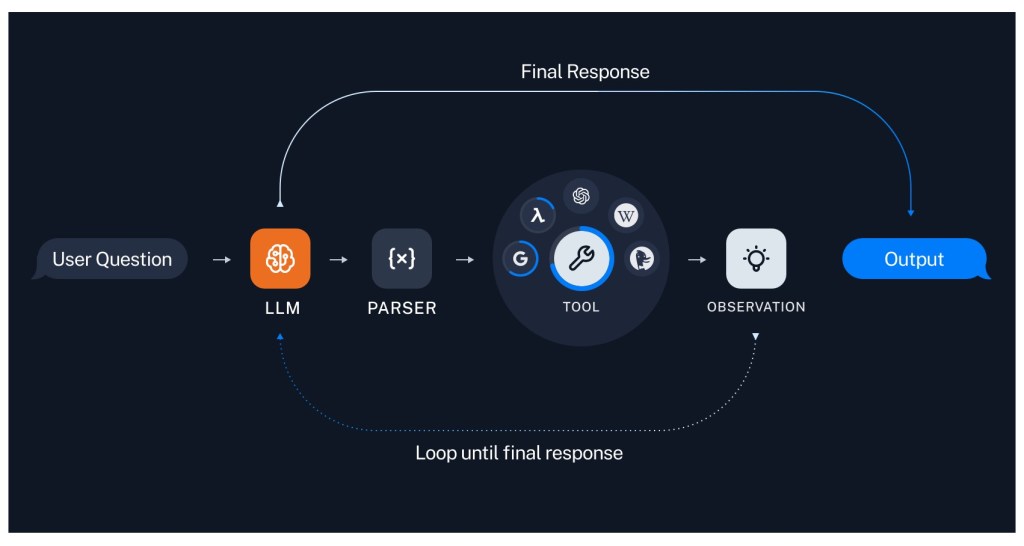
The following diagram from the use cases in LangChain is a good one, simplified to show the loops an agent should run to get a final result for a decision.
In our example, we will not loop until we get to the final result. We execute an agent and provide the output. (Resource: Image from LangChain)
3. An example of using tools in “actions” in a chat to get temperature information for various cities
These are the implementation steps for the example application in the GitHub repository XXXX.
Step 1: Define the tools functions
The annotation @tool identifies the function below as a tool function from langchain.tools. That function includes the proper formatted comments for a complete function description you can also define in a JSON format, as you may have seen in my last blog post. But by using the annotation @tool, the function can also be executed by an action (if the framework for the model provides an implementation for a runnable interface), and you can invoke it locally using the following example code.
- Invocation of the function
argument = {"cities": city_list}
result = current_temperature.invoke(argument)
- Source code for the function
@tool (response_format="content")
def current_temperature(cities: List[str]) -> List[str]:
     """provides the current temperature information for given cities.
     Args:
                cities: The parameter cities is a list e.g. ["LA", "NY"].
     """
     base_weather_url="https://wttr.in/"
     cities_input = cities
     cities_output = []

     for city in cities_input:
          # Ensure to get the JSON format: '?format=j1'
          city_temp_url = base_weather_url + city + "?format=j1"
          response = requests.get(city_temp_url)
          if (response.status_code == 200):
              # convert from byte to text
              byte_content = response.content
              text_content = byte_content.decode("utf-8")

              # load json
              content = json.loads(text_content)
              print(f"{content}")

              # extract temperature
              temperature = content['current_condition'][0]['temp_C']
              cities_output.append({"city": city, "temperature":temperature})
          else:
              cities_output.append({"city": f"{city} ERROR", "temperature":0})

     return cities_output
Step 2: Create a WatsonxChat instance
     watsonx_chat =  ChatWatsonx( model_id=environment['model_id'],
            url=environment['url'],
            project_id=environment['project_id'],
            apikey= environment['apikey'],
            params=parameters
     )
Step 3: Create a Chat prompt template
     system_prompt = """You are a weather expert. If the question is not about the weather, say: I don't know."""
     prompt_template = ChatPromptTemplate.from_messages(
       [
              ("system", system_prompt),
              ("placeholder", "{chat_history}"),
              ("human", "{input}"),
              ("placeholder", "{agent_scratchpad}"),
       ]
     )
Step 4: Create a tool calling agent instance
Now we create a predefined Tool calling agent,
- langchain-ibm Library instance.
agent = create_tool_calling_agent(watsonx_chat, tool, prompt_template)
Step 5: Create an Action Executor
To execute the agent, we use an Action Executor.
- Create
agent_executor = AgentExecutor(agent=agent, tools=tool, verbose=True)
- Invoke
response = agent_executor.invoke({"input": question,
                                  "include_run_info": True})
Step 6: Inspect the response
The response is based on the combined prompt definition of our system prompt and the prompt defined inside the ChatWatsonx tools/function calling prompt.
print(f"{response}")
{'input': 'What is the temperature today in Berlin?',
'include_run_info': True,
'output': '\n\n```json\n{\n    "type": "function",\n    "function": {\n        "name": "current_temperature",\n        "arguments": {\n            "cities": ["Berlin"]\n        }\n    }\n}\n```\n</endoftext>'}
In the output of the terminal, we can see the following information.
> Entering new AgentExecutor chain...


```json
{
    "type": "function",
    "function": {
        "name": "current_temperature",
        "arguments": {
            "cities": ["Berlin"]
        }
    }
}
```
</endoftext>

> Finished chain.
4. Run the example
Following the steps in the GitHub repository: https://github.com/thomassuedbroecker/agent_tools_langchain_chatwatsonx
5. Additional resources
- IBM Developer Create a LangChain AI Agent in Python using watsonx
- IBM Research Large language models revolutionized AI. LLM agents are what’s next
- LangChain Action Executor
- LangChain Runnable interface
- LangChain Use tools quickstart
- LangChain ChatWatsonx
- LangChain Agents
- LangChain Tools
- LangChain Custom Agents
- LangChain Tool calling agent
- LangChain langchain-ibm Library
- LangChain Tool use and agents
6. Summary
The question: Does it work to use WatsonxChat from langchain_ibm to implement an action that invokes functions?
So we can say not fully, but partly, and it shows how important the prompt for a structured ChatPromptTemplate from LangChain.
Extract of this prompt:
'''Respond to the human as helpfully and accurately as possible. You have access to the following tools:

{tools}

Use a json blob to specify a tool by providing an action key (tool name) and an action_input key (tool input).

Valid "action" values: "Final Answer" or {tool_names}

Provide only ONE action per $JSON_BLOB, as shown:

```
{{
  "action": $TOOL_NAME,
  "action_input": $INPUT
}}
```

Follow this format:

Question: input question to answer
Thought: consider previous and subsequent steps
Action:
```
$JSON_BLOB
```
Observation: action result
... (repeat Thought/Action/Observation N times)
Thought: I know what to respond
Action:
```
{{
  "action": "Final Answer",
  "action_input": "Final response to human"
}}

Begin! Reminder to ALWAYS respond with a valid json blob of a single action. Use tools if necessary. Respond directly if appropriate. Format is Action:```$JSON_BLOB```then Observation'''

human = '''{input}

{agent_scratchpad}

(reminder to respond in a JSON blob no matter what)'''
Overall, I would say we are ready to move forward with the example from IBM Developer Create a LangChain AI Agent in Python using watsonx to see how it works with a specialized prompt for the IBM Granite foundation model.
I hope this was useful to you and let’s see what’s next?
Greetings,
Thomas
#llm, #langchain, #ai, #opensource, #ibm, #watsonx, #functioncalling, #aiagent, #mistralai, #functioncall, #python
 Thomas Suedbroecker's Blog