

The blog post outlines updates on fine-tuning a model with the InstructLab , detailing tasks like data preparation, validation, synthetic data generation, model training, and testing. It emphasizes the need for extensive and accurate input for effective training, while only minimal changes in the overall process since previous versions, particularly in handling data quality. This blog post contains updates related to my blog post InstructLab and Taxonomy tree: LLM Foundation Model Fine-tuning Guide | Musician Example.
Related GitHub repositories:
Please visit the InstructLab repository for additional details and the actual documentation.
- Table of content
- Motivation
- Prepare data in the Taxonomy tree
- Validate data in the Taxonomy tree
- Generate synthetic data
- Train the model
- Test the model
- Convert the model
- Serve the model
- Summary
1. Motivation
Since I installed and used InstructLab for the first time, I am 2220 commits behind the source code in the InstructLab repository on GitHub. I also noticed that when I did the first inspection on June 20. 2024, the repository had no version tag. Now, the InstructLab repository on GitHub contains version tags, and the current one is v0.23.1, so I had to expect some changes for the installation, but I didn’t discover significant changes.
Related blog post for the installation: How to Install and Configure InstructLab in January 2025 – are there any changes?
In this blog post, I focus on the fine-tuning process only when you follow the basic steps for InstructLab on a local machine with MacOS.
This is a simplified process overview to enhance a model’s knowledge of data.
First, we define the “real” proven training data, and then, using the Teacher Model in InstructLab, the Teacher Model creates the synthetic data for training the Student Model. The image below illustrates the simplified process.

There is some additional information about using teacher and student models in the article Knowledge distillation: Teaching LLMs with synthetic data (Brett Young).
2. Prepare data in the Taxonomy tree
During the InstructLab installation in the last blog post, we downloaded the Taxonomy repository, which contains the current data for the training; we will enhance this data. Here, we add our Musician Example as an additional knowledge area for music as an artist and trademark to our model. (Taxonomy used for classification)
You may ask yourself why I have chosen this example. I own the training data, and I have the best knowledge about myself and what is true or not. I am always able to verify the output, and I do not rely on other external data or information. I am not so famous in the music area that any model would know any information about me. And it makes fun to test this ;-).
Note: For the installation and the initial setup you can follow my blog post Related blog post for the installation: How to Install and Configure InstructLab in January 2025 – are there any changes?
Step 1: Navigate to your project folder
cd instructLab
Step 2: Verify the taxonomy exists
export USER=thomassuedbroecker
tree -L 2 /Users/${USER}/.local/share/instructlab/taxonomy
- Output
export USER=thomassuedbroecker
/Users/${USER}/.local/share/instructlab/taxonomy
├── CODE_OF_CONDUCT.md
├── CONTRIBUTING.md
├── CONTRIBUTOR_ROLES.md
├── LICENSE
├── MAINTAINERS.md
├── Makefile
├── README.md
├── SECURITY.md
├── compositional_skills
│   ├── arts
│   ├── engineering
│   ├── geography
│   ├── grounded
│   ├── history
│   ├── linguistics
│   ├── miscellaneous_unknown
│   ├── philosophy
│   ├── religion
│   ├── science
│   └── technology
├── docs
│   ├── KNOWLEDGE_GUIDE.md
│   ├── README.md
│   ├── SKILLS_GUIDE.md
│   ├── assets
│   ├── contributing_via_GH_UI.md
│   ├── knowledge-contribution-guide.md
│   ├── taxonomy_diagram.md
│   ├── taxonomy_diagram.png
│   ├── template_qna.yaml
│   └── triaging
├── foundational_skills
│   └── reasoning
├── governance.md
├── knowledge
│   ├── arts
│   ├── engineering
│   ├── geography
│   ├── history
│   ├── linguistics
│   ├── mathematics
│   ├── miscellaneous_unknown
│   ├── philosophy
│   ├── religion
│   ├── science
│   └── technology
└── scripts
 ├── check-yaml.py
 └── requirements.txt
Step 3: Add additional folder into the knowledge area
export USER=thomassuedbroecker
export TAXONOMY_PATH="/Users/${USER}/.local/share/instructlab/taxonomy"

mkdir ${TAXONOMY_PATH}/knowledge/arts/music/artists
mkdir ${TAXONOMY_PATH}/knowledge/arts/music/artists/trademarks
Step 4: Generate a qna.yaml file
The structure has changed. You must have five context topics. Each context topic needs in minimum 3 pairs of questions and answers.
Here is an important extract of the Taxonomy documentation readme.
Do not use tables in your markdown freeform contribution
Guidelines for Knowledge Contributions

* Submit the most up-to-date version of the document
* All submissions must be text, images will be ignored
* **Do not use tables in your markdown freeform contribution**
Step 5: Understand the qna.yaml format
version: 3
created_by: thomassuedbroecker
domain: arts
seed_examples:
 - context: |
     Text
   questions_and_answers:
 - question: |
     Text
   answer: |
     Text
 - question: |
     Text
   answer: |
     Text
 - question: |
     Text
   answer: |
     Text
 - context: |
     Text
   questions_and_answers:
 - question: |
     Text
   answer: |
     Text
 - question: |
     Text
   answer: |
     Text
 - question: |
     Text
   answer: |
     Text
 - context: |
     Text
   questions_and_answers:
    - question: |
        Text
      answer: |
        Text
    - question: |
        Text
      answer: |
        Text
    - question: |
        Text
      answer: |
        Text
    - context: |
        Text
   questions_and_answers:
    - question: |
        Text
      answer: |
        Text
    - question: |
        Text
      answer: |
        Text
    - question: |
        Text
      answer: |
        Text
    - context: |
        Text
   questions_and_answers:
    - question: |
        Text
      answer: |
        Text
    - question: |
        Text
      answer: |
        Text
    - question: |
        Text
      answer: |
        Text
document_outline: |
     Text
document:
 repo: link
 commit: id
 patterns:
 - "*.md"
Step 6: Generate a qna.yaml file
- Generate the file
touch ${TAXONOMY_PATH}/knowledge/arts/music/artists/trademarks/qna.yaml
- Edit the file
nano ${TAXONOMY_PATH}/knowledge/arts/music/artists/trademarks/qna.yaml
- Remove if needed
rm ${TAXONOMY_PATH}/knowledge/arts/music/artists/trademarks/qna.yaml
You can insert the following example text. You can expand the number of additional files for the training by uncomment `#- “*.md” in the pattern section, but keep in mind this will expand the training data generated dramatically.
version: 3
created_by: thomassuedbroecker
domain: arts
seed_examples:
  - context: |
      These are questions and answers related to the **Artist and Trademark** called **TNM - Drummer**, the questions are answered by using the information in the existing documents, and his personal feedback. An the additional resources available on his home page [TNM - Drummer](https://tnm-drummer.de).
    questions_and_answers:
      - question: |
          What is **TNM - Drummer**?
        answer: |
          **TNM - Drummer** is a trademark representing an artist who plays the drums, composes music and generates music videos and images.
      - question: |
          Who is **TNM - Drummer**?
        answer: |
          The **TNM** stands for **Thomas Nikolaus Michael**. These are the three surnames of the artist in the trademark name "TNM - Drummer". Drummer stands for his main interest in music because his first instrument is playing the drums. **TNM - Drummer** is an artist who plays the drums, composes music and generates music videos and images.
      - question: |
          What does **TNM - Drummer** stand for?
        answer: |
          **TNM - Drummer**  generates all styles of music and is not limited to a special. He creates various kinds of impression videos based on his own recording video and taken images, and the background music is also done by himself.
  - context: |
      These are questions and answers related to the **styles of music and music** creation of the Artist and Trademark **TNM - Drummer**, the questions are answered by using the information in the existing documents, and his personal feedback. An the additional resources  available on his home page [TNM - Drummer](https://tnm-drummer.de).
    questions_and_answers:
      - question: |
          Does **TNM—Drummer**  also using AI to create music?
        answer: |
          Yes, **TNM—Drummer** uses AI support to create his own music. He also uses loops, or live recorded parts, of various instruments.
      - question: |
          What kind of music does **TNM—Drummer** create?
        answer: |
          **TNM - Drummer** generates all styles of music and is not limitited to a special.
      - question: |
          Does **TNM—Drummer** have a favorite music style?
        answer: |
          No, he is open-minded
  - context: |
      These are questions and answers related to **videos** creation of the Artist and Trademark **TNM - Drummer**, the questions are answered by using the information in the existing documents, and his personal feedback. An the additional resources  available on his home page [TNM - Drummer](https://tnm-drummer.de).
    questions_and_answers:
      - question: |
          Which kind of videos does he create?
        answer: |
          He creates various impression videos and small information experience videos on multiple topics. He also generates drum cover shorts of cover songs or his own music. For the recording, he also uses a drone to capture interesting perspectives for his videos.
      - question: |
          Does he have a drone flying licenes?
        answer: |
          Yes, he has the A1/A2/A3 licenses for the EU.
      - question: |
          Which camera does he use for recording videos?
        answer: |
          Mostly, he uses a mobile phone or a drone for recording.
  - context: |
      These are questions and answers related to **image** creation of the Artist and Trademark **TNM - Drummer**, the questions are answered by using the information in the existing documents, and his personal feedback. An the additional resources  available on his home page [TNM - Drummer](https://tnm-drummer.de).
    questions_and_answers:
      - question: |
          What kind of images does he create?
        answer: |
          He creates various impression photos to capture details of an impression moment.
      - question: |
          How does he capture or create images?
        answer: |
          He records mostly using a mobile phone and has also started using AI to create images.
      - question: |
          Does he use additional tools to enhance his images?
        answer: |
          Yes, he uses various online or software tools.
  - context: |
      These are questions and answers related to **bands** the Artist and Trademark **TNM - Drummer** played in, the questions are answered by using the information in the existing documents, and his personal feedback. An the additional resources  available on his home page [TNM - Drummer](https://tnm-drummer.de).
    questions_and_answers:
      - question: |
          What were some names of bands he played in?
        answer: |
          He played in several not-famous bands. One Band was called **The Voice**, which covered and owned music in the 90s, which was in the last century.
      - question: |
          Does he play in bands that publish songs on Spotify?
        answer: |
          Yes, the not-famous band called **3TC** had some published songs, but they are no longer available.
      - question: |
          What kind of bands have they played mostly?
        answer: |
          Mostly, he played in local cover bands.
document_outline: |
  Contains import information about TNM - Drummer music, his background, his history, and characteristics.
document:
  repo: https://github.com/thomassuedbroecker/music-artists-trademark-tnm-drummer-knowledge.git
  commit: 8f41daa
  patterns:
    - "*.md"
    #- "README.md"
Step 7: Generate a attribution.txt file
nano ${TAXONOMY_PATH}/knowledge/arts/music/artists/trademarks/attribution.txt
Title of work: "TNM - Drummer" definition
Link to work: https://my_work
License of the work: THE LICENSE
Creator names: Thomas Suedbroecker
3. Validate data in the Taxonomy tree
Step 1: Verify the structure
source venv/bin/activate
ilab taxonomy diff
- Output:
knowledge/arts/music/artists/trademarks/qna.yaml
Taxonomy in /Users/thomassuedbroecker/.local/share/instructlab/taxonomy is valid 🙂
4. Generate synthetic data
If you are interested how the synthetic data generation works in detail you can visit the article How InstructLab’s synthetic data generation enhances LLMs.
Step 1: Synthetic data creation
Now, we will generate data for training and testing data.
The Teacher Model for the synthetic data creation model is defined in the /Users/${USER}/.config/instructlab/config.yaml file. In the Teacher Model section.
The following table contains the main folder in the share/instructlab/.
| Datasets | Phased | Logs | ChatLogs | Internal | |
|---|---|---|---|---|---|
| Short description | Contains a number of folders which do match with your fine tune input documents count, with a name of a timestamp. These folders containing the data for generated, knowledge_recipe, knowledge_train_msgs, messages, node_datasets, preprocessed, skills_recipe, skills_train_msgs, test, train.The data preparation results will be saved in subfolder of /Users/${USER}/.local/share/instructlab/ called Datasets. | Contains the log file generated during the training. | Contains the chat logs files. Generated during the interaction with the model for system, user, and assistant. | Results for various evaluations of benchmarks. Machine profile environment configuration and training configuration. (eval_data process_registry.json system_profiles train_configuration) |
a. Content share/instructlab
You can inspect the subfolders share/instructlab folder yourself.
tree -L 2 /Users/${USER}/.local/share/instructlab/
- Example output after the successful execution.
/Users/thomassuedbroecker/.local/share/instructlab/
├── chatlogs
│   └── chat_2025-01-28T15_20_25.log
├── checkpoints
│   └── instructlab-granite-7b-lab-mlx-q
├── datasets
│   ├── 2025-01-29_102048
│   ├── 2025-01-29_105002
│   ├── 2025-01-29_105821
│   ├── 2025-01-29_110007
│   ├── 2025-01-29_110216
│   ├── 2025-01-29_112322
│   ├── 2025-01-29_113533
│   ├── test.jsonl
│   ├── test_gen.jsonl
│   ├── train.jsonl
│   ├── train_gen.jsonl
│   └── valid.jsonl
├── internal
│   ├── eval_data
│   ├── process_registry.json
│   ├── process_registry.json.lock
│   ├── system_profiles
│   └── train_configuration
├── logs
│   └── generation
├── phased
└── taxonomy
 ├── CODE_OF_CONDUCT.md
 ├── CONTRIBUTING.md
 ├── CONTRIBUTOR_ROLES.md
 ├── LICENSE
 ├── MAINTAINERS.md
 ├── Makefile
 ├── README.md
 ├── SECURITY.md
 ├── compositional_skills
 ├── docs
 ├── foundational_skills
 ├── governance.md
 ├── knowledge
 └── scripts
b. Content share/instructlab/datasets
The results for the data preparation will be saved in a subfolder of /Users/${USER}/.local/share/instructlab/ called Datasets.
Step 1: Get the available datasets
ilab data list
- Output
Run from valid.jsonl
+-------------+---------+---------------------+-----------+
| Dataset     | Model   | Created At | File size |
+-------------+---------+---------------------+-----------+
| valid.jsonl | General | 2025-01-30 15:04:51 | 172.08 KB |
+-------------+---------+---------------------+-----------+

Run from train_gen.jsonl
+-----------------+---------+---------------------+-----------+
| Dataset         | Model   | Created At | File size |
+-----------------+---------+---------------------+-----------+
| train_gen.jsonl | General | 2025-01-30 15:04:50 | 423.15 KB |
+-----------------+---------+---------------------+-----------+

Run from train.jsonl
+-------------+---------+---------------------+-----------+
| Dataset     | Model   | Created At | File size |
+-------------+---------+---------------------+-----------+
| train.jsonl | General | 2025-01-30 15:04:51 | 689.40 KB |
+-------------+---------+---------------------+-----------+

Run from test_gen.jsonl
+----------------+---------+---------------------+-----------+
| Dataset        | Model   | Created At | File size |
+----------------+---------+---------------------+-----------+
| test_gen.jsonl | General | 2025-01-30 15:04:50 | 183.60 KB |
+----------------+---------+---------------------+-----------+

Run from test.jsonl
+------------+---------+---------------------+-----------+
| Dataset    | Model   | Created At | File size |
+------------+---------+---------------------+-----------+
| test.jsonl | General | 2025-01-30 15:04:51 | 372.39 KB |
+------------+---------+---------------------+-----------+

Run from 2025-01-29_113533
+-------------------------------------------------------------------------------------------------------------+---------+---------------------+-----------+
| Dataset                                                                                                     | Model   | Created At | File size |
+-------------------------------------------------------------------------------------------------------------+---------+---------------------+-----------+
| 2025-01-29_113533/generated_2025-01-29T11_35_37/knowledge_arts_music_artists_trademarks.jsonl               | General | 2025-01-30 09:19:53 | 2.68 MB |
| 2025-01-29_113533/knowledge_train_msgs_2025-01-29T11_35_37.jsonl                                            | General | 2025-01-30 09:39:20 | 3.16 MB |
| 2025-01-29_113533/messages_2025-01-29T11_35_37.jsonl                                                        | General | 2025-01-30 09:39:18 | 469.83 KB |
| 2025-01-29_113533/node_datasets_2025-01-29T11_35_37/knowledge_arts_music_artists_trademarks_p07.jsonl       | General | 2025-01-30 09:39:18 | 3.14 MB |
| 2025-01-29_113533/node_datasets_2025-01-29T11_35_37/knowledge_arts_music_artists_trademarks_p10.jsonl       | General | 2025-01-30 09:39:18 | 8.71 MB |
| 2025-01-29_113533/node_datasets_2025-01-29T11_35_37/mmlubench_knowledge_arts_music_artists_trademarks.jsonl | General | 2025-01-30 09:39:17 | 64.82 KB |
| 2025-01-29_113533/preprocessed_2025-01-29T11_35_37/knowledge_arts_music_artists_trademarks.jsonl            | General | 2025-01-29 11:36:03 | 188.04 KB |
| 2025-01-29_113533/skills_train_msgs_2025-01-29T11_35_37.jsonl                                               | General | 2025-01-30 09:39:20 | 8.75 MB |
| 2025-01-29_113533/test_2025-01-29T11_35_37.jsonl                                                            | General | 2025-01-29 11:36:03 | 183.60 KB |
| 2025-01-29_113533/train_2025-01-29T11_35_37.jsonl                                                           | General | 2025-01-30 09:39:18 | 423.15 KB |
+-------------------------------------------------------------------------------------------------------------+---------+---------------------+-----------+

Run from 2025-01-29_112322
+--------------------------------------------------------------------------------------------------+---------+---------------------+-----------+
| Dataset                                                                                          | Model   | Created At | File size |
+--------------------------------------------------------------------------------------------------+---------+---------------------+-----------+
| 2025-01-29_112322/preprocessed_2025-01-29T11_23_27/knowledge_arts_music_artists_trademarks.jsonl | General | 2025-01-29 11:24:11 | 36.71 KB |
| 2025-01-29_112322/test_2025-01-29T11_23_27.jsonl                                                 | General | 2025-01-29 11:24:11 | 36.72 KB |
+--------------------------------------------------------------------------------------------------+---------+---------------------+-----------+
Step 2: Inspect the generated synthetic data in the datasets folder directly
tree -L 2 /Users/${USER}/.local/share/instructlab/datasets/
/Users/thomassuedbroecker/.local/share/instructlab/datasets/
....
└── 2025-01-29_113533
 ├── generated_2025-01-29T11_35_37
 ├── knowledge_recipe_2025-01-29T11_35_37.yaml
 ├── knowledge_train_msgs_2025-01-29T11_35_37.jsonl
 ├── messages_2025-01-29T11_35_37.jsonl
 ├── node_datasets_2025-01-29T11_35_37
 ├── preprocessed_2025-01-29T11_35_37
 ├── skills_recipe_2025-01-29T11_35_37.yaml
 ├── skills_train_msgs_2025-01-29T11_35_37.jsonl
 ├── test_2025-01-29T11_35_37.jsonl
 └── train_2025-01-29T11_35_37.jsonl
Step 3: Inspect the content of the generated data
cat /Users/${USER}/.local/share/instructlab/datasets/2025-01-29_113533/train_2025-01-29T11_35_37.jsonl | jq '.'
The following extract is a generated question-and-answer pair related to the TNM—Drummer song lyrics. Based on the given information, this question-and-answer pair fits very well. You can also see the generated system prompt for the chat mode.
{
  "system": "I am an advanced AI language model designed to assist you with a wide range of tasks and provide helpful, clear, and accurate responses. My primary role is to serve as a chat assistant, engaging in natural, conversational dialogue, answering questions, generating ideas, and offering support across various topics.",
  "user": "What is the significance of the line \"Mein Rheindürkheim, bitte bleibe einfach so\" in TNM - Drummer's song?",
  "assistant": "The line \"Mein Rheindürkheim, bitte bleibe einfach so\" in TNM - Drummer's song translates to \"My Rheindürkheim, please stay the same.\" This line emphasizes the importance of preserving the natural beauty and community spirit of Rheindürkheim. It suggests that the people who live or visit there value the simplicity and authenticity of the place and want to preserve its unique character and charm for future generations."
}
You can verify the model defined in the config.yaml file.
export USER=thomassuedbroecker
export INSTRUCTLAB_CONFIG_HOME=/Users/${USER}/.config/instructlab
cat ${INSTRUCTLAB_CONFIG_HOME}/config.yaml
Step 4: Download the Teacher Model.
- Verify the existing downloaded models
export USER=thomassuedbroecker
export INSTRUCTLAB_CACHE_HOME=/Users/${USER}/.cache/instructlab
ls -al ${INSTRUCTLAB_CACHE_HOME}
- Download the Teacher Model
export GGUF_MODEL_ON_HUGGINGFACE='https://huggingface.co/codegood/Mistral-7B-Instruct-v0.2-Q4_K_M-GGUF/resolve/main/mistral-7b-instruct-v0.2.Q4_K_M.gguf'
export MODEL_FILE_NAME="${INSTRUCTLAB_CACHE_HOME}/models/mistral-7b-instruct-v0.2.Q4_K_M.gguf"

wget --output-document=${MODEL_FILE_NAME} ${GGUF_MODEL_ON_HUGGINGFACE}
- Generate the synthetic data creation (took a 8h with all data on my machine)
source venv/bin/activate
ilab data generate
The following list contains a subset of steps which will be done during the synthetic data generation.
- It takes now all the given input and creates JSONs data
- The contexts with the questions-and-answers pairs and the resources in provided documents in the GitHub repository.
- It generates new instructions for a prompt.
- It loads the tokenizer for the Teacher Model.
- It is searching for duplicates in the data.
- It generates synthetic data from scratch.
- It does spellcheck for the prompt generation.
- It evaluates a faithfulness question-answer pair for prompt generation.
WARNING 2025-01-29 11:35:36,850 instructlab:186: Disabling SDG batching - unsupported with llama.cpp serving
INFO 2025-01-29 11:35:36,971 numexpr.utils:162: NumExpr defaulting to 12 threads.
INFO 2025-01-29 11:35:37,195 datasets:59: PyTorch version 2.5.1 available.
INFO 2025-01-29 11:35:37,845 instructlab:204: Generating synthetic data using 'full' pipeline, '/Users/thomassuedbroecker/.cache/instructlab/models/mistral-7b-instruct-v0.2.Q4_K_M.gguf' model, '/Users/thomassuedbroecker/.local/share/instructlab/taxonomy' taxonomy, against http://127.0.0.1:60387/v1 server
INFO 2025-01-29 11:35:37,845 root:352: Converting taxonomy to samples
INFO 2025-01-29 11:35:38,564 instructlab.sdg.utils.taxonomy:160: Processing files...
INFO 2025-01-29 11:35:38,565 instructlab.sdg.utils.taxonomy:166: Pattern '*.md' matched 8 files.

...

WARNING 2025-01-29 11:35:40,615 easyocr.easyocr:71: Using CPU. Note: This module is much faster with a GPU.
You are using the default legacy behaviour of the <class 'transformers.models.llama.tokenization_llama_fast.LlamaTokenizerFast'>. This is expected, and simply means that the `legacy` (previous) behavior will be used so nothing changes for you. If you want to use the new behaviour, set `legacy=False`. This should only be set if you understand what it means, and thoroughly read the reason why this was added as explained in https://github.com/huggingface/transformers/pull/24565 - if you loaded a llama tokenizer from a GGUF file you can ignore this message.
Merges were not in checkpoint, building merges on the fly.
100%|##########| 32000/32000 [00:19<00:00, 1669.52it/s]
INFO 2025-01-29 11:36:03,591 instructlab.sdg.utils.chunkers:271: Successfully loaded tokenizer from: /Users/thomassuedbroecker/.cache/instructlab/models/mistral-7b-instruct-v0.2.Q4_K_M.gguf

...
Map: 100%|##########| 41/41 [00:00<00:00, 10510.11 examples/s]
...
Filter: 100%|##########| 29/29 [00:00<00:00, 20028.79 examples/s]
Flattening the indices: 100%|##########| 22/22 [00:00<00:00, 11160.46 examples/s]
Casting to class labels: 100%|##########| 22/22 [00:00<00:00, 5996.15 examples/s]
INFO 2025-01-30 09:39:17,959 instructlab.sdg.eval_data:126: Saving MMLU Dataset /Users/thomassuedbroecker/.local/share/instructlab/datasets/2025-01-29_113533/node_datasets_2025-01-29T11_35_37/mmlubench_knowledge_arts_music_artists_trademarks.jsonl
Creating json from Arrow format: 100%|##########| 1/1 [00:00<00:00, 259.40ba/s]
INFO 2025-01-30 09:39:17,966 instructlab.sdg.eval_data:130: Saving MMLU Task yaml /Users/thomassuedbroecker/.local/share/instructlab/datasets/2025-01-29_113533/node_datasets_2025-01-29T11_35_37/knowledge_arts_music_artists_trademarks_task.yaml
Map: 100%|##########| 629/629 [00:00<00:00, 14982.89 examples/s]
Map: 100%|##########| 629/629 [00:00<00:00, 34607.74 examples/s]
Filter: 100%|##########| 629/629 [00:00<00:00, 96060.92 examples/s]
Map: 100%|##########| 16/16 [00:00<00:00, 9535.22 examples/s]
Map: 100%|##########| 16/16 [00:00<00:00, 10981.65 examples/s]
Creating json from Arrow format: 100%|##########| 1/1 [00:00<00:00, 72.31ba/s]
Map: 100%|##########| 629/629 [00:00<00:00, 16736.77 examples/s]
Map: 100%|##########| 629/629 [00:00<00:00, 14965.89 examples/s]
Map: 100%|##########| 629/629 [00:00<00:00, 16523.87 examples/s]
Map: 100%|##########| 629/629 [00:00<00:00, 43460.35 examples/s]
Filter: 100%|##########| 629/629 [00:00<00:00, 107005.36 examples/s]
Map: 100%|##########| 16/16 [00:00<00:00, 10525.23 examples/s]
Creating json from Arrow format: 100%|##########| 2/2 [00:00<00:00, 42.58ba/s]
INFO 2025-01-30 09:39:18,347 instructlab.sdg.datamixing:138: Loading dataset from /Users/thomassuedbroecker/.local/share/instructlab/datasets/2025-01-29_113533/node_datasets_2025-01-29T11_35_37/knowledge_arts_music_artists_trademarks_p10.jsonl ...
Generating train split: 1274 examples [00:00, 68687.49 examples/s]
INFO 2025-01-30 09:39:19,666 instructlab.sdg.datamixing:140: Dataset columns: ['messages', 'metadata', 'id']
INFO 2025-01-30 09:39:19,667 instructlab.sdg.datamixing:141: Dataset loaded with 1274 samples
Map (num_proc=8): 100%|##########| 1274/1274 [00:00<00:00, 9797.08 examples/s]
Map (num_proc=8): 100%|##########| 1274/1274 [00:00<00:00, 12769.27 examples/s]
Creating json from Arrow format: 100%|##########| 2/2 [00:00<00:00, 44.63ba/s]
INFO 2025-01-30 09:39:20,017 instructlab.sdg.datamixing:215: Mixed Dataset saved to /Users/thomassuedbroecker/.local/share/instructlab/datasets/2025-01-29_113533/skills_train_msgs_2025-01-29T11_35_37.jsonl
INFO 2025-01-30 09:39:20,018 instructlab.sdg.datamixing:138: Loading dataset from /Users/thomassuedbroecker/.local/share/instructlab/datasets/2025-01-29_113533/node_datasets_2025-01-29T11_35_37/knowledge_arts_music_artists_trademarks_p07.jsonl ...
Generating train split: 645 examples [00:00, 55892.86 examples/s]
INFO 2025-01-30 09:39:20,485 instructlab.sdg.datamixing:140: Dataset columns: ['messages', 'metadata', 'id']
INFO 2025-01-30 09:39:20,485 instructlab.sdg.datamixing:141: Dataset loaded with 645 samples
Map (num_proc=8): 100%|##########| 645/645 [00:00<00:00, 6192.41 examples/s]
Map (num_proc=8): 100%|##########| 645/645 [00:00<00:00, 6882.47 examples/s]
Creating json from Arrow format: 100%|##########| 1/1 [00:00<00:00, 64.64ba/s]
INFO 2025-01-30 09:39:20,772 instructlab.sdg.datamixing:215: Mixed Dataset saved to /Users/thomassuedbroecker/.local/share/instructlab/datasets/2025-01-29_113533/knowledge_train_msgs_2025-01-29T11_35_37.jsonl
INFO 2025-01-30 09:39:20,772 instructlab.sdg.generate_data:729: Generation took 79422.93s
ᕦ(òᴗóˇ)ᕤ Data generate completed successfully! ᕦ(òᴗóˇ)ᕤ
5. Train model
Now we train the Student Model with the generated data by the Teacher Model.
Step 1: Define the training data
- Search for the given data
tree -L 2 /Users/${USER}/.local/share/instructlab/datasets/ | grep train
- Output:
│   ├── knowledge_train_msgs_2025-01-29T11_35_37.jsonl
│   ├── skills_train_msgs_2025-01-29T11_35_37.jsonl
│   └── train_2025-01-29T11_35_37.jsonl
├── train.jsonl
├── train_gen.jsonl
Step 2: Start model training
- Start the training of the Student Model with the training data
knowledge_train_msgs.
source venv/bin/activate
export USER=thomassuedbroecker
export DATA_PATH=/Users/${USER}/.local/share/instructlab/datasets
export TRAININGDATA=2025-01-29_113533/knowledge_train_msgs_2025-01-29T11_35_37.jsonl
ilab -vv model train --pipeline=simple --device=cpu --data-path ${DATA_PATH}
# export TRAININGDATA=2025-01-29_113533/knowledge_train_msgs_2025-01-29T11_35_37.jsonl
# ilab -vv model train --pipeline=full --device=cpu --data-path ${DATA_PATH}/${TRAININGDATA}
- Output:
WARNING 2025-01-30 11:45:56,816 instructlab.model.simple_train:80: Found multiple files from `ilab data generate`. Using the most recent generation.
[INFO] Loading
WARNING 2025-02-02 17:11:54,962 instructlab.model.simple_train:80: Found multiple files from `ilab data generate`. Using the most recent generation.
2025-02-02 17:11:54,962 instructlab.model.simple_train:84: train_file=/Users/thomassuedbroecker/.local/share/instructlab/datasets/2025-01-29_113533/train_2025-01-29T11_35_37.jsonl
2025-02-02 17:11:54,962 instructlab.model.simple_train:85: test_file=/Users/thomassuedbroecker/.local/share/instructlab/datasets/2025-01-29_113533/test_2025-01-29T11_35_37.jsonl
[INFO] Loading
2025-02-02 17:11:55,710 urllib3.connectionpool:1049: Starting new HTTPS connection (1): huggingface.co:443
INFO 2025-02-02 17:12:21,105 numexpr.utils:162: NumExpr defaulting to 12 threads.
2025-02-02 17:12:21,745 urllib3.connectionpool:544: https://huggingface.co:443 "HEAD /instructlab/granite-7b-lab/resolve/main/tokenizer_config.json HTTP/1.1" 200 0
You are using the default legacy behaviour of the <class 'transformers.models.llama.tokenization_llama_fast.LlamaTokenizerFast'>. This is expected, and simply means that the `legacy` (previous) behavior will be used so nothing changes for you. If you want to use the new behaviour, set `legacy=False`. This should only be set if you understand what it means, and thoroughly read the reason why this was added as explained in https://github.com/huggingface/transformers/pull/24565 - if you loaded a llama tokenizer from a GGUF file you can ignore this message.
dtype=mlx.core.float16
[INFO] Quantizing
Using model_type='llama'
Loading pretrained model
Using model_type='llama'
Total parameters 1165.829M
Trainable parameters 2.097M
Loading datasets
*********

ᕙ(•̀‸•́‶)ᕗ  Training has started! ᕙ(•̀‸•́‶)ᕗ

*********
Epoch 1: Iter 1: Val loss 2.801, Val took 68.704s
Iter 010: Train loss 2.358, It/sec 0.260, Tokens/sec 171.449

...

Epoch 1: Iter 100: Val loss 0.815, Val took 87.894s
Iter 100: Saved adapter weights to /Users/thomassuedbroecker/.local/share/instructlab/checkpoints/instructlab-granite-7b-lab-mlx-q/adapters-100.npz.
ᕦ(òᴗóˇ)ᕤ Simple Model training completed successfully! ᕦ(òᴗóˇ)ᕤ
Note: You can use option -vv for a detailed logging.
source venv/bin/activate
export USER=thomassuedbroecker
export DATA_PATH=/Users/${USER}/.local/share/instructlab/datasets
#ilab -vv model train --pipeline=full --device=mps --data-path ${DATA_PATH}
ilab -vv model train --pipeline=simple --device=cpu --data-path ${DATA_PATH}
Step 2: Verify the Student Model is generated
The new model is generate in the .local/share/instructlab/checkpoints folder
export USER=thomassuedbroecker
tree -L 2 /Users/${USER}/.local/share/instructlab/checkpoints
- Output:
/Users/thomassuedbroecker/.local/share/instructlab/checkpoints
└── instructlab-granite-7b-lab-mlx-q
 ├── adapters-010.npz
 ├── adapters-020.npz
 ├── adapters-030.npz
 ├── adapters-040.npz
 ├── adapters-050.npz
 ├── adapters-060.npz
 ├── adapters-070.npz
 ├── adapters-080.npz
 ├── adapters-090.npz
 ├── adapters-100.npz
 ├── adapters.npz
 ├── added_tokens.json
 ├── config.json
 ├── model.safetensors
 ├── special_tokens_map.json
 ├── tokenizer.json
 ├── tokenizer.model
 └── tokenizer_config.json
6. Test the model
Step 1: (optional) Download the test model
With this test model, we would generate more specific testing data, but this is not relevant at the moment because we will use only the simple option for the data training.
source .env
ilab model download --repository prometheus-eval/prometheus-8x7b-v2.0 --hf-token ${HUGGINGFACE_TOKEN}
Step 2: Get the test file
tree -L 2 /Users/${USER}/.local/share/instructlab/datasets | grep test
- Output
│   └── test_2025-01-29T11_23_27.jsonl
│   ├── test_2025-01-29T11_35_37.jsonl
├── test.jsonl
├── test_gen.jsonl
Step 3: Inspect the content of the test file
export USER=thomassuedbroecker
export TESTFILE_NAME=test.jsonl
#export TESTFILE_NAME=test_gen.jsonl
cat tree -L 2 /Users/${USER}/.local/share/instructlab/datasets/${TESTFILE_NAME} | jq '.'
{
  "system": "I am an advanced AI language model designed to assist you with a wide range of tasks and provide helpful, clear, and accurate responses. My primary role is to serve as a chat assistant, engaging in natural, conversational dialogue, answering questions, generating ideas, and offering support across various topics.",
  "user": "Who is **TNM - Drummer**?\n\nThese are questions and answers related to the **Artist and Trademark** called **TNM - Drummer**, the questions are answered by using the information in the existing documents, and his personal feedback. An the additional resources available on his home page [TNM - Drummer](https://tnm-drummer.de).",
  "assistant": "The **TNM** stands for **Thomas Nikolaus Michael**. These are the three surnames of the artist in the trademark name \"TNM - Drummer\". Drummer stands for his main interest in music because his first instrument is playing the drums. **TNM - Drummer** is an artist who plays the drums, composes music and generates music videos and images.",
  "text": "<|system|>\nI am an advanced AI language model designed to assist you with a wide range of tasks and provide helpful, clear, and accurate responses. My primary role is to serve as a chat assistant, engaging in natural, conversational dialogue, answering questions, generating ideas, and offering support across various topics.\n<|user|>\nWho is **TNM - Drummer**?\n\nThese are questions and answers related to the **Artist and Trademark** called **TNM - Drummer**, the questions are answered by using the information in the existing documents, and his personal feedback. An the additional resources available on his home page [TNM - Drummer](https://tnm-drummer.de).\n<|assistant|>\nThe **TNM** stands for **Thomas Nikolaus Michael**. These are the three surnames of the artist in the trademark name \"TNM - Drummer\". Drummer stands for his main interest in music because his first instrument is playing the drums. **TNM - Drummer** is an artist who plays the drums, composes music and generates music videos and images.<|endoftext|>"
}
export USER=thomassuedbroecker
export TESTFILE_NAME=test.jsonl
export TESTFILE="/Users/${USER}/.local/share/instructlab/datasets/${TESTFILE_NAME}"

# 1. Create the requested folder for the `test.jsonl`
mkdir /Users/${USER}/.local/share/internal
export TEST_SOURCE_FOLDER="/Users/${USER}/.local/share/instructlab/internal/${TESTFILE_NAME}"
# Copy the file to the requested folder
cp  ${TESTFILE} ${TEST_SOURCE_FOLDER}

# 2. Create the requested folder and copy and paste the content in the model folder into `/Users/${USER}/.local/share/instructlab/checkpoints`
mkdir /Users/${USER}/.local/share/instructlab/checkpoints
export CONFIG_TEST_SOUCE="/Users/${USER}/.local/share/instructlab/checkpoints/instructlab-granite-7b-lab-mlx-q"
export CONFIG_TEST_TARGET="/Users/${USER}/.local/share/instructlab/checkpoints"
cp  ${CONFIG_TEST_SOUCE}/*.json ${CONFIG_TEST_TARGET}/
cp  ${CONFIG_TEST_SOUCE}/*.npz ${CONFIG_TEST_TARGET}/
cp  ${CONFIG_TEST_SOUCE}/*.safetensors ${CONFIG_TEST_TARGET}/
cp  ${CONFIG_TEST_SOUCE}/*.model ${CONFIG_TEST_TARGET}/
#ilab -vv model test --test_file ${TESTFILE}
ilab -vv model test
- Now we can see the answer before and after the training in the console output.
....
[21]
 user prompt: Does **TNM—Drummer** have a favorite music style?

These are questions and answers related to the **styles of music and music** creation of the Artist and Trademark **TNM - Drummer**, the questions are answered by using the information in the existing documents, and his personal feedback. An the additional resources  available on his home page [TNM - Drummer](https://tnm-drummer.de).
expected output: No, he is open-minded

-----model output BEFORE training----:

Loading pretrained model
Using model_type='llama'
LoRA init skipped
Total parameters 1163.732M
Trainable parameters 0.000M
Loading datasets
LoRA loading skipped
Generating
==========
Based on the information available, TNM—Drummer is a versatile drummer and music producer who has worked with various artists and music styles. However, when asked directly if he has a favorite music style, he mentioned that he enjoys working on different projects and does not have a specific favorite.

In the document, TNM—Drummer's work on the song "Regardez-vous" with the band "Evil" is
==========

-----model output AFTER training----:

Loading pretrained model
Using model_type='llama'
Total parameters 1165.829M
Trainable parameters 2.097M
Loading datasets
Generating
==========
Yes, **TNM—Drummer** enjoys making music in various styles, including pop, rock, electronic, house, Dubstep, and analogue synth music.
==========
....
ᕦ(òᴗóˇ)ᕤ MacOS model test completed successfully! ᕦ(òᴗóˇ)ᕤ
7. Convert the model
Step 1: Verify the generated model exists
The new trained model is generate in the .local/share/instructlab/checkpoints folder.
export USER=thomassuedbroecker
tree -L 2 /Users/${USER}/.local/share/instructlab/checkpoints
- Output:
/Users/thomassuedbroecker/.local/share/instructlab/checkpoints
└── instructlab-granite-7b-lab-mlx-q
 ├── adapters-010.npz
 ├── adapters-020.npz
 ├── adapters-030.npz
 ├── adapters-040.npz
 ├── adapters-050.npz
 ├── adapters-060.npz
 ├── adapters-070.npz
 ├── adapters-080.npz
 ├── adapters-090.npz
 ├── adapters-100.npz
 ├── adapters.npz
 ├── added_tokens.json
 ├── config.json
 ├── model.safetensors
 ├── special_tokens_map.json
 ├── tokenizer.json
 ├── tokenizer.model
 └── tokenizer_config.json
Step 3: Convert the model
Now, we convert the generated model containing several files into a single file model using the GGUF format.
- Define the model source for the conversion.
export USER=thomassuedbroecker

export MODEL_SOURCE_PATH=/Users/${USER}/.local/share/instructlab/checkpoints
export MODEL_SOURCE_NAME=instructlab-granite-7b-lab-mlx-q
export SOURCE_NAME=${MODEL_SOURCE_PATH}/${MODEL_SOURCE_NAME}
- Define the model name for the converted format
export DESTINATION_NAME=granite-7b-lab-Q4_K_M-tuned_20240203
- Run the converted model
source venv/bin/activate
ilab -vv model convert --model-dir ${SOURCE_NAME} --model-name ${DESTINATION_NAME}
- Output:
INFO 2025-02-03 18:05:18,881 numexpr.utils:162: NumExpr defaulting to 12 threads.
[INFO] Loading
dtype=<class 'numpy.float16'>
INFO 2025-02-03 18:05:56,452 instructlab.model.convert:102: deleting /Users/thomassuedbroecker/.local/share/instructlab/checkpoints/instructlab-granite-7b-lab-mlx-q-fused...
Loading model file granite-7b-lab-Q4_K_M-tuned_20240203-trained/model.safetensors

...

Wrote granite-7b-lab-Q4_K_M-tuned_20240203-trained/granite-7b-lab-Q4_K_M-tuned_20240203.gguf
INFO 2025-02-03 18:06:17,336 instructlab.model.convert:112: deleting safetensors files from granite-7b-lab-Q4_K_M-tuned_20240203-trained...
main: build = 1 (784e11d)
main: built with Apple clang version 15.0.0 (clang-1500.0.40.1) for arm64-apple-darwin23.4.0
main: quantizing 'granite-7b-lab-Q4_K_M-tuned_20240203-trained/granite-7b-lab-Q4_K_M-tuned_20240203.gguf' to 'granite-7b-lab-Q4_K_M-tuned_20240203-trained/granite-7b-lab-Q4_K_M-tuned_20240203-Q4_K_M.gguf' as Q4_K_M
llama_model_loader: loaded meta data with 23 key-value pairs and 291 tensors from granite-7b-lab-Q4_K_M-tuned_20240203-trained/granite-7b-lab-Q4_K_M-tuned_20240203.gguf (version GGUF V3 (latest))

...

llama_model_quantize_internal: model size  = 12853.14 MB
llama_model_quantize_internal: quant size  =  3891.29 MB
INFO 2025-02-03 18:07:01,280 instructlab.model.convert:122: deleting granite-7b-lab-Q4_K_M-tuned_20240203-trained/granite-7b-lab-Q4_K_M-tuned_20240203.gguf...
INFO 2025-02-03 18:07:01,281 instructlab.model.convert:125: deleting /Users/thomassuedbroecker/.local/share/instructlab/checkpoints/instructlab-granite-7b-lab-mlx-q...
ᕦ(òᴗóˇ)ᕤ Model convert completed successfully! ᕦ(òᴗóˇ)ᕤ
Step 4: Verify the converted model exists
- Verify the deleted resources
We got the notice of the deleted models.
INFO 2025-02-03 18:07:01,280 instructlab.model.convert:122: deleting granite-7b-lab-Q4_K_M-tuned_20240203-trained/granite-7b-lab-Q4_K_M-tuned_20240203.gguf...
INFO 2025-02-03 18:07:01,281 instructlab.model.convert:125: deleting /Users/thomassuedbroecker/.local/share/instructlab/checkpoints/instructlab-granite-7b-lab-mlx-q...
The model source checkpoints/instructlab-granite-7b-lab-mlx-q for the converted model is deleted.
export USER=thomassuedbroecker
tree -L 2 /Users/${USER}/.local/share/instructlab/checkpoints
- Output:
The source for the converted model is deleted.
/Users/thomassuedbroecker/.local/share/instructlab/checkpoints

0 directories, 0 files
- Verify change the existing models in the
modelsfolder
export USER=thomassuedbroecker
tree -L 2 /Users/${USER}/.cache/instructlab
/Users/thomassuedbroecker/.cache/instructlab/
├── models
│   ├── granite-7b-lab-Q4_K_M-trained
│   ├── granite-7b-lab-Q4_K_M.gguf
│   └── mistral-7b-instruct-v0.2.Q4_K_M.gguf
└── oci
- Verify models in the execution folder of the
ilabcommand.
tree -L 2 ./
tree -L 2 ./granite-7b-lab-Q4_K_M-tuned_20240203-trained | grep "gguf"
- Output
./
│   ├── granite-7b-lab-Q4_K_M-tuned_20240203-Q4_K_M.gguf
8. Serve the model
Now, we will serve and access the model using the REST API and directly chat with the model.
Step 1: Verify the model location
ls
- Output
granite-7b-lab-Q4_K_M-tuned_20240203-trained instructlab-granite-7b-lab venv
Step 2: Verify the model file
ls ./granite-7b-lab-Q4_K_M-tuned_20240203-trained | grep 'gguf'
- Output:
granite-7b-lab-Q4_K_M-tuned_20240203-Q4_K_M.gguf
Step 3: Serve the new fine-tuned model
ilab model serve --model-path ./granite-7b-lab-Q4_K_M-tuned_20240203-trained/granite-7b-lab-Q4_K_M-tuned_20240203-Q4_K_M.gguf
- Output:
INFO 2025-01-31 09:54:04,137 instructlab.model.backends.llama_cpp:232: Starting server process, press CTRL+C to shutdown server...
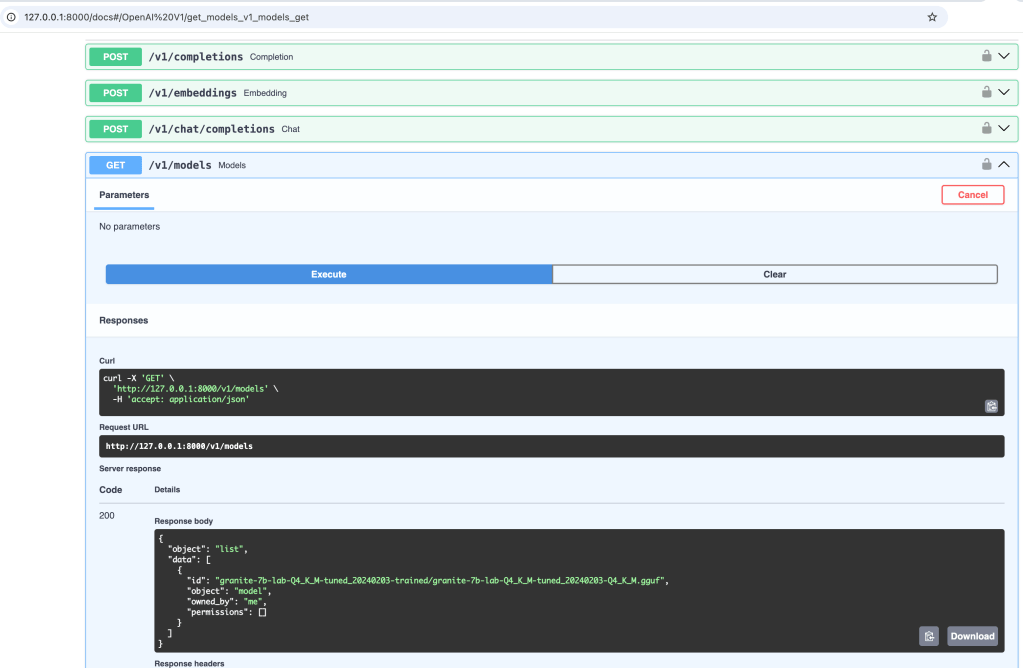
INFO 2025-01-31 09:54:04,137 instructlab.model.backends.llama_cpp:233: After application startup complete see http://127.0.0.1:8000/docs for API.
Step 4: Open the browser and inspect the access

Check who owns the model by calling the “models” endpoint. The image below shows the invocation
Step 5. Using curl to interact with the served model
Open a new terminal and execute the following command
curl -X 'POST' \
 'http://127.0.0.1:8000/v1/chat/completions' \
  -H 'accept: application/json' \
 -H 'Content-Type: application/json' \
  -d '{
 "model": "granite-7b-lab-Q4_K_M-tuned_20240203-trained/granite-7b-lab-Q4_K_M-tuned_20240203-Q4_K_M.gguf",
 "messages": [
 {
 "role": "user",
 "content": "Does **TNM—Drummer** create videos?"
 }
 ]
}' | jq '.'
- Output:
 % Total    % Received % Xferd  Average Speed   Time    Time     Time  Current
 Dload  Upload   Total   Spent    Left  Speed
100   719  100   497  100   222    430    192  0:00:01  0:00:01 --:--:--   621
{
  "id": "chatcmpl-6344c159-908a-4a0a-8263-cbb021075e44",
  "object": "chat.completion",
  "created": 1738593176,
  "model": "granite-7b-lab-Q4_K_M-tuned_20240203-trained/granite-7b-lab-Q4_K_M-tuned_20240203-Q4_K_M.gguf",
  "choices": [
 {
      "index": 0,
      "message": {
        "content": "Yes, TNM-Drummer does create videos. I found a YouTube channel with several drum covers and original compositions.",
        "role": "assistant"
 },
      "logprobs": null,
      "finish_reason": "stop"
 }
 ],
  "usage": {
    "prompt_tokens": 20,
    "completion_tokens": 27,
    "total_tokens": 47
 }
}
Step 6. Start model in the chat mode
We will not use the REST API; we will directly chat with the model.
source venv/bin/activate
ilab model chat -m ./granite-7b-lab-Q4_K_M-tuned_20240203-trained/granite-7b-lab-Q4_K_M-tuned_20240203-Q4_K_M.gguf
INFO 2025-02-03 15:35:23,539 instructlab.model.backends.llama_cpp:125: Trying to connect to model server at http://127.0.0.1:8000/v1
...
INFO 2025-02-03 15:35:28,031 instructlab.model.chat:775: Requested model ./granite-7b-lab-Q4_K_M-tuned_20240203-trained/granite-7b-lab-Q4_K_M-tuned_20240203-Q4_K_M.gguf is not served by the server. Proceeding to chat with served model: granite-7b-lab-Q4_K_M-tuned_20240203-trained/granite-7b-lab-Q4_K_M-tuned_20240203-Q4_K_M.gguf
╭─────────────────────────────────────────────────────────────────────────────────── system ───────────────────────────────────────────────────────────────────────────────────╮
│ Welcome to InstructLab Chat w/ GRANITE-7B-LAB-Q4_K_M-TUNED_20240203-Q4_K_M.GGUF (type /h for help)                                                                           │
╰──────────────────────────────────────────────────────────────────────────────────────────────────────────────────────────────────────────────────────────────────────────────╯
>>>
9. Summary
Overall, I am impressed with the Teacher-Model generated questions and how well the answers match.
Sure, compared to the older version’s first try, I also provided less information for the training first, and other models were used.
From my last example of synthetic data generation in June 2024, I noticed that the Teacher Model generated question-and-answer pairs related to content that didn’t exist in my data. The questions were not bad, but I didn’t provide any answers correctly, so the model hallucinated the answers.
In the newer version of InstructLab in 2025, you must provide more input data and background related to question and answer pairs. That is why you now need to provide at least five contexts within three question-and-answer pairs.
During the generation of that, the question-and-answer questions for the training and the testing data were still hallucinated by the model.
Generating and verifying training data is still an important process where manual integration verification can be necessary.
Overall, there was no significant change in the entire process.
Here are some reasons why to fine-tune provided in an article from IBM, the following list is an extract from this article, the simple Musician Example is “Adding domain-specific knowledge“:
- Customizing style: Models can be fine-tuned to reflect a brand’s desired tone, from implementing complex behavioral patterns and idiosyncratic illustration styles to simple modifications like beginning each exchange with a polite salutation.
- Specialization: The general linguistic abilities of LLMs can be honed for specific tasks. For example, Meta’s Llama 2 models were released as base foundation models, chatbot-tuned variants (Llama-2-chat) and code-tuned variants (Code Llama).
- Adding domain-specific knowledge: While LLMs are pre-trained on a massive corpus of data, they are not omniscient. Using additional training samples to supplement the base model’s knowledge is particularly relevant in legal, financial or medical settings, which typically entail use of specialized, esoteric vocabulary that may not have been sufficiently represented in pre-training.
- Few-shot learning: Models that already have strong generalized knowledge can often be fine-tuned for more specific classification texts using comparatively few demonstrative examples.
- Addressing edge cases: You may want your model to handle certain situations that are unlikely to have been covered in pre-training in a specific way. Fine-tuning a model on labeled examples of such situations is an effective way to ensure they are dealt with appropriately.
- Incorporating proprietary data: Your company may have its own proprietary data pipeline, highly relevant to your specific use case. Fine-tuning allows this knowledge to be incorporated into the model without having to train it from scratch.
I hope this was useful to you and let’s see what’s next?
Greetings,
Thomas
#llm, #instructlab, #ai, #opensource, #installation, #finetune, #teachermodel, #ibm, #redhat
 Thomas Suedbroecker's Blog