
In this post, I share my initial experiences with IBM Bob, an AI SDLC tool. By discuss setting it up with VS Code, its configurable modes, and key features. I show some details using IBM Bob to build a RAG system, highlighting its impressive support for planning, coding, and documentation, enhancing workflow efficiency.
- Introduction
- First Impressions of IBM Bob
- Supported IDEs and Setup
- Modes in IBM Bob
- Key Features
- The prompt I provided to IBM Bob
- The interaction
- Generating the initial idea and the plan for the solution
- Initial plan
- Start Implementation
- Summary and Personal Takeaways
- Additional Resources
1. Introduction
This is my first post of the new year 2026, and I am happy to finally have access to IBM Bob. In this post, I share my first hands-on impressions of using it.
After the download and setup, I was happy to get my first personal experience with IBM Bob and how it feels to use it, and how it can support both developer and architect roles.
I noticed there are many posts out there that share their first steps, and IBM Bob is powerful.
Therefore, I avoided writing an overly trivial or straightforward initial prompt when I started with a first example test.
I wanted IBM Bob to help me build a fairly common RAG scenario using IBM Cloud services and IBM watsonx tooling.
For those readers who don’t know IBM Bob, IBM Bob can be your AI SDLC tool that augments existing workflows, helping you plan, code, tackle advanced topics, or answer questions related to your codebases.
Some existing posts and videos about Bob:
- Fixing Errors in the AI-based IDE Project Bob (Niklas Heidloff)
- IBM enters the AI-native IDE game! Meet Bob! (Maximilian Jesch)
2. First Impressions of IBM Bob
Here is what I did and my first close hands-on experience with the IDE.
2.1. Supported IDEs and Setup
I use it in VS Code. I was able to use my standard VS Code extensions and import it; there was a good setup and introduction wizard.
2.2. Modes in IBM Bob
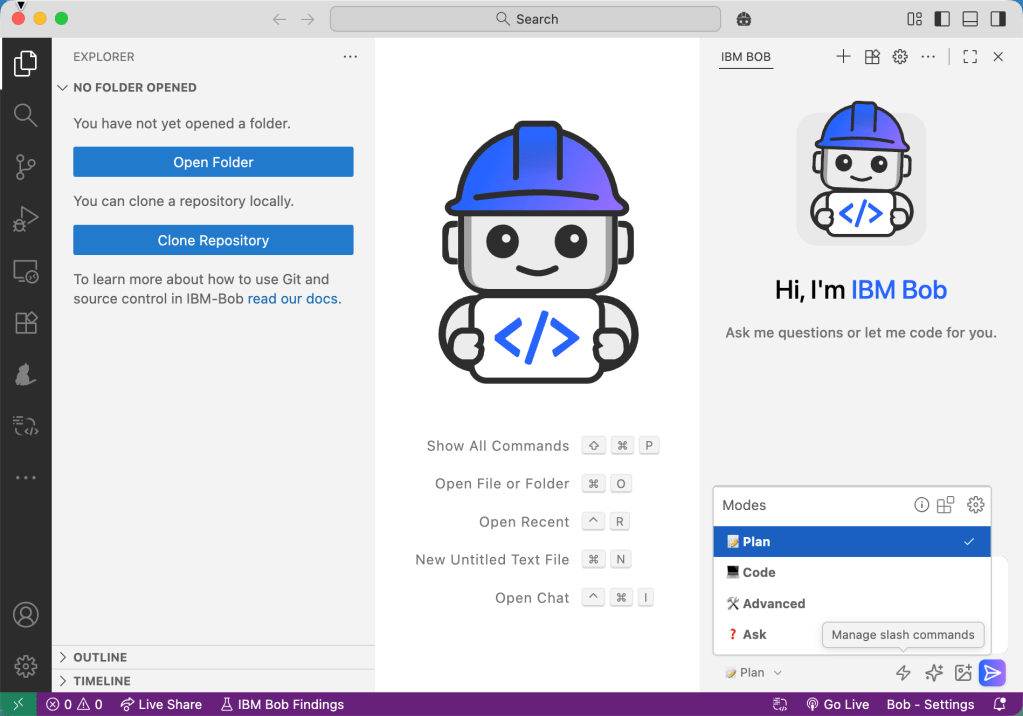
I noticed that IBM Bob provides configurable Modes: “Modes are specialized personas that tailor Bob’s behavior for your specific tasks. Each mode offers different capabilities and access levels to help you accomplish particular goals more efficiently.”
IBM Bob was coming with four default modes:
- Plan
- Code
- Advanced
- Ask
2.3 Key Features
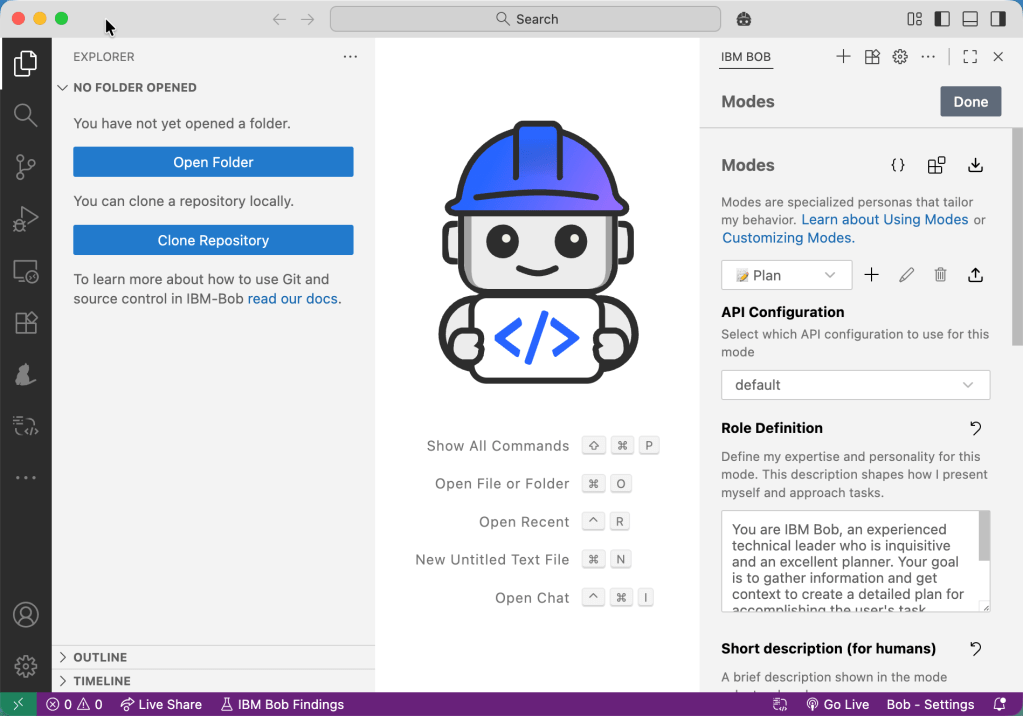
- Configuration of the Modes for Bob
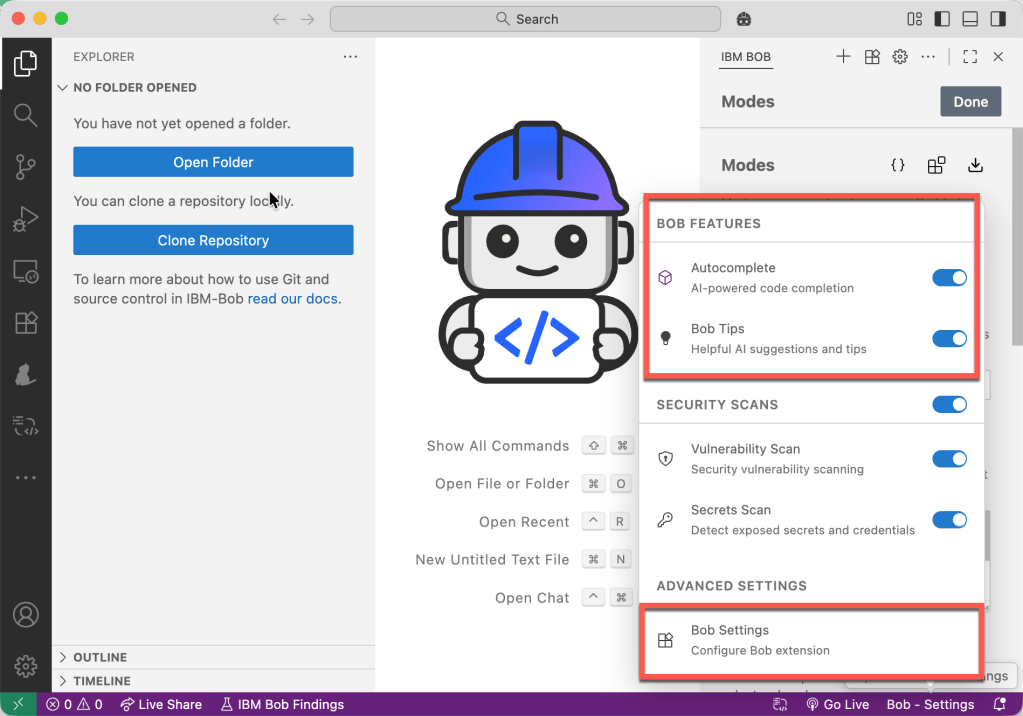
- Autocomplete
- Bob’s Tips
3. The prompt I provided to IBM Bob
The following text is the full prompt I provided IBM Bob to start with. The prompt includes a use case that should cover a not-too-simple RAG situation because, if the question contains more than 20,000 words, the embedding and the vector search must be handled so that the search query in the vector DB will provide useful and relevant answers.
So the prompt includes the use case and some architectural and technological constraints.
## 1. Use Case
Building **BobDB Studio RAG Helper**
The objective is to build a RAG (Retrieval-Augmented Generation) system that provides efficient, fast searches and summarizations to solve technical problems for a specific product. Queries may include additional context, such as logs or configuration files, with a token count exceeding 20,000.
Help information for this product is available in a complex format across multiple JSON files.
To enable consumption by other AI tools, in conversational or non-conversational applications, the RAG access must be implemented as an agent or tool available on an MCP (Model Context Protocol) server, or through an A2A (Agent-to-Agent) communication setup.
## 2. Architecture boundaries
### 2.1 Preprocessing and simplifying a complex JSON
#### 2.1.1 Example complex JSON
This is an example complex JSON generated with AI you should use.
```json
{"tool": {
"name": "BobDB Studio",
"type": "database administration & observability",
"cli": "bobdb",
"version": "2.3.0"
},
"troubleshooting_catalog": [{
"id": "BDB-005",
"title": "Backup job failure due to storage quota exceeded",
"component": "Backup Service",
"severity": "medium",
"frequency": "occasional",
"symptoms": ["Backup job exits with code 17", "Error: quota exceeded", "No recent full backups available"],
"identification": { "quick_checks": [ {
"step_id": "QC-040",
"description": "Check backup job status",
"command": "bobdb backup status --latest"
}],
"metrics": [{
"name": "backup_storage_utilization_pct",
"operator": ">=",
"threshold": 95,
"sampling_period": "daily",
"source": "ObjectStore",
"example_query": "backup_storage_used_bytes / backup_storage_quota_bytes * 100 >= 95"
}],
"log_patterns": [{
"file": "/var/log/bobdb/backup.log",
"match": "ERROR .* quota exceeded .*",
"timeframe": "last_24h",
"case_sensitive": false
}]
},
"root_causes": [{ "cause": "Retention policy misconfigured (no pruning)",
"likelihood_pct": 60 }],
"solutions": [{
"solution_id": "SOL-005A",
"title": "Enable pruning according to retention policy",
"type": "configuration",
"steps": [{ "step_no": 1, "action": "Set retention", "config_file": "/etc/bobdb/backup.yaml", "key": "retention.days", "value": 14 }],
"validation": ["bobdb storage quota show --target s3://backups/bobdb", "Ensure utilization < 80%"]
}],
"applies_to": { "versions": [">=1.9.0"], "platforms": ["cloud", "on-prem"] },
"tags": ["backup", "storage", "retention"]
}]
}
```
#### 2.1.2 Tools, Products, and Frameworks Used for Implementation
* Docling for preprocessing
* Python
* FastAPI server
* JSON upload
* JSON download
* JSON preprocessing
* IBM Cloud Object Storage
* Store JSON data
### 2.2 Ingestion Pipeline
#### Using the Output from Preprocessing
The ingestion pipeline will consume the REST API from the data preprocessing application.
#### 2.2.2 Tools, Products, and Frameworks Used for Implementation
- watsonx.data
- Milvus Vector DB
- Python
- FastAPI server
- Generate embeddings with a model on watsonx.ai
### 2.3 RAG Inference Provided by an MCP Server or via Agent-to-Agent Communication
The tool or the new agent must be integrated within watsonx Orchestrate.4. The interaction
Here are some of my interactions with IBM Bob.
4.1 Generating the initial idea and the plan for the solution
Before Bob started planning based on my input prompt, it asked for a few clarifications to better understand what exactly needed to be done.
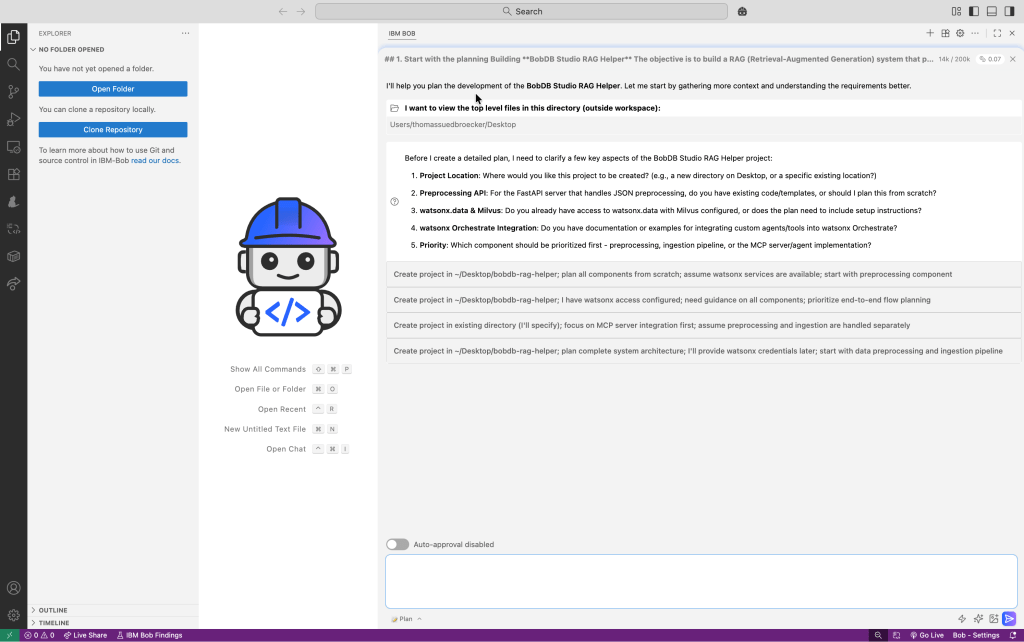
Here is my response to Bob’s follow-up questions:
1. Project location: /dev/bobdb_studio_rag_helper
2. Plan from scratch based on all the information you currently have.
3. With the setup plan and how to access.
4. You must all provide the information and steps from scratch!
5. You must go step by step from preprocessing, to ingestion pipeline, to a MCP server/agent implementation!
4.2 Initial plan
Then Bob generates the initial plan. I had switched off auto-approve because I wanted to verify each generation step and understand what Bob generated.
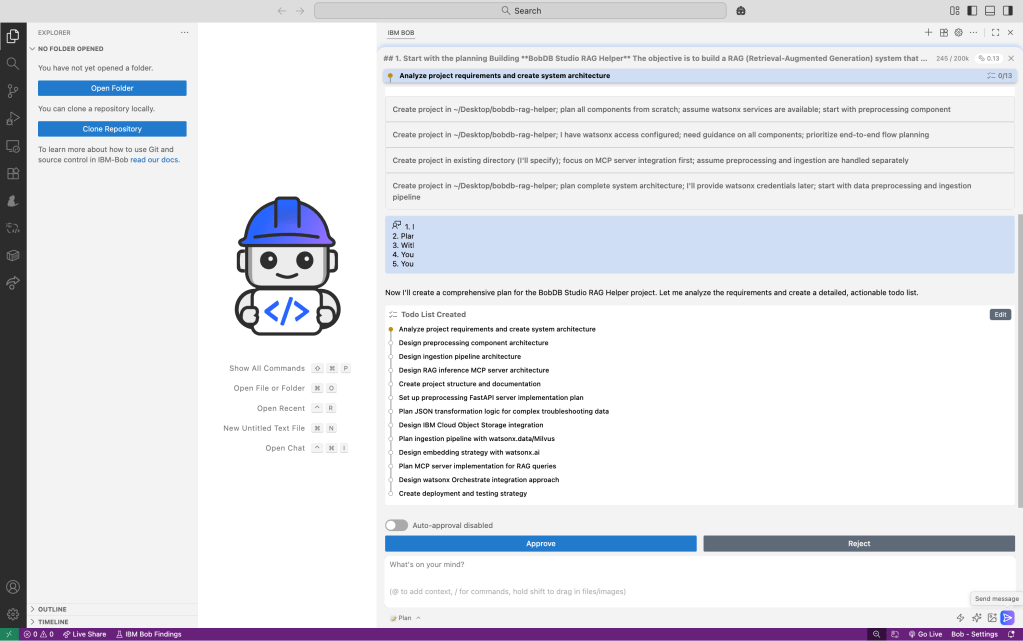
These are some additional steps Bob did:
- fetch detailed instructions to assist with the current task
- Generate an architecture document
- Generate an implementation plan
- Generate a Setup Guide
- Generate a checkpoint readme
- Generate a configuration guide
- Generate a planning summary
4.3 Start Implementation
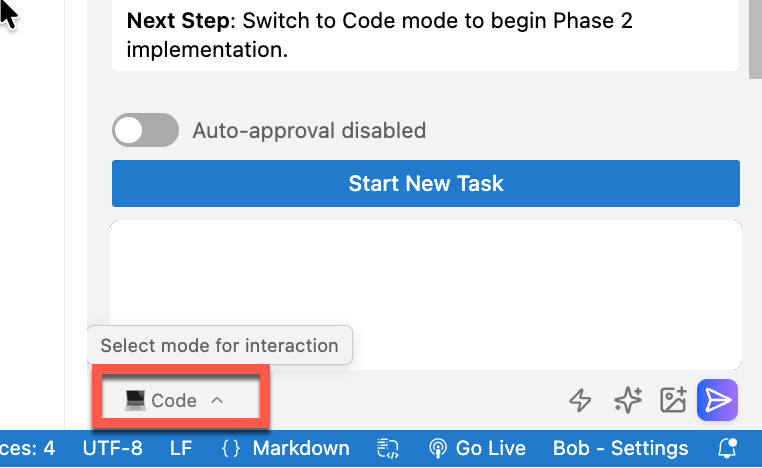
Here I need to switch to code mode.
I copied and pasted the summary and started a new task by pressing Send Message!
5. Summary and Personal Takeaways
My personal summary.
It was very impressive to see how Bob supports the workflow for the entire process—from planning to coding—especially for this non-trivial use case.
This is why I chose a common RAG help use case—one where I can verify the technical outcome—since I have applied similar scenarios in several use cases in the past. I wanted to share with you the feeling and the impression I got when I got my hands dirty for the first time with IBM Bob.
It is awesome that you can verify each step, and your input will be used for the next steps.
The outcome of planning, the architecture documentation, the implementation plan, the initial testing, and the documentation for the setup was impressive. Everything was delivered in a very structured and easily consumable way.
Sure, you should understand what IBM Bob generated and how the technology works. With this in mind, this is a real booster for your planning, documentation, testing, and system implementation, by enabling you to be much faster.
Let’s see when IBM Bob will be more widely available to other users.
6. Additional Resources
If you want to explore IBM Bob, RAG architectures, and the underlying IBM AI ecosystem in more detail, the following resources are helpful starting points:
6.1 IBM Bob
- IBM Project Bob (AI-Native IDE)
https://www.ibm.com/products/project-bob - Fixing Errors in the AI-based IDE Project Bob – Niklas Heidloff
https://heidloff.net/article/fixing-errors-ai-based-ide-project-bob/ - IBM enters the AI-native IDE game! Meet Bob! – Maximilian Jesch
https://maximilianjesch.com/ibm-enters-the-ai-native-ide-game-meet-bob/
6.2 Retrieval-Augmented Generation (RAG)
- Retrieval-Augmented Generation (RAG) – IBM Research Overview
https://research.ibm.com/blog/retrieval-augmented-generation - What is RAG? – IBM Developer
https://developer.ibm.com/articles/what-is-retrieval-augmented-generation-rag/ - RAG is Dead … Long Live RAG (Thomas Südbröcker)
6.3 IBM watsonx and AI Platform
- IBM watsonx Overview
https://www.ibm.com/watsonx - watsonx.ai Documentation
https://www.ibm.com/docs/en/watsonx-ai - watsonx Orchestrate
https://www.ibm.com/products/watsonx-orchestrate
6.4 Vector Databases and Ingestion
- Milvus Vector Database
https://milvus.io/ - watsonx.data
https://www.ibm.com/products/watsonx-data
6.5 Developer Tooling
- Visual Studio Code
https://code.visualstudio.com/ - FastAPI
https://fastapi.tiangolo.com/
I hope this was useful to you and let’s see what’s next?
Greetings,
Thomas
#IBM, #watsonx, #IBMCloud, #EnterpriseAI, #CloudArchitecture
 Thomas Suedbroecker's Blog
Leave a comment