
This blog post is related to my YouTube video, to provide an additional simplified documentation.
Table of contents
- Motivation and Introduction
- Why this setup is interesting?
- Understanding IBM Bob first
- Bob customizations
- Custom mode
- Rules
- Skills
- AGENTS.md
- Galaxium Travels infrastructure
- What this means?
- Infrastructure together with watsonx Orchestrate
- Infrastructure with Bob and watsonx Orchestrate
- What the video shows in practice?
- Summary
1. Motivation and Introduction
In this post, I want to explain a local setup I use for one practical goal:
using IBM Bob to help generate an agent for watsonx Orchestrate that works with tools exposed by the Galaxium Travels MCP server.
To make that understandable, I also explain the technical context behind it:
- the Galaxium Travels infrastructure
- the role of watsonx Orchestrate in the setup
- the role of IBM Bob in the development workflow
- the main IBM Bob building blocks, such as modes, rules, skills, tools, and MCP connections
The setup is based on these two repositories:
The first repository provides the application infrastructure.
The second repository provides the practical guide for connecting that infrastructure to watsonx Orchestrate and preparing IBM Bob for the agent-generation workflow.
This post is the architecture and learning story behind the video I recorded on 29. March 2026.
The practical outcome is to show how Bob can support the generation and configuration of an agent in watsonx Orchestrate that uses the tools from the Galaxium Travels MCP server.
YouTube Video: https://youtu.be/QRb2_ZVlynE
2. Why this setup is interesting?
Many examples focus on only one part:
- only the application
- only the agent
- only the IDE
- only the protocol
But in real projects, these parts work together.
That is why I like this setup. It makes the full path visible:
- local application infrastructure
- MCP-based service access
- local orchestration with watsonx Orchestrate
- AI-supported development with IBM Bob
The important point is this:
the setup is not only for understanding the architecture.
It is prepared so that IBM Bob can help generate an agent for watsonx Orchestrate based on the tools exposed by the Galaxium Travels MCP server.
That makes the environment useful both for learning and for practical implementation.
3. Understanding IBM Bob first
Before using Bob in a project, it helps to understand its main building blocks.
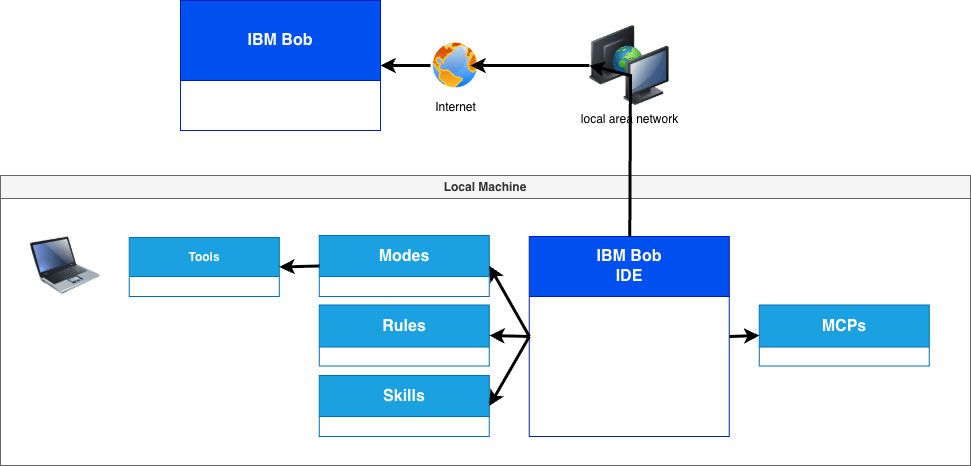
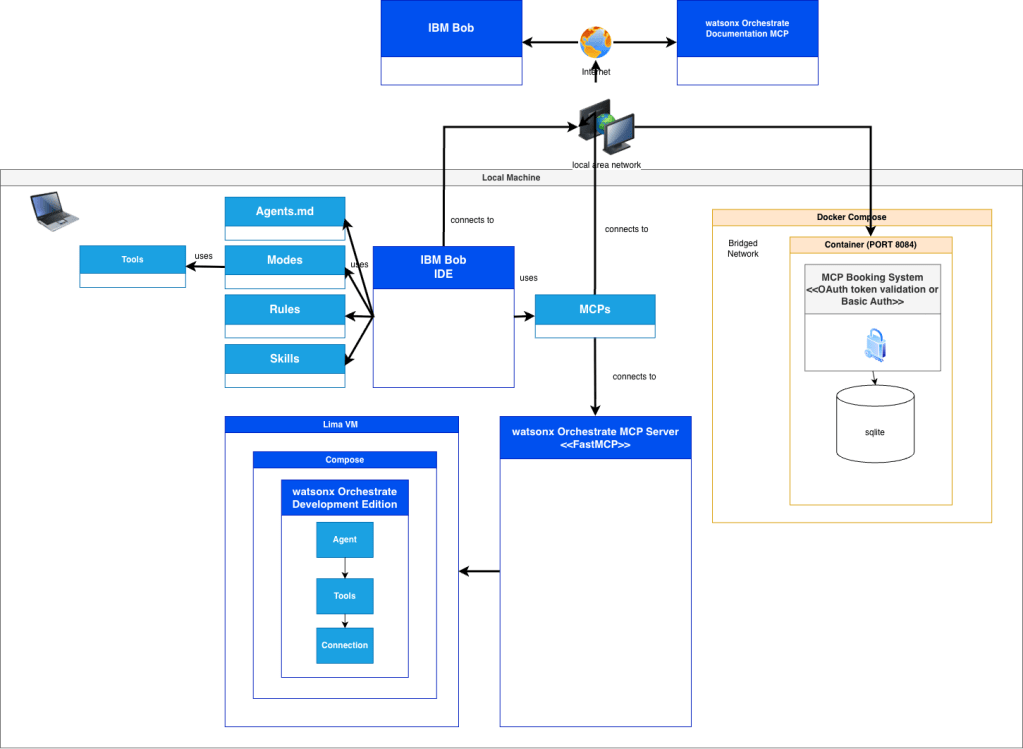
In my diagram, Bob is shown as an IDE that works with:
This is important, because Bob is not only a chat interface.
It is better to think about it as a structured development environment:
Modesdefine how Bob should workRulesdefine constraints and expectationsSkillsprovide reusable project knowledgeToolsprovide executable functionsMCPsconnect Bob to external systems
So Bob can become the center of a guided development workflow.
4. Bob customizations
The Bob setup in this repository is not generic.
The repository already contains project-local Bob configuration files.
These files help prepare Bob for this exact Galaxium Travels workflow.
4.1 Custom mode
The file .bob/custom_modes.yaml defines one custom mode named Galaxium Travels Developer.
This mode is intended for:
- Python development
watsonx Orchestrateintegration- MCP server work
- container-based local development
- authentication
- debugging
- API integration tasks
The enabled groups are:
readeditbrowsercommandmcpmodes
The instructions also tell Bob to:
- use Python
- prefer maintainable solutions
- respect the existing project structure
- stay compatible with local and container-based workflows
- consider MCP design and
watsonx Orchestrateintegration
4.2 Rules
The .bobrules folder contains repository-specific rules.
In the current structure, this includes files such as:
coding-style.mdwatsonx-orchestrate-configurations.md
The role of these files is clear: they give Bob coding and project behavior constraints for this repository.
4.3 Skill
The repository contains one skill file in .bob/skills named:
galaxium_travels_watsonx_orchestrate_customization_developer.md
This skill supports development for watsonx Orchestrate Developer Edition customization work in this repository.
In practice, that means Bob gets project-specific guidance instead of working only from the general prompt context.
4.4 AGENTS.md
The repository also includes an AGENTS.md file as part of the active Bob-related setup.
In this project, I see it as a compact repository-level control file for agent behavior.
It complements the custom mode, rules, and skill by adding one more layer of project guidance.
5. Galaxium Travels infrastructure
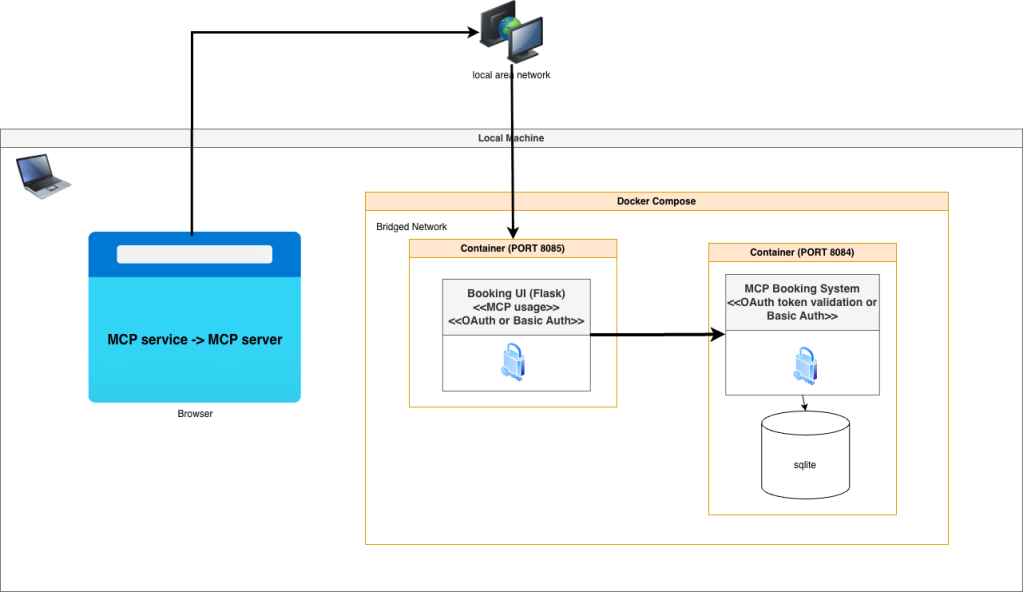
The next diagram shows the local application itself.
The main idea is simple:
- a browser loads the UI
- the UI talks to the MCP service
- the MCP backend contains the business logic
- the backend stores data in SQLite
The setup uses a local Docker Compose environment with these main parts:
Booking UI (Flask)MCP Booking SystemSQLite
Authentication can be done with:
- OAuth token validation
- Basic Auth
What this means?
The key idea is:
The MCP server is not only for AI agents.
It can also act as the service layer for the application itself.
That is one reason why I find this setup useful.
It helps discuss architecture, not only tools.
6. Infrastructure together with watsonx Orchestrate
The next step adds watsonx Orchestrate Developer Edition.
In the diagram, it runs locally and connects the agent layer with the MCP-based backend.
The important concepts are:
AgentToolsConnection
This is the point where the setup changes from a local MCP application into a local agent environment.
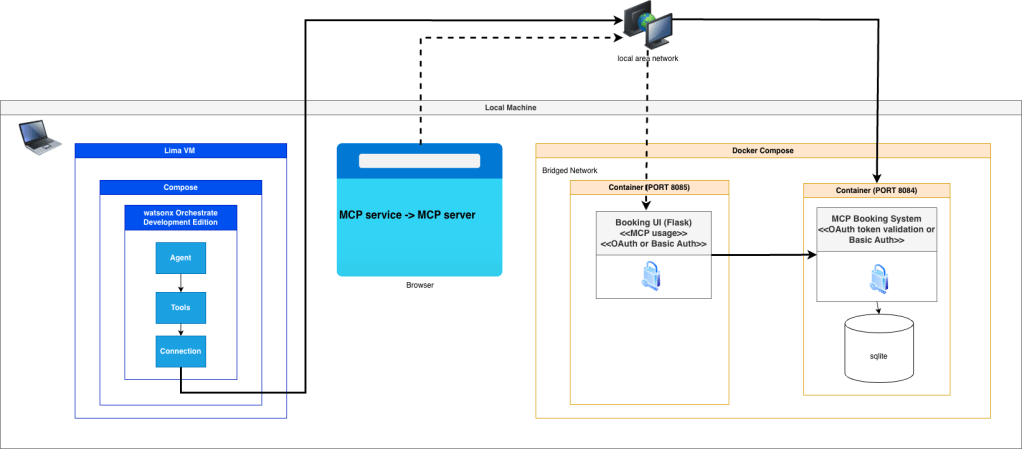
Now the infrastructure is not only something a browser can use.
It becomes something an agent can use through configured tools and connections.
7. Understanding the infrastructure with Bob and watsonx Orchestrate
The last diagram combines everything:
- the local Galaxium Travels MCP backend
- the local watsonx Orchestrate Developer Edition
- the local watsonx Orchestrate MCP server
- the Bob IDE with modes, rules, skills, tools, and MCP connections
- an external documentation MCP endpoint
This is the most interesting part for me.
Because this is the point where Bob becomes more than an editor assistant.
Bob can work closer to:
- the local application backend
- the local orchestration environment
- the documentation source
This is also the point where the prepared Bob setup can support the practical goal of this project:
helping generate and configure an agent in watsonx Orchestrate that uses the tools provided by the Galaxium Travels MCP server.Instead of only writing code, Bob can help navigate the architecture and prepare the integration work.
8. What the video shows in practice?
The video is not only about the architecture behind the setup.
It also shows the practical workflow step by step.
After explaining the role of IBM Bob, MCP, the Galaxium Travels infrastructure, and watsonx Orchestrate Developer Edition, the video moves into the actual hands-on flow.
This practical part includes:
- starting with the IBM Bob prompt
- submitting the prompt
- reviewing the task plan created by IBM Bob
- configuring the environment file
- running the required commands
- importing MCP tools
- generating the agent configuration
- testing the generated result
This is an important part of the walkthrough.
It shows that the setup is not only useful for understanding the different components.
It also shows how these components can be used together in a reproducible workflow to generate an agent for watsonx Orchestrate that uses the tools exposed by the Galaxium Booking MCP Server.
That practical flow is the main reason why I think this example is useful.
It connects the architectural understanding with the actual implementation steps.
9. Summary
The practical value of this setup is not only that the environment runs locally.
The practical value is that IBM Bob can work with the prepared repository structure, MCP connections, and watsonx Orchestrate environment to help generate an agent that uses the tools exposed by the Galaxium Booking MCP Server.
That makes this setup useful not only for learning, but also as a reproducible starting point for implementation.
Note: This post reflects my own ideas and experience; AI was used only as a writing and thinking aid to help structure and clarify the arguments, not to define them.
#AI, #MCP, #ModelContextProtocol, #RESTAPI, #SoftwareArchitecture, #AIArchitecture, #AIAgents, #GenerativeAI, #DeveloperTools, #OpenSource, #Containerized, #CloudNative, #GalaxiumTravels
 Thomas Suedbroecker's Blog
Leave a comment