

This blog post is about the powerful JSOUP Java Library, which allows you to convert an HTML to plain, formatted text based on your requirements by extracting and inspecting HTML elements in various ways. We check two methods to do this in this example.
Note: The example code on GitHub.
Content
- Introduction
- Objectives
- Basic information about JSOUP
- Example implementation Element list iteration
- Example implementation for the head <> and the tail </>
- Simplified architecture of the example
- Input and output format of the example application
- Run the example Application
- Clone the project to your local machine
- Create an .env file
- Edit the environment file
- Edit the .vscode/launch.json to specify where the .env file is located.
- Open a new terminal from the code folder of the project
- Load the environment variables
- In VSCode select the ExampleApp.java file and press the run button inside the file.
- Summary
- Additional resources
1. Introduction
Writing an HTML-to-Text converter can be one of the first tasks in an AI pipeline because, for most of AI Systems, you need to input data in the correct format.
In generative AI you are even more dependent on the right formatted input data to the AI when you use prompts.
With that in mind, we are now taking a closer look at the JSOUP Java Libary and how to convert an HTML to plain formatted text.
Let us start a bit with HTML(HyperText Markup Language). An HTML page contains TAGs with a start <TAG> and an end </TAG> that TAG can contain attributes. The TAG can have nested TAGs.
Here is an example code for an HTML page we want to use as input for your generative AI prompt text.
<!DOCTYPE html>
<html>
<body>

<h1>My First Heading</h1>
<p>My first <strong>paragraph strong text.</strong></p>

</body>
</html>
The following text below is an example, of how you want to format the text input for your generative AI model.
My First Heading

My first paragraph strong text.
The document of the example above contains five tags (elements) the document can be represented as a list of elements or in node lists later in the JSOUP framework. In the context of converting HTML to text, it can be helpful to take a short look into Anatomy on an HTML element.
The list below shows the elements from different perspectives. Each element can contain a list of elements surrounded by a Tag, which can include additional attributes
<html>contains the tags/elements<body><h1><p>and<strong>.
<body>contains the tags/elements<h1><p><strong>.
<h1>has no nested tags/elements.<p>contains the tags/elements<strong>.
<p>has no nested tags/elements.
2. Objectives
The goal is to build HTML-to-text conversion.
HTML to TEXT conversion- Load HTML from a file
- Convert HTML String Byte Array to JSON Text using to approaches
- Convert it using an
Elementslist - Convert it using a
NodeVisitor
- Convert it using an
3. Basic information about JSOUP
Basic information about JSOUP. With JSOUP, it is possible to iterate a list of elements or traverse nodes by visiting each node’s head <> and the tail </>.
Example HTML:
<div>
  <p></p>
<div>
- Element list iteration
- The first element contains the
<div>and the nested<p>. - The second element contains
<p>.
- The first element contains the
- Traverse nodes by visiting the
head <>and thetail </>In this case, you need to implement a visitor.- The first node contains the
<div>and the nested<p>. - The second node contains
<p>.
- The first node contains the
- Simplified diagram of the main dependencies for
JSOUP
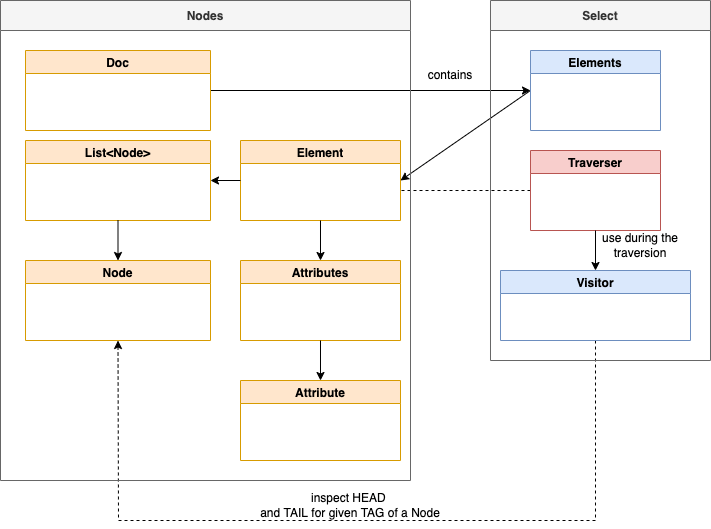
The following diagram shows the main dependencies for JSOUP. In the diagram (which is not UML conform) you see that a Document contains Elements and each Element can contain a list of Nodes and Attributes.
3.1 Example implementation Element list iteration
Here is a code extract from the example implementation for a table row. If we find an element of the tag type tr and the row is empty, we just insert a \n; otherwise, we add the ownText, and an additional \n.
- Input
<tr>Own text
    <td>Not own text</td>
</tr>
- Output
OwnText
public String buildTextByElements (Elements elements)
...
else if (verifyTagType(element, "tr")){
                text = getElementOwnTextByTagType(element,"tr");
                if (!text.isEmpty()){
                    appendText("\n" + text + "\n");
                } else {
                    appendText("\n");
                }
...
3.2 Example implementation for the head <> and the tail </>
Here is a code extract from the example implementation for a table row. When we find in the <head> a table row and the text for that row is empty, we insert a \n; otherwise, we at the ownText, which is the text that belongs only to the <tr> tag. We only add a line break in the <head>.
- Input
<tr>Own text
    <td>Not own text</td>
</tr>
- Output
OwnText
<head>implementation
public void head(Node node, int depth) {
    ...
   else if (name.equals("tr")) {
       if (((Element) node).ownText().isEmpty()){ append( "\n");
       } else { append( ((Element) node).ownText() + "\n");
              }
       }
<tail>implementation
public void tail(Node node, int depth) {
... else if (name.equals("tr"))
   { append( "\n");
}
4. Simplified architecture of the example
The ExampleConverter provides two methods to convert the html_string to a JSON object that provides the source HTML code and the converted plain text as a return value.
public JSONObject convertHTMLtoJSON_ElementsIterator(String html_string)
public JSONObject convertHTMLtoJSON_Visiter(String html_string)
- Example return value for the
JSONObjectof each method
{ "html_content":"<div>Text</div>",
  "text":"Text" }
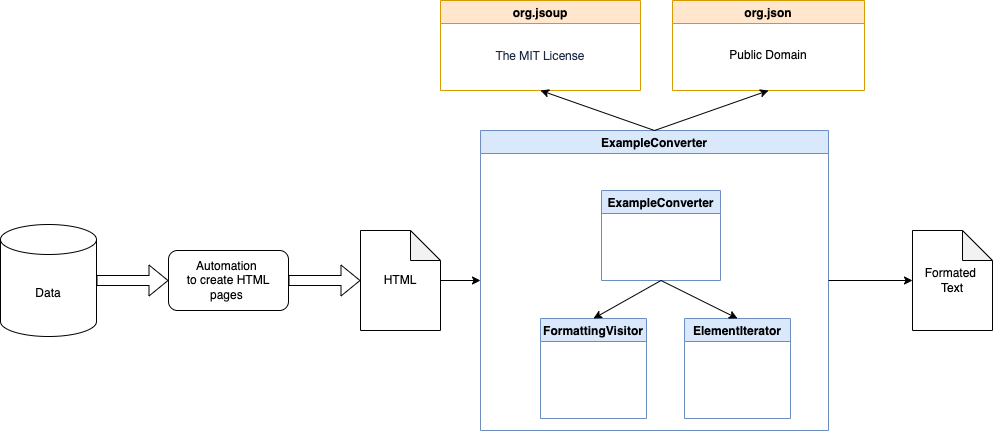
The diagram below shows the simplified dependencies. The example only depends on jsoup and json.
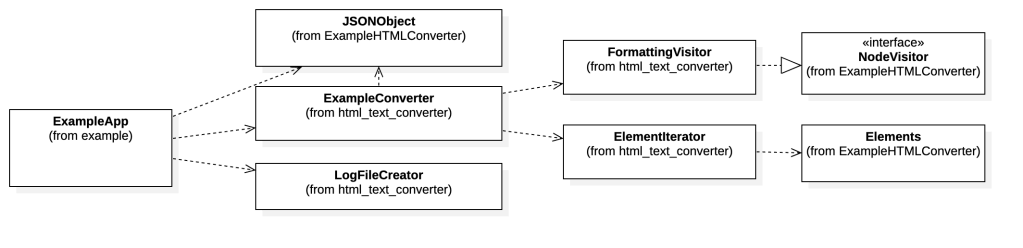
The following simplified UML diagram shows the five classes implemented in the example.
ExampleApp: This class uses the two possibilities to convert the HTML text and write the result to log files.ExampleConverter: TheExampleConverterprovides the two approaches to convert HTML-to-text:- Using the
Elementslist in the ELementIterator class - Using the and in the
FormatingVistorclass
- Using the
The source code below shows an extract of the Maven Project Object Model .pom file dependencies implementation.
    <dependencies>
        <dependency>
            <groupId>org.apache.commons</groupId>
            <artifactId>commons-compress</artifactId>
            <version>1.24.0</version>
        </dependency>
        <dependency>
            <groupId>org.apache.logging.log4j</groupId>
            <artifactId>log4j-slf4j-impl</artifactId>
            <version>2.18.0</version>
        </dependency>
        <!-- https://mvnrepository.com/artifact/org.jsoup/jsoup -->
        <dependency>
            <groupId>org.jsoup</groupId>
            <artifactId>jsoup</artifactId>
            <version>1.16.2</version>
        </dependency>
        <!-- https://mvnrepository.com/artifact/org.json/json -->
        <dependency>
            <groupId>org.json</groupId>
            <artifactId>json</artifactId>
            <version>20231013</version>
        </dependency>
    </dependencies>
5. Input and output format of the example application
- Example
HTML input:
<!DOCTYPE html\n SYSTEM \"about:legacy-compat\">
<html>

<head>
  <title>head title</title>
</head>

<body>
  <div>
    <h1>header 1</h1>
    <div>
      <p class="p">p-text-1_2 <span>span text</span> p-text-2_2.</p>
      <ul class="ul">
        <li class="li">
          <p class="p">p-text-in-li-1.</p>
        </li>
        <li class="li">li-text</li>
      </ul>
    </div>
    <div>
      <table>
        <caption>
          table caption
        </caption>
        <tr>
          <th scope="col">table header 1</th>
          <th scope="col">table header 2</th>
          <th scope="col">table header 3</th>
        </tr>
        <tr>
          <th scope="row">table header 4</th>
          <td>table data 4.1</td>
          <td>table data 4.2</td>
        </tr>
        <tr>
          <th scope="row">table header 5</th>
          <td>table data 5.1</td>
          <td>table data 5.2</td>
        </tr>
        <tr>
          <th scope="row">table header 6</th>
          <td>table data 6.1</td>
          <td>table data 6.2</td>
        </tr>
      </table>
    </div>
    <div>
      <dl>
        description list 1
        <dt>description term element 1</dt>
      </dl>
    </div>
    <div>
      <div>div text 1</div>
      <div><a class=\"xref\"
          href=\"/href 1\"
          target=\"_blank\" rel=\"noopener\"
          alt=\"alt 1\"
          title=\"href title 1">link text 1<img
            src=\"path_to_image.png" class=\"link\" alt=\"alt information\" title=\"title information\" border=\"0\"></a>
      </div>
    </div>
</body>

</html>
- Example text output
header 1
p-text-1_2 span text p-text-2_2.
* p-text-in-li-1.
* li-text
table caption
table header 1 table header 2 table header 3
table header 4 table data 4.1 table data 4.2
table header 5 table data 5.1 table data 5.2
table header 6 table data 6.1 table data 6.2
description list 1
description term element 1
: div text 1
[link text 1](\"/href)
6. Run the example Application
Step 1: Clone the project to your local machine
git clone https://github.com/thomassuedbroecker/jsoup-html-to-text-converter
Step 2: Create an .env file
cat .env_template > .env
Step 3: Edit the environment file
The folder data in this project contains an example HTML file and a file containing the files’ filenames to be converted to text.
export LOCAL_FILES=/Users/YOUR_PATH/jsoup-html-to-text/code/data/
export HTML_FILE=nested-content.html
Step 4: Edit the .vscode/launch.json to specify where the .env file is located.
Just, replace the location with your path.
{
    // Use IntelliSense to learn about possible attributes.
    // Hover to view descriptions of existing attributes.
    // For more information, visit: https://go.microsoft.com/fwlink/?linkid=830387
    "version": "0.2.0",
    "configurations": [
        {
            "type": "java",
            "name": "Current File",
            "request": "launch",
            "mainClass": "${file}",
            "envFile": "/Users/YOUR_PATH/dev/qa-html-json-conversion/code/.env"
        }
    ]
}
Step 5: Open a new terminal from the code folder of the project
Step 6: Load the environment variables
cd code
source ./.env
Step 7: In VSCode select the ExampleApp.java file and press the run button inside the file.
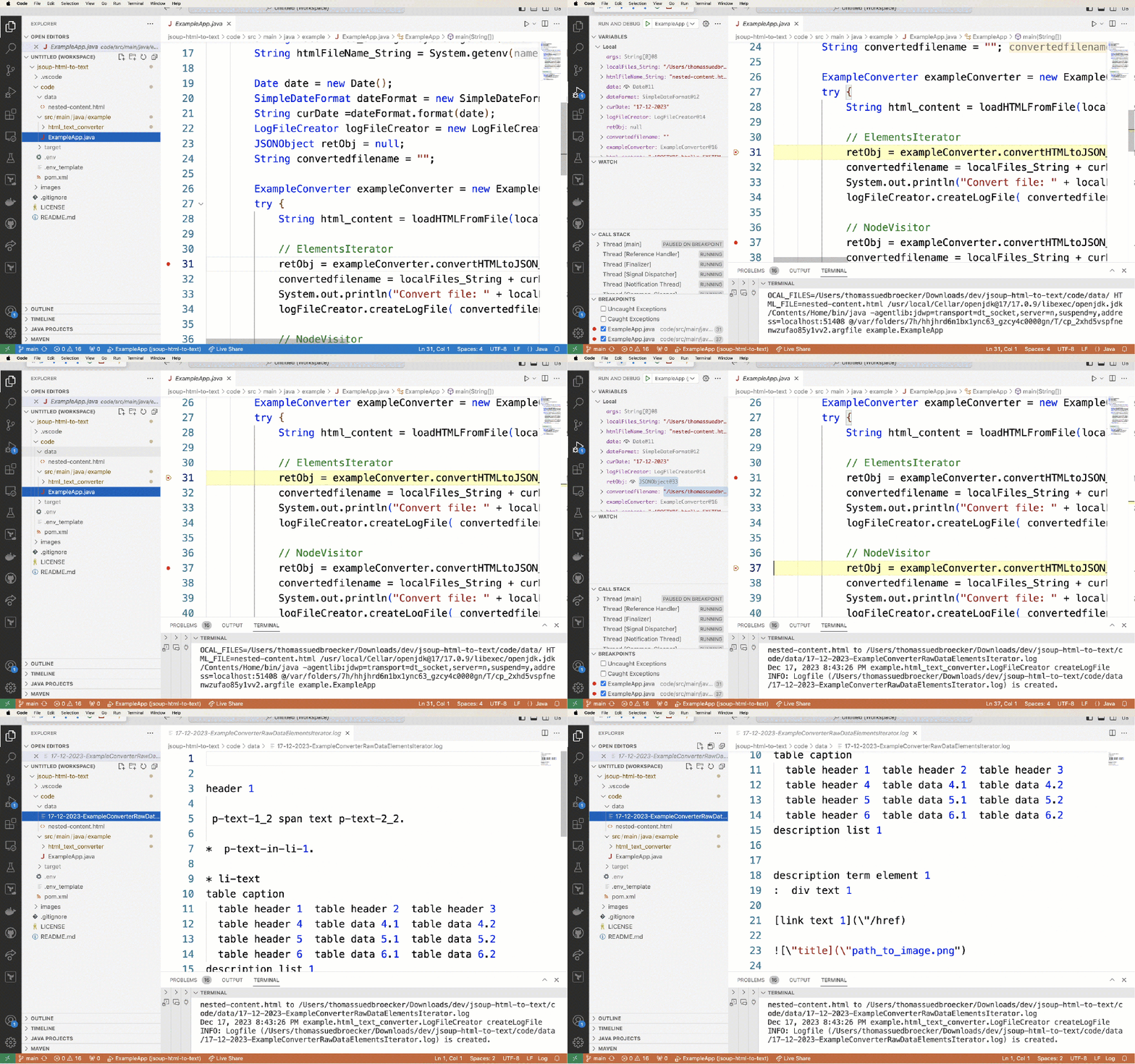
The gif below shows the debug execution of the example application.
7. Summary
It was interesting to see how text information can be extracted from HTML and converted to text various methods.
The JSOUP Java Libary is powerful and allows you to convert an HTML to plain, formatted text based on your requirements by extracting and inspecting HTML elements in various ways. It would help if you implemented it yourself; sometimes, it can be more complex than expected.
There is also a jsoup cookbook that contains guides.
8. Additional resources
Be the way; One additional question: Where does AI start? One AI explanation in one of the IBM Design pages says:
“Narrow AI focuses on one, narrow task of human intelligence, and within it, there are two branches: rule-based AI and example based AI. The former involves giving the machine rules to follow while the latter giving it examples to learn from.”
Source IBM learning
I hope this was useful to you, and let’s see what’s next?
Greetings,
Thomas
#java, #jsoup, #html, #converter, #ai, #programming
 Thomas Suedbroecker's Blog
Thanks for sharing, you are right.
LikeLike