

You may have noticed that I wrote several blog posts about the Bee Agent Framework and the Bee Stack, as well as about using watsonx.ai.
“The developer stack for building and deploying production-grade agent applications“
The image below is a screenshot created 23.10.2024 from the project, showing its central repositories.
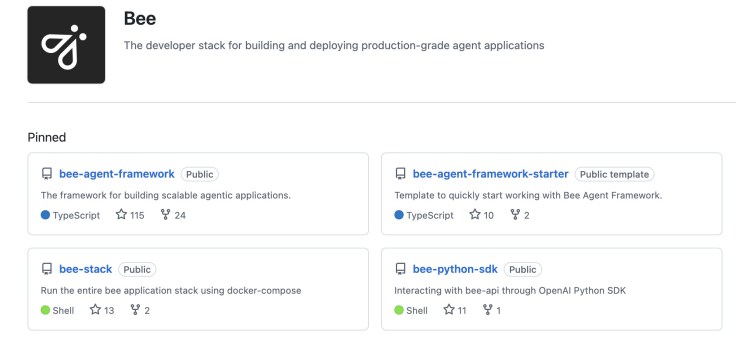
Table of content:
- Getting Started with the Bee Framework by using a Starter Template
- Building a more complex Bee agent using a custom tool and the observation
- Prepare to contribute to the Bee project development
- Development inside the Bee Framework adds a TypeScript Bee Agent tool to the Bee API and UI
- Working with custom Python tools in the Bee UI (much more simple than TypeScript)
- Develop a Custom Bee Agent
- Additional useful videos
If you want to follow a development and usage journey along with me, here is a list of topics, from easy to more complex.
- Getting Started with the Bee Framework by using a Starter Template
- An Example of how use the “Bee Agent Framework” (v0.0.33) with watsonx.ai
This blog post explores the Bee Agent Framework integration with watsonx.ai, detailing the setup process for a weather agent example on MacOS. It discusses necessary installations, environment variable configurations, and code updates needed due to framework changes. The execution output illustrates how the agent retrieves current weather data for Las Vegas.
- An Example of how use the “Bee Agent Framework” (v0.0.33) with watsonx.ai
- Building a more complex Bee agent using a custom tool and the observation
- Bee Agent example for a simple travel assistant using a custom tool and observe the agent behavior in detail (Bee Framework 0.0.34 and watsonx.ai)
This blog post explains the implementation of a custom travel assistant agent using the Bee Agent Framework. It covers creating a tool to suggest vacation locations and utilizing weather data, integrating with MLFlow for observability. The article emphasizes practical execution steps, system requirements, and the motivation behind combining location and weather insights for user queries.
- Bee Agent example for a simple travel assistant using a custom tool and observe the agent behavior in detail (Bee Framework 0.0.34 and watsonx.ai)
- Prepare to contribute to the Bee project development
- CheatSheet “Ready to Go” for Bee API and UI development
The content outlines the setup process for a development environment aimed at contributing to the Bee API and Bee UI repositories within the broader Bee Stack. It details the steps of cloning repositories, starting infrastructure, configuring .env files, and launching both the Bee API and UI servers, ensuring readiness for development.
- Maybe helpful in this context is:
CheatSheet: Essential Steps to Configure Podman Machines
Podman is enhancing its capabilities in managing containers, allowing seamless integration with Kubernetes. This blog outlines how to configure a Podman machine, including creating a machine with specific resources and modifying configurations without deletion. It highlights essential commands like Podman machine init and Podman machine set.
- Maybe helpful in this context is:
- CheatSheet “Ready to Go” for Bee API and UI development
- Development inside the Bee Framework adds a TypeScript Bee Agent tool to the Bee API and UI
- Bee API and UI development example by adding a TypeScript tool
The blog post explains how to integrate a custom TypeScript tool, TravelAgentTool, into the Bee API and UI to extend the Bee Framework’s functionality. It details the steps for setting up the tool, including modifying source files and configuring environment variables, and demonstrates its use in travel inquiries. Code instructions for implementation are provided throughout.
- Bee API and UI development example by adding a TypeScript tool
- Working with custom Python tools in the Bee UI (much more simple than TypeScript)
- Create Custom Bee Agent with a Custom Python Weather Tool: A Step-by-Step Guide
This blog post discusses integrating a custom Python tool into the Bee Agent using the Bee UI to provide real-time weather information for multiple cities. The process entails setting up the Bee stack, customizing the agent, and testing its functionality to retrieve temperatures, emphasizing the tool’s straightforward implementation and potential future applications.
- Create Custom Bee Agent with a Custom Python Weather Tool: A Step-by-Step Guide
- Develop a Custom Bee Agent
- Building a Custom Bee Agent in TypeScript
This blog post outlines the development of a custom Bee Agent utilizing the Bee Agent Framework examples, focusing on creating an agent that functions independently from the Bee Stack and responds in German. The implementation includes discussions on requirements, example agents from the framework, coding techniques using TypeScript, and references to GitHub repositories to execute the examples.
- Building a Custom Bee Agent in TypeScript
- Additional useful videos
- Bee AI for everyone in your business | Public beta walk-througth
- Building LLM Agent with IBM Bee Agent Framework
- A Bee API and Bee UI development example for adding a custom tool made for the Bee Agent Framework
- Bee Agent Framework for Building, Deploying, and Serving Powerful Agentic Workflows
I hope this was useful to you and let’s see what’s next?
Greetings,
Thomas
#watsonx, #typescript, #ai, #ibm, #granite, #agents, #ai, #beagentframework, #beagent, #llama, #aiagents, #beeui, #beestack, #containers
 Thomas Suedbroecker's Blog