

This blog post contains updates related to my blog post Fine-tune LLM foundation models with the InstructLab, an Open-Source project introduced by IBM and Red Hat. The blog post discusses updates on the InstructLab project by IBM and Red Hat, focusing on installation and configuration changes. It highlights, installation procedures, and troubleshooting steps for model serving. The overall installation process remains similar to previous guidance, with adjustments easily navigable for users.
Related GitHub repositories:
Table of Content
- Motivation
- Changes in the default locations
- Installation
- Summary
1. Motivation
Since I did the first installation, I am 2220 commits behind the InstructLab repository on GitHub, and it had no version tag on 2024.06.20; Now the InstructLab repository on GitHub contains version tags and the current on is v0.23.1, so I had to expect some changes for the installation, but I didn’t discovery big changes.
I focus on the installation process only when you follow the basic steps for InstructLab on a local machine.
2. Changes in the default locations
The default locations have changed. The table below shows the main three locations for InstructLab on your local computer.
| Config | Share | Cache | Profiles | |
|---|---|---|---|---|
| Description | Contains the configuration files, like the config.yaml | Contains the taxonomy data, for example, downloaded from GitHub | The downloaded models in the GGUF format. | Contains your machine profile configuration |
| Location on the local machine | /Users/${USER}/.config/instructlab | /Users/${USER}/.local/share/instructlab/taxonomy | /Users/${USER}/.cache/instructlab/models/ | /Users/${USER}/.local/share/instructlab/internal/system_profiles |
Content of an system profiles m3.yaml file..
- Chat
- Evaluate
- General
- Generate (
synthetic data) - Train
- Serve
- Metadata
chat:
  context: default
  # Directory where chat logs are stored
  logs_dir: ~/.local/share/instructlab/chatlogs
  # The maximum number of tokens that can be generated in the chat completion
  max_tokens:
  # Directory where model to be used for chatting with is stored
  model: ~/.cache/instructlab/models/granite-7b-lab-Q4_K_M.gguf
  session:
  # visual mode
  vi_mode: false
  # renders vertical overflow if enabled, displays ellipses otherwise
  visible_overflow: true
evaluate:
  # Base taxonomy branch
  base_branch:
  # Directory where the model to be evaluated is stored
  base_model: ~/.cache/instructlab/models/instructlab/granite-7b-lab
  # Taxonomy branch containing custom skills/knowledge that should be used for evaluation runs
  branch:
  # MMLU benchmarking settings
  mmlu:
    # batch size for evaluation.
    # Valid values are a positive integer or 'auto' to select the largest batch size that will fit in memory
    batch_size: auto
    # number of question-answer pairs provided in the context preceding the question used for evaluation
    few_shots: 5
  # Settings to run MMLU against a branch of taxonomy containing
  # custom skills/knowledge used for training
  mmlu_branch:
    # Directory where custom MMLU tasks are stored
    tasks_dir: ~/.local/share/instructlab/datasets
  model:
  # multi-turn benchmarking settings for skills
  mt_bench:
    # Directory where model to be used as judge is stored
    judge_model: ~/.cache/instructlab/models/prometheus-8x7b-v2.0
    max_workers: auto
    # Directory where evaluation results are stored
    output_dir: ~/.local/share/instructlab/internal/eval_data/mt_bench
  # Settings to run MT-Bench against a branch of taxonomy containing
  # custom skills/knowledge used for training
  mt_bench_branch:
    # Path to where base taxonomy is stored
    taxonomy_path: ~/.local/share/instructlab/taxonomy
general:
  debug_level: 0
  log_level: INFO
generate:
  # maximum number of words per chunk
  chunk_word_count: 1000
  # Teacher model that will be used to synthetically generate training data
  model: ~/.cache/instructlab/models/mistral-7b-instruct-v0.2.Q4_K_M.gguf
  # Number of CPU cores to use for generation
  num_cpus: 10
  # Directory where generated datasets are stored
  output_dir: ~/.local/share/instructlab/datasets
  # Directory where pipeline config files are stored
  pipeline: full
  # The total number of instructions to be generated
  sdg_scale_factor: 30
  # Branch of taxonomy used to calculate diff against
  taxonomy_base: empty
  # Directory where taxonomy is stored and accessed from
  taxonomy_path: ~/.local/share/instructlab/taxonomy
  # Teacher model specific settings
  teacher:
    # Serving backend to use to host the teacher model
    backend: llama-cpp
    # Chat template to supply to the teacher model. Possible values:
    #   - Custom chat template string
    #   - Auto: Uses default for serving backend
    chat_template: tokenizer
    # Llamacpp serving settings
    llama_cpp:
      # number of model layers to offload to GPU
      # -1 means all
      gpu_layers: -1
      # the family of model being served - used to determine the appropriate chat template
      llm_family: mixtral
      # maximum number of tokens that can be processed by the model
      max_ctx_size: 4096
    # Path to teacher model that will be used to synthetically generate training data
    model_path: ~/.cache/instructlab/models/mistral-7b-instruct-v0.2.Q4_K_M.gguf
    # Server configuration including host and port.
    server:
      # host where the teacher is being served
      host: 127.0.0.1
      # port where the teacher is being served
      port: 8000
serve:
  # Serving backend to use to host the model
  backend: llama-cpp
  # Chat template to supply to the served model. Possible values:
  #   - Custom chat template string
  #   - Auto: Uses default for serving backend
  chat_template: auto
  # Llamacpp serving settings
  llama_cpp:
    # number of model layers to offload to GPU
    # -1 means all
    gpu_layers: -1
    # the family of model being served - used to determine the appropriate chat template
    llm_family: ''
    # maximum number of tokens that can be processed by the model
    max_ctx_size: 4096
  # Path to model that will be served for inference
  model_path: ~/.cache/instructlab/models/granite-7b-lab-Q4_K_M.gguf
  # Server configuration including host and port.
  server:
    # host where the model is being served
    host: 127.0.0.1
    # port where the model is being served
    port: 8000
train:
  pipeline: simple
  # Directory where periodic training checkpoints are stored
  ckpt_output_dir: ~/.local/share/instructlab/checkpoints
  # Directory where the processed training data is stored (post filtering/tokenization/masking)
  data_output_dir: ~/.local/share/instructlab/internal
  # Directory where datasets used for training are stored
  data_path: ~/.local/share/instructlab/datasets
  num_epochs: 1
metadata:
  cpu_info: Apple M3
version: 1.0.0
2. Installation
The installation is mostly the same as it was during my first inspection in the blog post Fine-tune LLM foundation models with the InstructLab, an Open-Source project introduced by IBM and Red Hat.
2.1 Create a project folder
mkdir instructLab
2.1 Python version
At the moment you need to use the Python 3.11 version.
python3.11 -m venv --upgrade-deps venv
source venv/bin/activate
python3.11 -m pip cache remove llama_cpp_python
python3.11 -m pip install instructlab
python3 version
2.2 Initialization of instructLab on the local machine
Now, we generate the configuration for our local environment. These are the locations and content related to the environment:
- Config
- Share
- Cache
- Profiles
ilab config init
Step 1: Press enter to accept the defaults for your local machine environment, which will be saved to the profiles.
----------------------------------------------------
 Welcome to the InstructLab CLI
 This guide will help you to setup your environment
----------------------------------------------------

Please provide the following values to initiate the environment [press 'Enter' for default options when prompted]
Step 2: Insert ‘Y’ and press enter to clone the Taxonomy to your local computer.
Path to taxonomy repo [/Users/thomassuedbroecker/.local/share/instructlab/taxonomy]:
`/Users/thomassuedbroecker/.local/share/instructlab/taxonomy` seems to not exist or is empty.
Should I clone https://github.com/instructlab/taxonomy.git for you? [Y/n]:
Step 3: Press enter, to download the model to your local machine.
Path to your model [/Users/thomassuedbroecker/.cache/instructlab/models/granite-7b-lab-Q4_K_M.gguf]:
Generating config file:
 /Users/thomassuedbroecker/.config/instructlab/config.yaml

We have detected the APPLE M3 PRO profile as an exact match for your system.

--------------------------------------------
 Initialization completed successfully!
 You're ready to start using `ilab`. Enjoy!
--------------------------------------------
Step 3: Verify the generated files and folders
cat /Users/thomassuedbroecker/.config/instructlab/config.yaml
tree -L 1 /Users/thomassuedbroecker/.cache/instructlab/models/
tree -L 1 /Users/thomassuedbroecker/.local/share/instructlab/taxonomy
2.3 Interact with the model
2.3.1 Possible problem when you start ilab model serve
We may have noticed that the model was not saved in a GGUF format during the download. When we execute the ilab model serve command.
ilab model serve

Traceback (most recent call last):
 File "/instructlab/venv/lib/python3.11/site-packages/instructlab/model/backends/backends.py", line 76, in get
 auto_detected_backend, auto_detected_backend_reason = determine_backend(
 ^^^^^^^^^^^^^^^^^^
 File "/instructlab/venv/lib/python3.11/site-packages/instructlab/model/backends/backends.py", line 57, in determine_backend
 raise ValueError(
ValueError: The model file /Users/thomassuedbroecker/.cache/instructlab/models/granite-7b-lab-Q4_K_M.gguf is not a GGUF format nor a directory containing huggingface safetensors files. Cannot determine which backend to use.
Please use a GGUF file for llama-cpp or a directory containing huggingface safetensors files for vllm.
Note that vLLM is only supported on Linux.
Step 1: Delete the files in the model folder
rm -rf /Users/thomassuedbroecker/.cache/instructlab/models/
ls -al /Users/thomassuedbroecker/.cache/instructlab/
mkdir /Users/thomassuedbroecker/.cache/instructlab/models/
ls -al /Users/thomassuedbroecker/.cache/instructlab/
Step 2: Download model (without the HuggingFace CLI and log on to HuggingFace)
If you want to download a different model, copy the link from the download button of the GGUF file to your browser.

Step 3: Execute the following commands to download the model in the GGUF file format.
export USER=thomassuedbroecker
export GGUF_MODEL_ON_HUGGINGFACE='https://huggingface.co/instructlab/granite-7b-lab-GGUF/resolve/main/granite-7b-lab-Q4_K_M.gguf'
export MODEL_FILE_NAME='/Users/${USER}/.cache/instructlab/models/granite-7b-lab-Q4_K_M.gguf'

wget --output-document=${MODEL_FILE_NAME} ${GGUF_MODEL_ON_HUGGINGFACE}
Step 4: Very the model does exist
ls -al /Users/${USER}/.cache/instructlab/models/
- Output:
-rw-r--r-- 1 thomassuedbroecker staff 4081050336 Apr 19 2024 granite-7b-lab-Q4_K_M.gguf
2.3.2 Serve a model in a server on the local machine
- Serve the model
Start a local server to verify the model is accessible on your local machine.
source venv/bin/activate
ilab model serve

INFO 2025-02-03 17:51:57,724 instructlab.model.serve_backend:54: Setting backend_type in the serve config to llama-cpp
INFO 2025-02-03 17:51:57,731 instructlab.model.serve_backend:60: Using model '/Users/thomassuedbroecker/.cache/instructlab/models/granite-7b-lab-Q4_K_M.gguf' with -1 gpu-layers and 4096 max context size.
llama_new_context_with_model: n_ctx_pre_seq (4096) > n_ctx_train (2048) -- possible training context overflow
...
INFO 2025-02-03 17:51:59,239 instructlab.model.backends.llama_cpp:305: Replacing chat template:
 {% set eos_token = "<|endoftext|>" %}
{% set bos_token = "<|begginingoftext|>" %}
{% for message in messages %}{% if message['role'] == 'pretraining' %}{{'<|pretrain|>' + message['content'] + '<|endoftext|>' + '<|/pretrain|>' }}{% elif message['role'] == 'system' %}{{'<|system|>'+ '
' + message['content'] + '
'}}{% elif message['role'] == 'user' %}{{'<|user|>' + '
' + message['content'] + '
'}}{% elif message['role'] == 'assistant' %}{{'<|assistant|>' + '
' + message['content'] + '<|endoftext|>' + ('' if loop.last else '
')}}{% endif %}{% if loop.last and add_generation_prompt %}{{ '<|assistant|>' + '
' }}{% endif %}{% endfor %}
INFO 2025-02-03 17:51:59,241 instructlab.model.backends.llama_cpp:232: Starting server process, press CTRL+C to shutdown server...
INFO 2025-02-03 17:51:59,241 instructlab.model.backends.llama_cpp:233: After application startup complete see http://127.0.0.1:8000/docs for API.
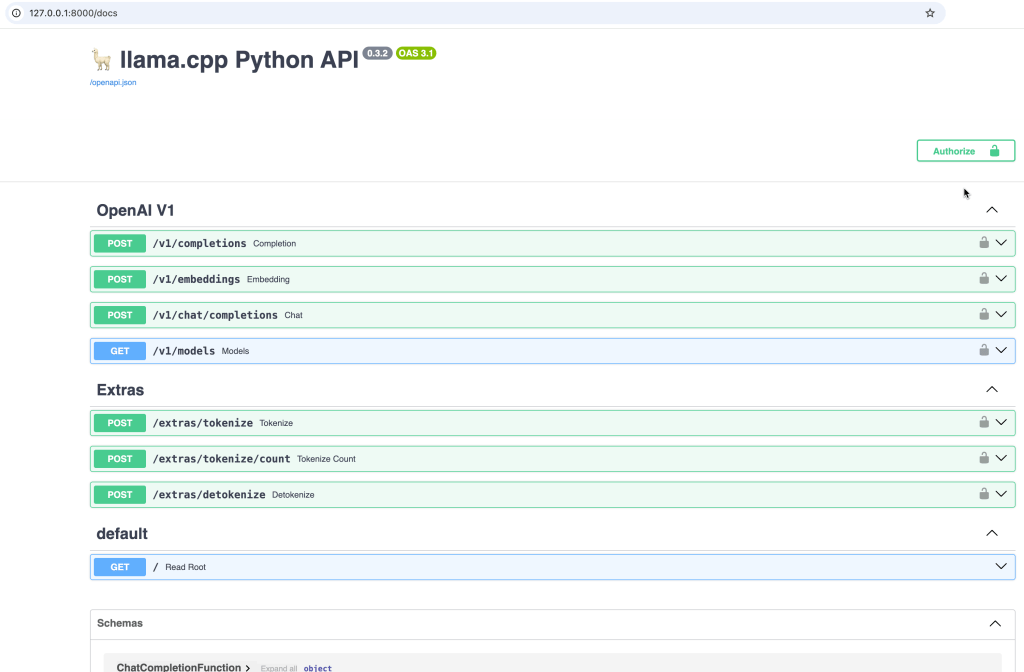
The image below show the Swagger UI.
2.3.3 Access the model using the REST API
Open a browser and enter the URL http://127.0.0.1:8000/docs
- Using curl to interact with the served model
curl -X 'POST' \
 'http://127.0.0.1:8000/v1/completions' \
  -H 'accept: application/json' \
 -H 'Content-Type: application/json' \
  -d '{
 "prompt": "\n\n### Instructions:\nWhat is the capital of France?\n\n### Response:\n",
 "stop": [
 "\n",
 "###"
 ]
}'
2.3.4 Access the model using a command line Chat interface
Open a new terminal from “instructlab” project folder and chat with the model.
Note: Ensure you loaded the Python virtual environment in the new terminal! Now, you can chat and close it with the exit command.
source venv/bin/activate
ilab model chat
- Output
INFO 2025-02-03 17:26:52,254 instructlab.model.backends.llama_cpp:125: Trying to connect to model server at http://127.0.0.1:8000/v1
llama_new_context_with_model: n_ctx_pre_seq (4096) > n_ctx_train (2048) -- possible training context overflow
...
╭─────────────────────────────────────────────────────────────────────────────────────────── system ────────────────────────────────────────────────────────────────────────────────────────────╮
│ Welcome to InstructLab Chat w/ GRANITE-7B-LAB-Q4_K_M.GGUF (type /h for help)                                                                                                                  │
╰───────────────────────────────────────────────────────────────────────────────────────────────────────────────────────────────────────────────────────────────────────────────────────────────╯
>>>
3. Summary
There are some minor changes in the organization’s setup, but this was easy to figure out. Overall the same installation on the local machine.
Now, move no to updates related to fine tune example
- (older version) InstructLab and Taxonomy tree: LLM Foundation Model Fine-tuning Guide | Musician Example
- (updates) InstructLab Fine-Tuning Guide: Updates and Insights for the Musician Example
I hope this was useful to you and let’s see what’s next?
Greetings,
Thomas
#llm, #instructlab, #ai, #opensource, #installation, #ibm, #redhat
 Thomas Suedbroecker's Blog