
Introduction
In my last blog post about IBM Bob, I mainly focused on first impressions and starting options ( My First Hands-On Experience with IBM Bob- From Planning to RAG Implementation )The goal was to understand how IBM Bob behaves and what kind of output it generates. This post continues that journey.
Here, I describe how I moved from my first ideas to a running MCP server for Astra DB (DataStax). (An MCP server exposes tools so an agent can call them 😉 )
I was not very familiar with Astra DB at the beginning, so this was also a learning step for me.
I used Bob mainly in Code Mode. I wanted to see if I can achieve a working result without strictly following a “Plan → Code → Advanced” workflow.
My focus was: automation scripts, documentation, working code, and verified execution.
The setup of Astra DB itself was not part of this work. The MCP server and its documentation assume that an Astra DB instance already exists.
This is not a tutorial. It is a description of my experiment and what I observed.
Keep in mind: IBM Project Bob is still under development.
You can register here https://www.ibm.com/products/bob to test it by yourself.
If you want also a short comparison visit this blog post from Andre Tost: AI (not just) Code Assistants: IBM Bob versus Cursor.
Here an overview of my personal workflow, how I used IBM Bob in this example.
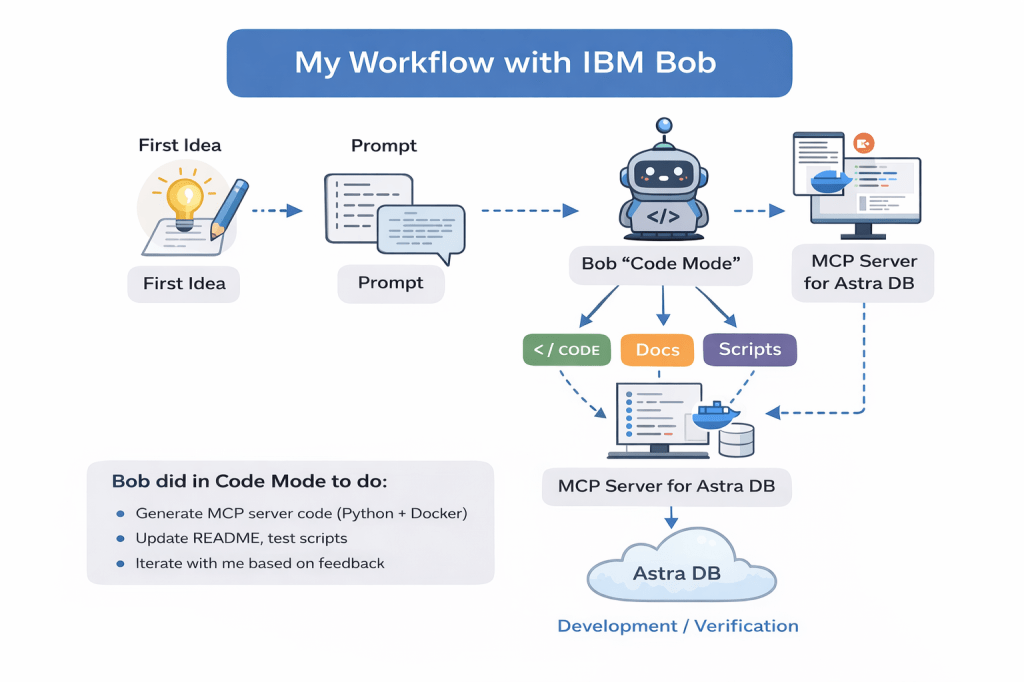
Table of contents
- Background and motivation
- First ideas and preparation
- Creating the initial prompt
- Working with Bob in Code Mode
- Keeping structure and overview
- A wrong direction at the beginning
- Automation and generated scripts
- Observing Bob executing code
- Working through many iterations
- Testing, verification, and current state
- GitHub integration and change summaries
- Final thoughts
1. Background and motivation
After my first experiments with Bob, I wanted to see if it is possible to build something more concrete. I want to use Bob with the Code Mode only to test can I achieve my result when I do not follow a Mode workflow Plan, Code, and Advanced.
Not just generated code snippets, but a small application that actually runs.
My use case was an MCP server that later can be used by an agent to work with Astra DB.
My goal was:
- run it locally as a Python application (for easy verification)
- run it also in a container (Docker / Docker Compose)
- provide tools to access data (CRUD + query)
- later easy deployment to a container engine
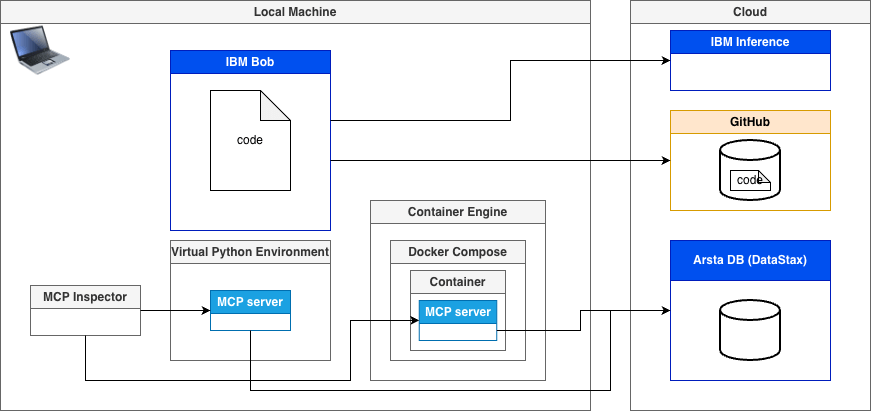
Simplified overview of my setup: local MCP server (Python or Docker Compose), MCP Inspector for testing, GitHub for code, and Astra DB as the remote database.
Main tools used in this example:
- IBM Bob
- Astra DB (DataStax)
- Docker and Docker Compose
- Python
- GitHub
- MCP Inspector
2. First ideas and preparation
I started without a real prompt, I wrote down my ideas in a simple text file:
- what the MCP server should do
- how I want to run it
- which features are required
This was not structured and not complete. It was only meant to clarify my own thinking.
Before starting the real work, I updated Bob to the latest version.
3. Creating the initial prompt
After writing down my own ideas, I used an LLM to transform these notes into a longer and more structured prompt for Bob.
It helped me to make the prompt:
- better structured
- easier to use as a project starter
- My initial unstructured idea prompt I created:
Optimize the following prompt for code generation steps with a tool.

Generate a customizable MCP server to access data on Astra DB.
The MCP server must be implemented in Python and be able to run on a local machine.
There must also be an option to run it as a container inside Docker Compose on the local machine. To run the MCP server, there must be Bash automations to avoid manual setup as much as possible.
Tests are required for the given data.

The MCP server can connect to Astra DB and discover the existing databases and collections.

It provides dynamic descriptions for collections and their contained data to enhance flexibility when adding new collections or databases, or when updating the existing structure, without changing the invocation for an agent.

The MCP server provides tools for connection management and for CRUD functionalities within the collections.

The server provides various query options for the given data.

The configuration needs to be flexible for connection settings.
I did not copy it blindly.
I reviewed it, adjusted details, and removed things that did not fit.
Below is an extract of the structured prompt I used as my initial input for Bob.
Title: Generate a customizable MCP Server for Astra DB (Python, Local + Docker, Automated Setup, Tests)

1. Goal
Create a Model Context Protocol (MCP) server in Python that exposes tools for Astra DB access.

The server must:

* Run locally and via Docker Compose.
* Include bash automation to minimize manual setup.
* Support dynamic discovery of Astra databases & collections and provide dynamic descriptions of collections and their data.
* Provide CRUD + query tools against collections.
* Offer flexible configuration (env vars, config file).
* Include tests (unit + integration/smoke).

...
4. Working with Bob in Code Mode
I started directly in Code Mode. I also turned off Auto Generation, because I wanted to approve every change and understand what Bob changed. I did not explicitly switch to Planning Mode. Still, Bob introduced planning-like explanations while generating code. It explained steps, assumptions, and structure.
I worked in small iterations:
- I gave feedback when something worked
- I explained when something failed
- I pasted error messages back into the chat
This felt like a dialogue.
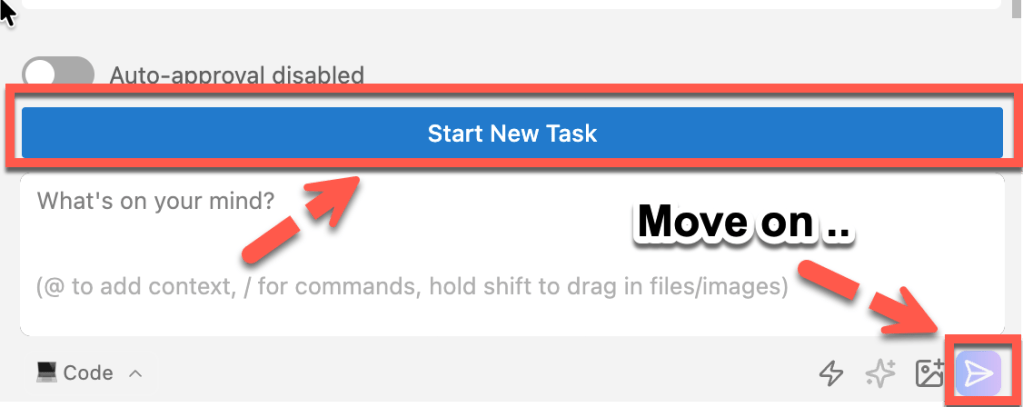
At one point, I accidentally pressed “Start New Task” instead of “Move on”.
Even then, Bob kept the project context and still identified the correct folders and code.
5. Keeping structure and overview
To avoid the feeling losing the overview, I saved all prompts I created separately in my code/prompts folder.
This helped me:
- track my own input
- understand why certain code was generated
- keep control over longer sessions
- isolate my thought’s
For me, this was important. Without this, the process would have been harder to follow. It also makes the whole process more transparent, because later I can see which prompt caused which change, by doing a rehearsal for my understanding.
This is the folder outline generated by IBM Bob, except for the code folder, which contains my personal prompt interactions, including recommendations, new instructions, and error messages from the console output and my initial data for the Astra DB (DataStax) configuration.
This is the project structure Bob generated.
.
├── LICENSE
├── Makefile
├── code
│   ├── bob_prompts
│   └── data
├── config.yaml.example
├── docker
│   ├── Dockerfile
│   └── docker-compose.yml
├── pyproject.toml
├── requirements.txt
├── scripts
│   ├── run_docker.sh
│   ├── run_http.sh
│   ├── run_local.sh
│   ├── setup_local.sh
│   └── stop_server.sh
├── setup.py
├── src
│   ├── mcp_astra
│   └── mcp_astra.egg-info
├── tests
│   ├── integration
│   └── unit
└── venv
6. A wrong direction at the beginning
At the beginning, Bob tried to implement everything using the Astra DB REST API.
This worked in theory, but it became complex very fast. For example:
- more manual request handling
- more error handling
- more configuration details
After that, I asked Bob to use the Astra DB framework instead. This simplified the implementation.
My recommendation prompt was:
If a framework exists, start with it. Use raw REST APIs only if really needed.
7. Automation and generated scripts
One thing I really liked was the focus on automation.
Bob generated:
- a Makefile
- bash scripts for local setup
- scripts to run the MCP server
- Docker and Docker Compose files
- scripts to run tests
I like automation and automated testing, everything which potentially needs to be done more than once should be automated. From my perspective, automation is often the harder part, not the implementation itself. Automation also made the project easier to repeat ;-).
Below is an example of one generated bash script.
#!/bin/bash
set -e

echo "=========================================="
echo "MCP Astra DB Server - HTTP Mode"
echo "=========================================="
echo ""

# Check if virtual environment exists
if [ ! -d "venv" ]; then
    echo "❌ Error: Virtual environment not found"
    echo "   Please run ./scripts/setup_local.sh first"
    exit 1
fi

# Activate virtual environment
echo "Activating virtual environment..."
source venv/bin/activate
echo "✅ Virtual environment activated"
echo ""

# Load environment variables
if [ -f ".env" ]; then
    echo "Loading environment variables from .env..."
    set -a
    source .env
    set +a
    echo "✅ Environment variables loaded"
else
    echo "⚠️  Warning: .env file not found"
    echo "   Using default configuration or environment variables"
fi
echo ""

# Validate required environment variables
echo "Validating configuration..."
MISSING_VARS=()
if [ -z "$ASTRA_TOKEN" ]; then
    MISSING_VARS+=("ASTRA_TOKEN")
fi
if [ -z "$ASTRA_DB_ID" ]; then
    MISSING_VARS+=("ASTRA_DB_ID")
fi
if [ -z "$ASTRA_DB_REGION" ]; then
    MISSING_VARS+=("ASTRA_DB_REGION")
fi

if [ ${#MISSING_VARS[@]} -gt 0 ]; then
    echo "❌ Error: Missing required environment variables:"
    for var in "${MISSING_VARS[@]}"; do
        echo "   - $var"
    done
    echo ""
    echo "Please configure these in your .env file or environment"
    exit 1
fi

echo "✅ Configuration validated"
echo ""

# Display server configuration
echo "Server Configuration:"
echo "  Mode: HTTP/SSE (for MCP Inspector)"
echo "  Host: ${MCP_SERVER_HOST:-0.0.0.0}"
echo "  Port: ${MCP_SERVER_PORT:-8000}"
echo "  Database: $ASTRA_DB_ID"
echo "  Region: $ASTRA_DB_REGION"
echo "  Keyspace: ${ASTRA_DB_KEYSPACE:-default_keyspace}"
echo "  Log Level: ${LOG_LEVEL:-INFO}"
echo ""

echo "=========================================="
echo "Starting MCP Astra DB Server (HTTP)..."
echo "=========================================="
echo ""
echo "Server will be available at:"
echo "  http://${MCP_SERVER_HOST:-0.0.0.0}:${MCP_SERVER_PORT:-8000}"
echo ""
echo "To connect MCP Inspector:"
echo "  1. Open MCP Inspector: npx @modelcontextprotocol/inspector"
echo "  2. Enter URL: http://localhost:${MCP_SERVER_PORT:-8000}/sse"
echo ""
echo "Press Ctrl+C to stop the server"
echo ""

# Run the HTTP server
python -m mcp_astra.server_http

# Made with Bob
8. Observing Bob executing code
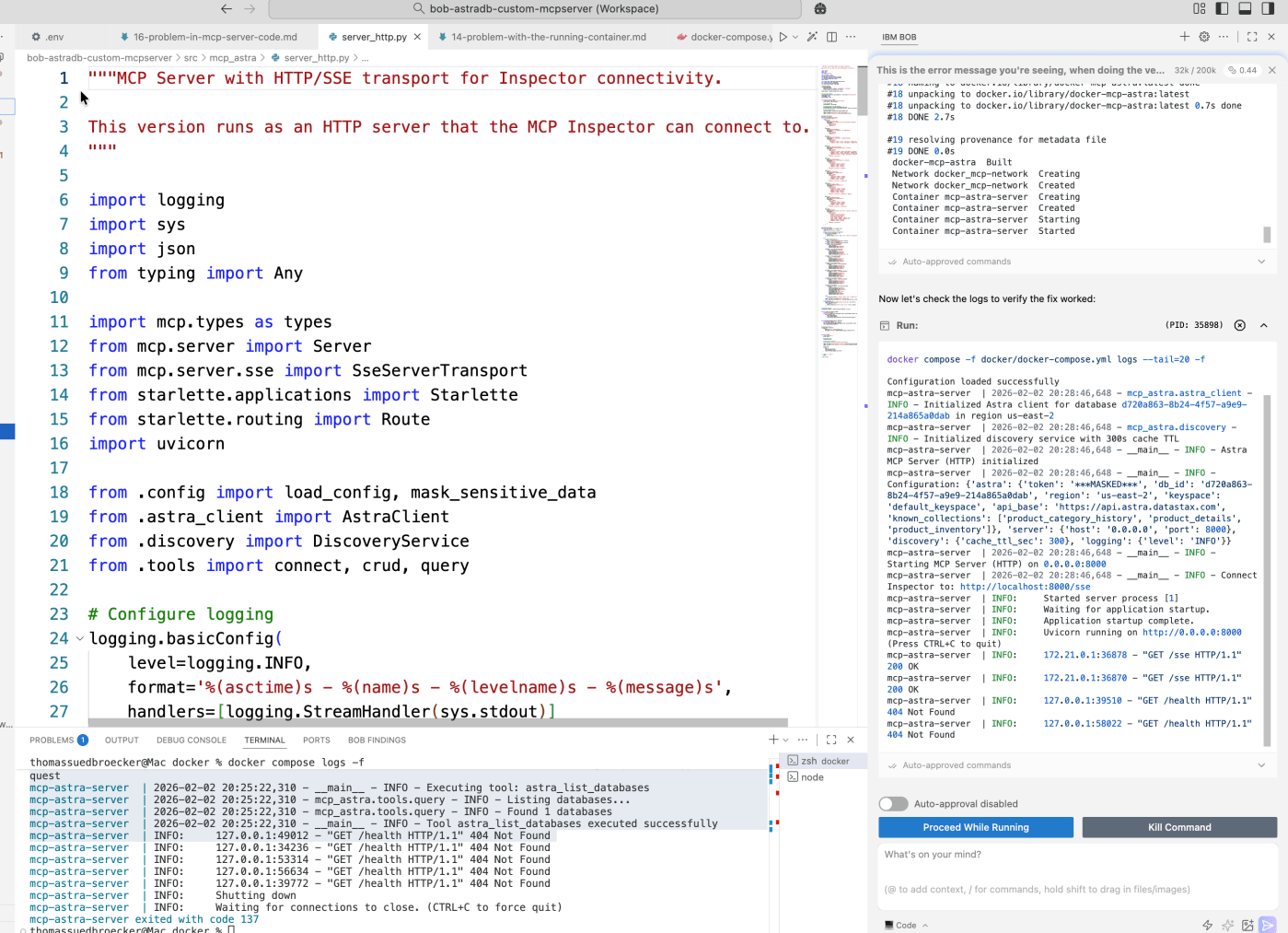
One thing that impressed me during this work was how Bob handled code execution. Bob did not only generate code. In several steps, it ran the code, checked the output, adjusted the solution, and ran it again.
This made a clear difference:
- errors were detected earlier
- assumptions were validated
- scripts and documentation became more realistic
In the image below, you can see the console output validation on the right side.
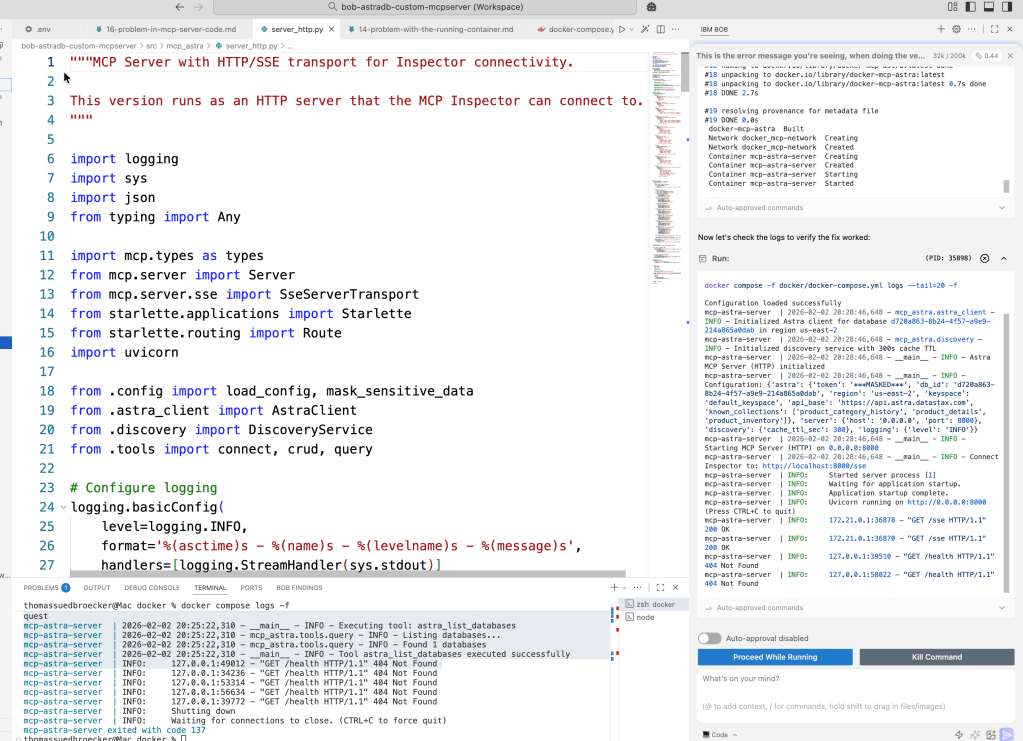
It felt less like static code generation and more like an iterative building/coding process.
9. Working through many iterations
Overall, I interacted with Bob more than 25 times during this project.
This was not a single prompt and result. It was a longer process with many small adjustments.
I really tried to avoid writing code and documentation myself as much as possible.
Instead, I focused on:
- describing what I want
- reviewing generated code and README files
- checking console output
- giving feedback and corrections
So prompting was my coding.
This felt very different from my usual way of developing.
10. Testing verification and current state
I did not create my own verification and testing logic. Bob provided automation scripts, documentation, and a test setup and implementation.
My task was to verify that:
- the scripts work as documented
- all required information is available
- tests and automation run without manual fixes
The tests failed at the beginning. After my feedback, Bob updated the code and the documentation.
So far, I verified that the Python application runs locally and also in the container. Both had some issues at the beginning, but Bob helped to resolve them and updated the related documentation.
For me, this verification step is where the real work happens: running scripts, checking logs, and validating that the documentation matches reality.
Here is the working MCP server running only Python execution:

11. GitHub integration and change summaries
When integrating Bob with GitHub, Bob provides a summary at the end of a change.
This summary can be used directly as input for commit message:
- what was changed
- why it was changed
- which files are affected
- how to test
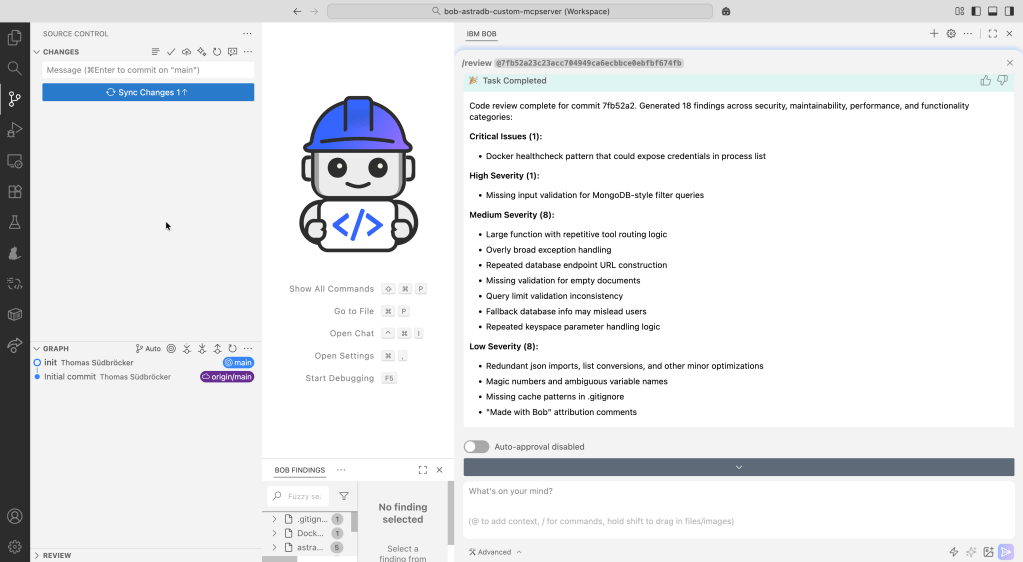
Bob also provides a code review before the commit you can also add to your commit message. You can use this suggestion review, follow the review instructions yourself, or let Bob apply the suggested changes.
This is useful, because it makes the change history easier to understand later.
The image below shows one:
12. Final thoughts
Working with Bob feels like a different style of programming.
Prompts are like human-readable code:
- they describe intent
- they document decisions
- they explain why something exists
Because of this, I think the human-created-prompts should be saved, just like source code, to the related commit.
Together with:
- generated code
- automation scripts
- documentation
- commit messages
this creates a transparent path from idea to implementation.
I like that Bob does not remove the responsibility. For me this is very important from the legal perspective to save investments and handle risks which I addressed in the posts AI-Generated Software, Patents, and Global IP Law — A First Deep Dive using AI and It’s All About Risk-Taking: Why “Trustworthy” Beats “Deterministic” in the Era of Agentic AI.
Now I have a running MCP server and tools. One remaining question is: how easy can an agent use these tools, and how well can tool descriptions be updated over time? This will be one of my next topics.
I hope this was useful to you and let’s see what’s next?
Greetings,
Thomas
Note: This post reflects my own ideas and experience; AI was used only as a writing and thinking aid to help structure and clarify the arguments, not to define them.
#AI,#AgenticAI,#MCP,#ModelContextProtocol,#AstraDB,#AIEngineering,#Automation,#Python,#Docker,#DevTools,#DeveloperExperience
 Thomas Suedbroecker's Blog
Leave a comment