

In this blog post, we will show how I modified the example for the excellent blog post of IBM Developer Create a LangChain AI Agent in Python using watsonx.
As in the two earlier posts, we implement a weather query application utilizing tools to obtain weather information for specific cities. The post provides insight into the implementation steps and offers additional resources for further exploration.
The earlier blog posts:
- Integrating langchain_ibm with watsonx and LangChain for function calls: Example and Tutorial
- Does it work to use WatsonxChat from langchain_ibm to implement an agent that invokes functions?
Table of content
- Objective
- Introduction
- The simple chain setup for question and answer
- The setup for the agent chain
- The implementation steps of the customized example
- Load environment variables
- Model parameters
- Create a WatsonxLLM instance.
- Create a prompt using the PromptTemplate with a variable
- Create a simple chain with the created prompt and the create watsonx_client.
- Invoke the simple chain by asking a question.
- Inspect the response.
- Define the tools
- Define agent system prompt
- Define human prompt
- Create an agent chat prompt from a ChatPromptTemplate
- Extent the Chat Prompt Template with the given tool names as variables
- Setup of a ConversationBufferMemory
- Define an agent chain, including a runnable passthrough
- Create an AgentExecutor
- Execution of the AgentExecutor
- Run the example
- Additional Resources
- Summary
1. Objective
Understand how the example from IBM Developer Create a LangChain AI Agent in Python using watsonx works by implementing a variation of the example.
The example uses the IBM Foundation Model Granite.
The source code is available in this GitHub repository: https://github.com/thomassuedbroecker/agent-tools-langchain-watsonx
2. Introduction
Customizing the example from IBM Developer Create a LangChain AI Agent in Python using watsonx worked awesome.
With this example implementation, we can execute a full action using tools to get the weather information. As you can see in the image below. (Resource: Image from LangChain)

When we execute the chain of RunnablePassthrough, ChatPromptTemplate, WatsonxLLM, and a JSONAgentOutputPhaser with an agent executor, we will get a final answer to all questions. In the section 3. The implementation steps of the customized example we will see the details for the implementation.
| Question | Final Answer |
|---|---|
| Which city is hotter today: LA or NY? | The temperature in LA is hotter. |
| What is the temperature today in Berlin? | The temperature in Berlin is approximately 10 degrees Celsius. |
| How to win a soccer game? | The only way to win a soccer game is to score more goals than the opposing team. |
| What is the official definition of the term weather? | Weather is a phenomenon associated with atmospheric conditions, primarily temperature, humidity, and precipitation, that occur in a given region over a more or less extended period of time. |
The following gif shows the execution of the example for the weather query application:

The example for a weather query application implementation contains two chains: a simple chain setup for question and answer and a second setup for the agent chain.
2.1 The simple chain setup for question and answer
The example first implements a simple chain setup with a PromptTemplate and a WatsonLLM class, where a question is asked, and the large language model answers the question without any function.
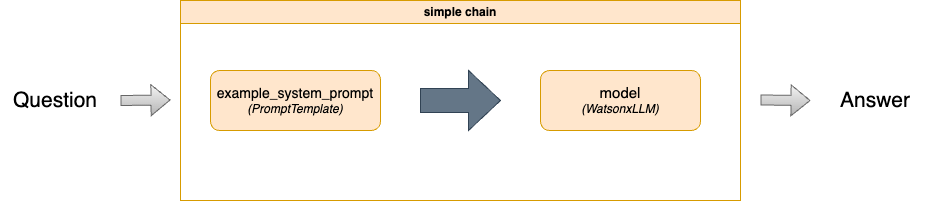
The following code shows the creation of a simple_chain, which will be directly invoked.
simple_chain = prompt | watsonx_client
response = simple_chain.invoke({"question": "Which city is hotter today: LA or NY?"})
The following text is the prompt with question as variable.
You are a weather expert. If the question is not about the weather, say: I don't know.
Based on the given instructions, answer the following question {question}.
2.2 The setup for the agent chain
The chain for the agent and function implementation uses the following elements from LangChain:

The following code shows the creation of an agent_chain for an AgentExecutor displayed in the image above.
agent_chain = ( RunnablePassthrough.assign(
            agent_scratchpad=lambda x: format_log_to_str(x["intermediate_steps"]),
            chat_history=lambda x: memory.chat_memory.messages,
        )
        | agent_chat_incl_tools_prompt |watsonx_client | JSONAgentOutputParser()

     )
These are the values used in the ChatPromptTemplate, which extracts the instance content in a terminal output to execute the weather query example application.
partial_variables={'chat_history': [],
                   'tools': "weather_service(cities: List[str]) -> str - weather service provides all of the weather needs and information in that api, it serves weather information. \n     Args:\n                cities: The parameter cities is a list e.g. [ LA, NY]., args: {'cities': {'title': 'Cities', 'type': 'array', 'items': {'type': 'string'}}}", 'tool_names': 'weather_service'}
input_variables=['tool_names', 'tools'],
- The following content is the prompt template with the variables
toolsandtool_names.
prompt="""Respond to the human as helpfully and accurately as possible. You have access to the following tools:

{tools}

Use a json blob to specify a tool by providing an action key (tool name) and an action_input key (tool input).

Valid "action" values: "Final Answer" or {tool_names}

Provide only ONE action per $JSON_BLOB, as shown:

```
{{
  "action": $TOOL_NAME,
  "action_input": $INPUT
}}
```

Follow this format:

Question: input question to answer
Thought: consider previous and subsequent steps
Action:
```
$JSON_BLOB
```
Observation: action result
... (repeat Thought/Action/Observation N times)
Thought: I know what to respond
Action:
```
{{
  "action": "Final Answer",
  "action_input": "Final response to human"
}}

Begin! Reminder to ALWAYS respond with a valid json blob of a single action. Use tools if necessary. Respond directly if appropriate. Format is Action:```$JSON_BLOB```then Observation'''"""
- The human prompt template with the variables:
inputis the question,agent_scratchpad“The prompt in the LLMChain MUST include a variable called “agent_scratchpad” where the agent can put its intermediary work.”
human = """'''{input}

{agent_scratchpad}

(reminder to always respond in a JSON blob)"""
- The chain will be executed by an AgentExecutor which takes the ChatPromptTemplate and the Tools as an input.
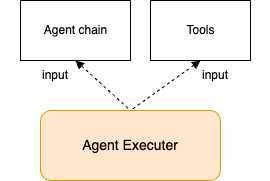
The following content is an example output for an execution of the AgentExecutor.
This is an overview of the following steps:
start AgentExecutor – 1. Action -> 2. Observation (result of the tool invocation) -> 3. Action -> 4. Observation (Final answer) -> end AgentExecuter with the response with a final output
> Entering new AgentExecutor chain...


Action:
```
{
    "action": "weather_service",
    "action_input": {
        "cities": ["LA", "NY"]
    }
}
```
Observation[{'city': 'NY', 'temperature': '26'}, {'city': 'LA', 'temperature': '12'}]
 The hottest city is NY with a temperature of 26 degrees Celsius. In the city LA the temperature is 12 degrees Celsius.
Action:
```
{
    "action": "Final Answer",
    "action_input": "NY is hotter today with a temperature of 26 degrees Celsius, while LA has a temperature of 12 degrees Celsius."
}
```
Observation

> Finished chain.
18.a Response of the agent executor
{'input': 'Which city is hotter today: LA or NY?', 'history': '', 'output': 'NY is hotter today with a temperature of 26 degrees Celsius, while LA has a temperature of 12 degrees Celsius.'}
3. The implementation steps of the customized example
This section contains the implementation steps with the terminal-related output when the example weather query application is executed.
Step 1: Load environment variables
Define the model we will use in this examples as: ibm/granite-13b-chat-v2.
{'project_id': 'YOUR_PROJECT', 'url': 'https://eu-de.ml.cloud.ibm.com', 'model_id': 'ibm/granite-13b-chat-v2', 'apikey': 'YOUR_APIKEY'}
}
Step 2: Model parameters
Based on the defined prompt for the agent, we need to ensure the model’s answer ends after receiving Observation information.
{'decoding_method': 'greedy', 'temperature': 0, 'min_new_tokens': 5, 'max_new_tokens': 250, 'stop_sequences': ['\nObservation', '\n\n']}
Step 3: Create a WatsonxLLM instance.
     watsonx_client = WatsonxLLM(
            model_id=environment['model_id'],
            url=environment['url'],
            project_id=environment['project_id'],
            apikey= environment['apikey'],
            params=parameters
        )
Step 4: Create a prompt using the PromptTemplate with a variable
- The variable
input_variables=['question']
- Prompt text
"You are a weather expert. If the question is not about the weather, say: I don't know.\nBased on the given instructions, answer the following question {question}."
Step 5: Create a simple chain with the created prompt and the create watsonx_client.
simple_chain = prompt | watsonx_client
Step 6: Invoke the simple chain by asking a question.
response = simple_chain.invoke({"question": "Which city is hotter today: LA or NY?"})
Step 7: Inspect the response.
This is the response of the simple chain.
I don't have real-time data or the ability to determine the current weather conditions in LA and NY, so I cannot provide an accurate answer to that question. However, I can tell you that LA is typically known for its warm climate, while NY is known for its cold winters. If you're interested in a general comparison, LA might be warmer than NY today, but I cannot confirm this without up-to-date weather data.
Step 8: Define the tools
We need to implement the function weather_service in the application to provide the list of tools later before the model invocation.
tools = [weather_service]
print(f"{tools}")
- Output
[StructuredTool(name='weather_service', description='weather service provides all of the weather needs and information in that api, it serves weather information.\n Args:\n cities: The parameter cities is a list e.g. [ LA, NY].', args_schema=<class 'pydantic.v1.main.weather_serviceSchema'>, func=<function weather_service at 0x102e418a0>)]
- The function behind the tools.
This function implementation uses the https://wttr.in/ endpoint to receive temperature information for various cities.
@tool
def weather_service(cities: List[str]) -> str:
     """weather service provides all of the weather needs and information in that api, it serves weather information.
     Args:
                cities: The parameter cities is a list e.g. [ LA, NY].
     """

     base_weather_url="https://wttr.in/"
     cities_input = cities
     cities = []

     for city in cities_input:
          # Ensure to get the JSON format: '?format=j1'
          city_temp_url = base_weather_url + city + "?format=j1"
          response = requests.get(city_temp_url)
          if (response.status_code == 200):
              # convert from byte to text
              byte_content = response.content
              text_content = byte_content.decode("utf-8")

              # load json
              content = json.loads(text_content)

              # extract temperature
              temperature = content['current_condition'][0]['temp_C']
              cities.append({"city": city, "temperature":temperature})
          else:
              cities.append({"city": f"{city} ERROR", "temperature":0})
     full_text = ""
     sorted_by_temperature =  sorted(cities, key=lambda x: (x['temperature'], x['city']), reverse=True)
     i = 0
     for city in sorted_by_temperature:
        if (i == 0):
             response_text =  f"The hottest city is {city['city']} with a temperature or {city['temperature']} degrees Celsius."
        else:
             response_text =  f"In the city {city['city']} the temperature is {city['temperature']} degrees Celsius."
        i = i + 1
        full_text = full_text + ' ' + response_text

     return full_text
Step 9: Define agent system prompt
Here, we define responsibility of the prompt, the tools, the related action parameters and values, and the output for an action.
In the observation, we define the loops we have seen in the image we saw in the introduction of this blog post. The prompt is not restricted as the first prompt to answer weather related question “Respond to the human as helpfully and accurately as possible.”. This is the out of the box definition given in the ChatPromptTemplate.
Note: Keep in mind a prompt doesn’t work for all LLMs because they are trained differently and the prompt structure can also be different, for example like a Llama model needs these tags to identify instructions <s>[INST] [/INST] and other models maybe need different tags.
You can find the resource for this prompt example in the following LangChain link.
Respond to the human as helpfully and accurately as possible. You have access to the following tools: {tools}
Use a json blob to specify a tool by providing an action key (tool name) and an action_input key (tool input).
Valid "action" values: "Final Answer" or {tool_names}
Provide only ONE action per $JSON_BLOB, as shown:"
```
{{
    "action": $TOOL_NAME,
    "action_input": $INPUT
}}
```
Follow this format:
Question: input question to answer
Thought: consider previous and subsequent steps
Action:
```
$JSON_BLOB
```
Observation: action result
... (repeat Thought/Action/Observation N times)
Thought: I know what to respond
Action:
```
{{
"action": "Final Answer",
"action_input": "Final response to human"
}}
Begin! Reminder to ALWAYS respond with a valid json blob of a single action.
Respond directly if appropriate. Format is Action:```$JSON_BLOB```then Observation
The following content is related output to this prompt in a chat context.
> Entering new AgentExecutor chain...


Action:
```json
{
    "action": "weather_service",
    "action_input": {
        "cities": ["LA", "NY"]
    }
}
```
Weather service response:
```json
{
    "result": "LA",
    "cities": ["LA", "NY"]
}
```

[{'city': 'NY', 'temperature': '19'}, {'city': 'LA', 'temperature': '17'}]
 The hottest city is NY with a temperature or 19 degrees Celsius. In the city LA the temperature is 17 degrees Celsius.
Action:
```json
{
    "action": "Final Answer",
    "action_input": "The hottest city is NY with a temperature of 19 degrees Celsius."
}
```


> Finished chain.
Step 10. Define human prompt
{input}
    {agent_scratchpad}
    (reminder to always respond in a JSON blob)
Step 11: Create an agent chat prompt from a ChatPromptTemplate
     agent_chat_prompt = ChatPromptTemplate.from_messages(
        [
            ("system", agent_system_prompt),
            MessagesPlaceholder("chat_history", optional=True),
            ("human", human_prompt),
        ]
     )
     print(f"agent_chat_prompt")
- Output
input_variables=['agent_scratchpad', 'input', 'tool_names', 'tools'] optional_variables=['chat_history'] input_types={'chat_history': typing.List[typing.Union[langchain_core.messages.ai.AIMessage, langchain_core.messages.human.HumanMessage, langchain_core.messages.chat.ChatMessage, langchain_core.messages.system.SystemMessage, langchain_core.messages.function.FunctionMessage, langchain_core.messages.tool.ToolMessage]]} partial_variables={'chat_history': []} messages=[SystemMessagePromptTemplate(prompt=PromptTemplate(input_variables=['tool_names', 'tools'], template='Respond to the human as helpfully and accurately as possible. You have access to the following tools: {tools} \nUse a json blob to specify a tool by providing an action key (tool name) and an action_input key (tool input).\nValid "action" values: "Final Answer" or {tool_names}\nProvide only ONE action per $JSON_BLOB, as shown:"\n```\n{{\n "action": $TOOL_NAME,\n "action_input": $INPUT\n}}\n```\nFollow this format:\nQuestion: input question to answer\nThought: consider previous and subsequent steps\nAction:\n```\n$JSON_BLOB\n```\nObservation: action result\n... (repeat Thought/Action/Observation N times)\nThought: I know what to respond\nAction:\n```\n{{\n"action": "Final Answer",\n"action_input": "Final response to human"\n}}\nBegin! Reminder to ALWAYS respond with a valid json blob of a single action.\nRespond directly if appropriate. Format is Action:```$JSON_BLOB```then Observation')), MessagesPlaceholder(variable_name='chat_history', optional=True), HumanMessagePromptTemplate(prompt=PromptTemplate(input_variables=['agent_scratchpad', 'input'], template='{input}\n {agent_scratchpad}\n (reminder to always respond in a JSON blob)'))]
Step 12: Extent the Chat Prompt Template with the given tool names as variables
agent_chat_incl_tools_prompt = agent_chat_prompt.partial(
    tools=render_text_description_and_args(list(tools)),
    tool_names=", ".join([t.name for t in tools]),
)
- Output
input_variables=['agent_scratchpad', 'input'] optional_variables=['chat_history'] input_types={'chat_history': typing.List[typing.Union[langchain_core.messages.ai.AIMessage, langchain_core.messages.human.HumanMessage, langchain_core.messages.chat.ChatMessage, langchain_core.messages.system.SystemMessage, langchain_core.messages.function.FunctionMessage, langchain_core.messages.tool.ToolMessage]]} partial_variables={'chat_history': [], 'tools': "weather_service(cities: List[str]) -> str - weather service provides all of the weather needs and information in that api, it serves weather information.\n Args:\n cities: The parameter cities is a list e.g. [ LA, NY]., args: {'cities': {'title': 'Cities', 'type': 'array', 'items': {'type': 'string'}}}", 'tool_names': 'weather_service'} messages=[SystemMessagePromptTemplate(prompt=PromptTemplate(input_variables=['tool_names', 'tools'], template='Respond to the human as helpfully and accurately as possible. You have access to the following tools: {tools} \nUse a json blob to specify a tool by providing an action key (tool name) and an action_input key (tool input).\nValid "action" values: "Final Answer" or {tool_names}\nProvide only ONE action per $JSON_BLOB, as shown:"\n```\n{{\n "action": $TOOL_NAME,\n "action_input": $INPUT\n}}\n```\nFollow this format:\nQuestion: input question to answer\nThought: consider previous and subsequent steps\nAction:\n```\n$JSON_BLOB\n```\nObservation: action result\n... (repeat Thought/Action/Observation N times)\nThought: I know what to respond\nAction:\n```\n{{\n"action": "Final Answer",\n"action_input": "Final response to human"\n}}\nBegin! Reminder to ALWAYS respond with a valid json blob of a single action.\nRespond directly if appropriate. Format is Action:```$JSON_BLOB```then Observation')), MessagesPlaceholder(variable_name='chat_history', optional=True), HumanMessagePromptTemplate(prompt=PromptTemplate(input_variables=['agent_scratchpad', 'input'], template='{input}\n {agent_scratchpad}\n (reminder to always respond in a JSON blob)'))]
Step 13: Setup of a ConversationBufferMemory
memory = ConversationBufferMemory()
Step 14: Define an agent chain, including a runnable passthrough
agent_chain = ( RunnablePassthrough.assign(
            agent_scratchpad=lambda x: format_log_to_str(x["intermediate_steps"]),
            chat_history=lambda x: memory.chat_memory.messages,
        )
        | agent_chat_incl_tools_prompt |watsonx_client | JSONAgentOutputParser()

     )
print(f"{agent_chain}")
- Output
first=RunnableAssign(mapper={
  agent_scratchpad: RunnableLambda(lambda x: format_log_to_str(x['intermediate_steps'])),
  chat_history: RunnableLambda(lambda x: memory.chat_memory.messages)
}) middle=[ChatPromptTemplate(input_variables=['agent_scratchpad', 'input'], optional_variables=['chat_history'], input_types={'chat_history': typing.List[typing.Union[langchain_core.messages.ai.AIMessage, langchain_core.messages.human.HumanMessage, langchain_core.messages.chat.ChatMessage, langchain_core.messages.system.SystemMessage, langchain_core.messages.function.FunctionMessage, langchain_core.messages.tool.ToolMessage]]}, partial_variables={'chat_history': [], 'tools': "weather_service(cities: List[str]) -> str - weather service provides all of the weather needs and information in that api, it serves weather information.\n     Args:\n                cities: The parameter cities is a list e.g. [ LA, NY]., args: {'cities': {'title': 'Cities', 'type': 'array', 'items': {'type': 'string'}}}", 'tool_names': 'weather_service'}, messages=[SystemMessagePromptTemplate(prompt=PromptTemplate(input_variables=['tool_names', 'tools'], template='Respond to the human as helpfully and accurately as possible. You have access to the following tools: {tools}    \nUse a json blob to specify a tool by providing an action key (tool name) and an action_input key (tool input).\nValid "action" values: "Final Answer" or {tool_names}\nProvide only ONE action per $JSON_BLOB, as shown:"\n```\n{{\n    "action": $TOOL_NAME,\n    "action_input": $INPUT\n}}\n```\nFollow this format:\nQuestion: input question to answer\nThought: consider previous and subsequent steps\nAction:\n```\n$JSON_BLOB\n```\nObservation: action result\n... (repeat Thought/Action/Observation N times)\nThought: I know what to respond\nAction:\n```\n{{\n"action": "Final Answer",\n"action_input": "Final response to human"\n}}\nBegin! Reminder to ALWAYS respond with a valid json blob of a single action.\nRespond directly if appropriate. Format is Action:```$JSON_BLOB```then Observation')), MessagesPlaceholder(variable_name='chat_history', optional=True), HumanMessagePromptTemplate(prompt=PromptTemplate(input_variables=['agent_scratchpad', 'input'], template='{input}\n    {agent_scratchpad}\n    (reminder to always respond in a JSON blob)'))]), WatsonxLLM(model_id='ibm/granite-13b-chat-v2', project_id='5b69b298-bad0-498d-8927-9fb8c0d872db', url=SecretStr('**********'), apikey=SecretStr('**********'), params={'decoding_method': 'greedy', 'temperature': 0, 'min_new_tokens': 5, 'max_new_tokens': 250, 'stop_sequences': ['\nObservation', '\n\n']}, watsonx_model=<ibm_watsonx_ai.foundation_models.inference.model_inference.ModelInference object at 0x138a2a890>)] last=JSONAgentOutputParser()
Step 15: Create an AgentExecutor
agent_executor = AgentExecutor(agent=agent_chain, tools=tools, handle_parsing_errors=True, verbose=True, memory=memory)
- Output:
memory=ConversationBufferMemory() verbose=True agent=RunnableAgent(runnable=RunnableAssign(mapper={
  agent_scratchpad: RunnableLambda(lambda x: format_log_to_str(x['intermediate_steps'])),
  chat_history: RunnableLambda(lambda x: memory.chat_memory.messages)
})
| ChatPromptTemplate(input_variables=['agent_scratchpad', 'input'], optional_variables=['chat_history'], input_types={'chat_history': typing.List[typing.Union[langchain_core.messages.ai.AIMessage, langchain_core.messages.human.HumanMessage, langchain_core.messages.chat.ChatMessage, langchain_core.messages.system.SystemMessage, langchain_core.messages.function.FunctionMessage, langchain_core.messages.tool.ToolMessage]]}, partial_variables={'chat_history': [], 'tools': "weather_service(cities: List[str]) -> str - weather service provides all of the weather needs and information in that api, it serves weather information.\n     Args:\n                cities: The parameter cities is a list e.g. [ LA, NY]., args: {'cities': {'title': 'Cities', 'type': 'array', 'items': {'type': 'string'}}}", 'tool_names': 'weather_service'}, messages=[SystemMessagePromptTemplate(prompt=PromptTemplate(input_variables=['tool_names', 'tools'], template='Respond to the human as helpfully and accurately as possible. You have access to the following tools: {tools}    \nUse a json blob to specify a tool by providing an action key (tool name) and an action_input key (tool input).\nValid "action" values: "Final Answer" or {tool_names}\nProvide only ONE action per $JSON_BLOB, as shown:"\n```\n{{\n    "action": $TOOL_NAME,\n    "action_input": $INPUT\n}}\n```\nFollow this format:\nQuestion: input question to answer\nThought: consider previous and subsequent steps\nAction:\n```\n$JSON_BLOB\n```\nObservation: action result\n... (repeat Thought/Action/Observation N times)\nThought: I know what to respond\nAction:\n```\n{{\n"action": "Final Answer",\n"action_input": "Final response to human"\n}}\nBegin! Reminder to ALWAYS respond with a valid json blob of a single action.\nRespond directly if appropriate. Format is Action:```$JSON_BLOB```then Observation')), MessagesPlaceholder(variable_name='chat_history', optional=True), HumanMessagePromptTemplate(prompt=PromptTemplate(input_variables=['agent_scratchpad', 'input'], template='{input}\n    {agent_scratchpad}\n    (reminder to always respond in a JSON blob)'))])
| WatsonxLLM(model_id='ibm/granite-13b-chat-v2', project_id='5b69b298-bad0-498d-8927-9fb8c0d872db', url=SecretStr('**********'), apikey=SecretStr('**********'), params={'decoding_method': 'greedy', 'temperature': 0, 'min_new_tokens': 5, 'max_new_tokens': 250, 'stop_sequences': ['\nObservation', '\n\n']}, watsonx_model=<ibm_watsonx_ai.foundation_models.inference.model_inference.ModelInference object at 0x138a2a890>)
| JSONAgentOutputParser(), input_keys_arg=[], return_keys_arg=[], stream_runnable=True) tools=[StructuredTool(name='weather_service', description='weather service provides all of the weather needs and information in that api, it serves weather information.\n     Args:\n                cities: The parameter cities is a list e.g. [ LA, NY].', args_schema=<class 'pydantic.v1.main.weather_serviceSchema'>, func=<function weather_service at 0x102e418a0>)] handle_parsing_errors=True
Step 16: Execution of the AgentExecutor
question = "Which city is hotter today: LA or NY?"
dict = {"input": question}
response = agent_executor.invoke({"input":"Which city is hotter today: LA or NY?"})
print(f{response})
- Output
> Entering new AgentExecutor chain...


Action:
```json
{
    "action": "weather_service",
    "action_input": {
        "cities": ["LA", "NY"]
    }
}
```
Weather service response:
```json
{
    "result": "LA",
    "cities": ["LA", "NY"]
}
```

[{'city': 'NY', 'temperature': '19'}, {'city': 'LA', 'temperature': '17'}]
 The hottest city is NY with a temperature or 19 degrees Celsius. In the city LA the temperature is 17 degrees Celsius.
Action:
```json
{
    "action": "Final Answer",
    "action_input": "The hottest city is NY with a temperature of 19 degrees Celsius."
}
```


> Finished chain.
4. Run the example
Follow the steps in the GitHub repository: https://github.com/thomassuedbroecker/agent-tools-langchain-watsonx
5. Additional Resources
- IBM Developer Create a LangChain AI Agent in Python using watsonx
- IBM Research Large language models revolutionized AI. LLM agents are what’s next
- LangChain Action Executor
- LangChain Runnable interface
- LangChain Use tools quickstart
- LangChain Agents
- LangChain Tools
- LangChain langchain-ibm Library
- LangChain Tool use and agents
- LangChain ChatPromptTemplate
6. Summary
The IBM Developer blog post Create a LangChain AI Agent in Python using watsonx is an excellent resource for starting from scratch and getting an executable application. The post contains a lot of additional information. Try this post out and run the example for free in watsonx.ai.
Without using the example itself directly, it was straightforward for me to customize the IBM Developer example to my own weather query application.
With these three posts, I now have the feeling that I got a clear understanding of what is currently possible and what is not when working with LangChain and watsonx.ai.
I hope this was useful to you and let’s see what’s next?
Greetings,
Thomas
#llm, #langchain, #ai, #opensource, #ibm, #watsonx, #granitefoundationmodel ,#functioncalling, #aiagent, #ibmfoundationmodel, #functioncall, #python, #ibmdeveloper
 Thomas Suedbroecker's Blog