

This post shows how to build, test, and orchestrate AI support agents using IBM’s watsonx.ai and watsonx Orchestrate. You’ll get into the following topics written for an advanced beginner to intermediate level on IBM Cloud, watsonx.ai, and watsonx Orchestrate audience:
- Using the example for the development of an “Specialist Support Agent for DB2”
- Integrate that agent into watsonx Orchestrate
- Build a multi-agent orchestration
- Review step-by-step setup
- Summary and Best Practices
This blog post is in context for the blog post Develop and Deploy Custom AI Agents to watsonx.ai on IBM Cloud.
It describes developing a “Specialist Support Agent for DB2” available in the workshop material for the regional techXchange in Germany.
This gif shows the usage of the “Specialist Support Agent for DB2” running in watsonx.ai into a “Support Agent” running in the watsonx Orchestrate “Agent Builder”:

1. Motivation
IBM’s watsonx Orchestrate has introduced powerful new capabilities for agent-based workflows. By leveraging the watsonx.ai Agent Template and LangGraph, you can develop custom AI agents locally and seamlessly import them into watsonx Orchestrate.
Based on this news, I want to highlight how it is possible to add an agent locally developed based on the watsonx.ai Agent template made by watsonx developer hub.
2. Starting Point: Specialist Support Agent for DB2
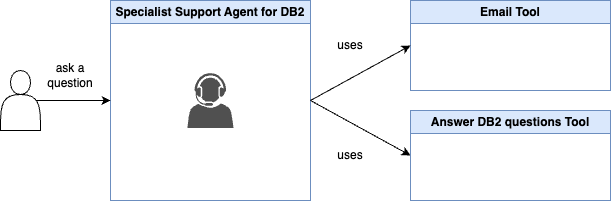
In the workshop material for the regional techXchange in Germany, you can follow the steps to develop a support agent for DB2 locally that utilizes two capabilities generated before one: an email outline that can be sent to the customer and second, a RAD implementation to answer questions related to DB2 as tools. Developed with LangGraph.
- Here is a description for this Specialist Support Agent for DB2
We can say this agent is a support expert for level one to level two to answer questions and provide an initial email outline for support members to be more effective. This agent can find the answers to complex questions by accessing DB2 documentation. If you request an outline for an email to send to a customer, it can outline this.
In the Regional TechXchange workshop material, we built a Specialist Support Agent for DB2. This agent:
- Generates an email outline to communicate with customers.
- Answers DB2-related questions by querying the official DB2 documentation.
The image below shows the simplified dependencies for this agent.
3. Evolving to Multi-Agent Orchestration
Now, we can easily integrate this agent to watsonx Orchestrate from a deployment in watsonx.ai.
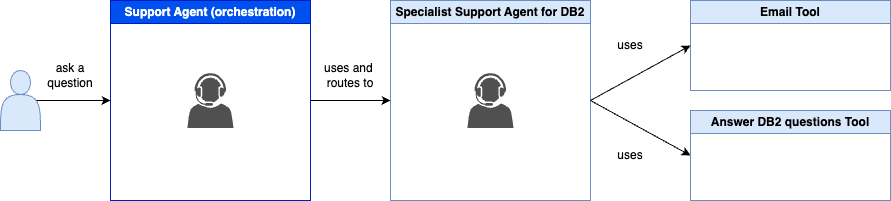
With watsonx Orchestrate, you can combine multiple specialist agents to create an orchestrator support agent which:
- Receives user requests about various IBM Software or Cloud services
- Routes questions to the appropriate specialist agent (e.g., DB2, IBM Cloud Services)
- Aggregates responses and sends a unified reply
Here is a description of this Support Agent (orchestrator)
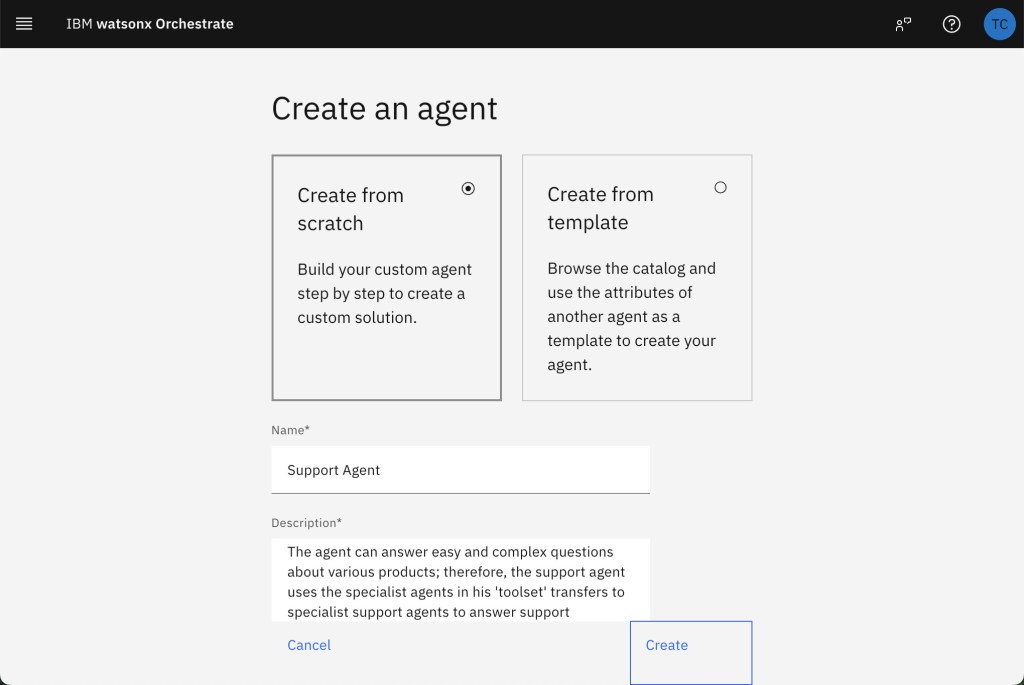
The agent can answer easy and complex questions about various products; therefore, the support agent uses the specialist agents in his ‘toolset’ transfers to specialist support agents to answer support questions about the products the specialist support agents are responsible for. The amount of specialist support agents can change in the future.
4. Integration Overview: watsonx.ai and watsonx Orchestrate
With this we can realize following scenario to create an orchestration support agent. In this context, it is useful to understand the terminology of three agent types.
To learn more about agent orchestration concepts and terminology::
- Blog: Integrating watsonx.ai Agents in watsonx Orchestrate
- IBM watsonx Orchestrate documentation: Adding agents for orchestration
- IBM Think 2025 article:
What is AI agent orchestration?
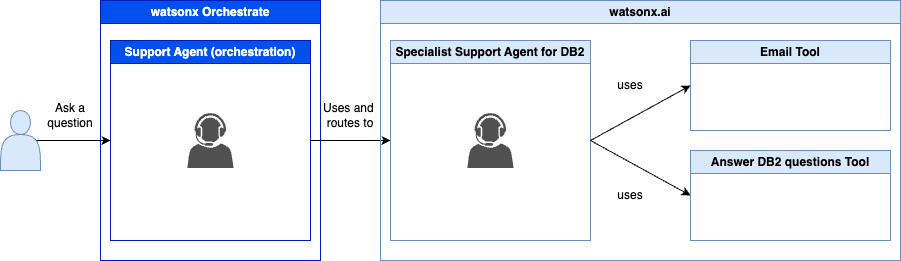
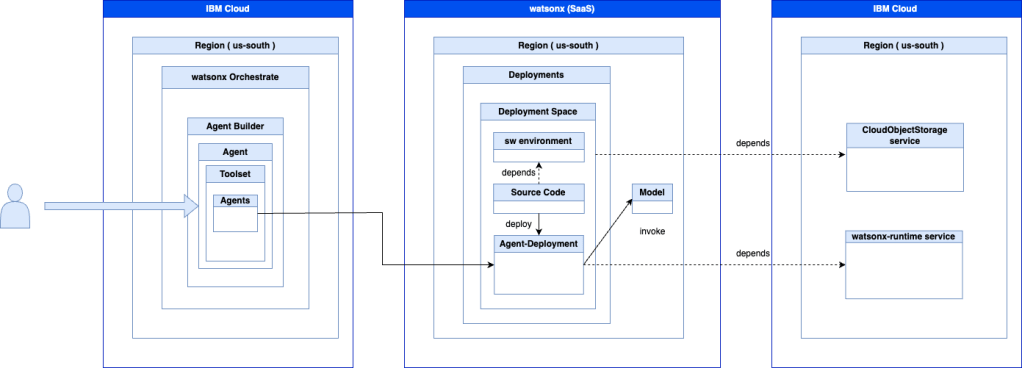
The image below simplifies technical dependencies based on the last blog post and the workshop documentation for the Specialist Support Agent for DB2 and the new orchestration agent we will create in watsonx Orchestrate.
The agent in the watsonx.ai deployment was locally developed and then deployed to watsonx.ai.(more details about the right part of the image you can find in the blog post Develop and Deploy Custom AI Agents to watsonx.ai on IBM Cloud)
5. Easy Setup: Importing Your Agent into watsonx Orchestrate
The setup watsonx.ai and watsonx Orchestrate
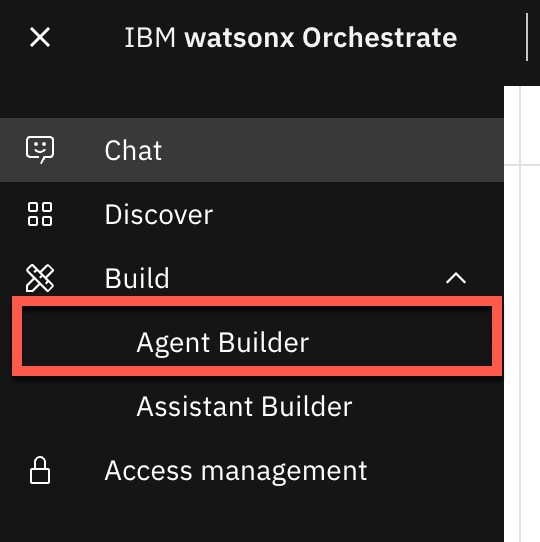
Step 1: Select the Agent Builder
Step 2: Select Create Agent from scratch
Enter a name and description, then click Create.
Step 3: Specify the Knowledge

Step 4: Add an agent
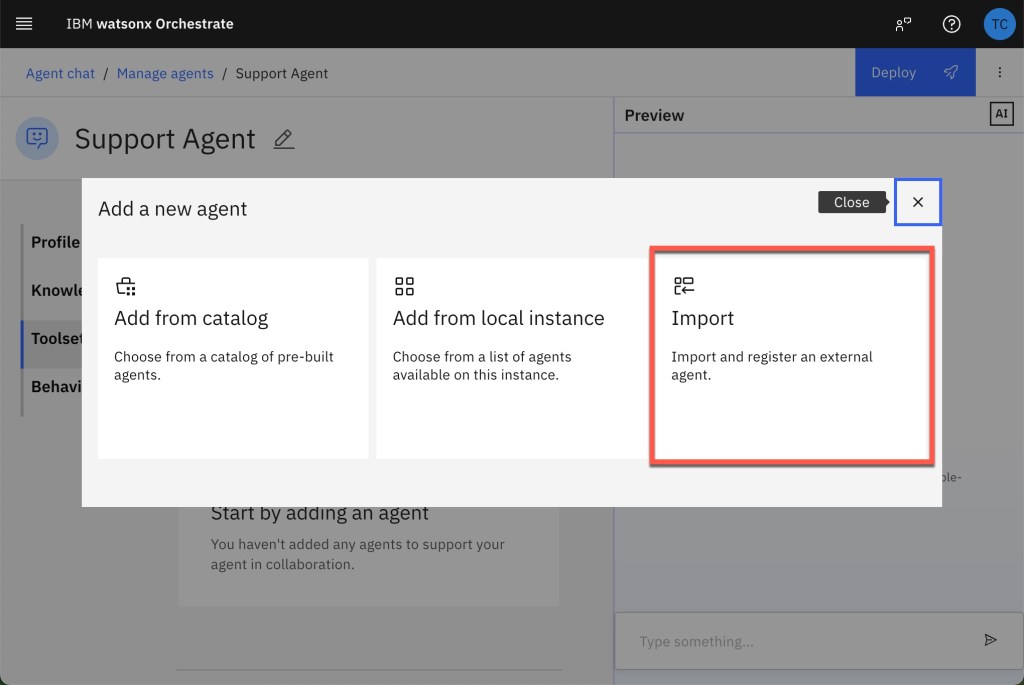
Step 5: Select “Import”
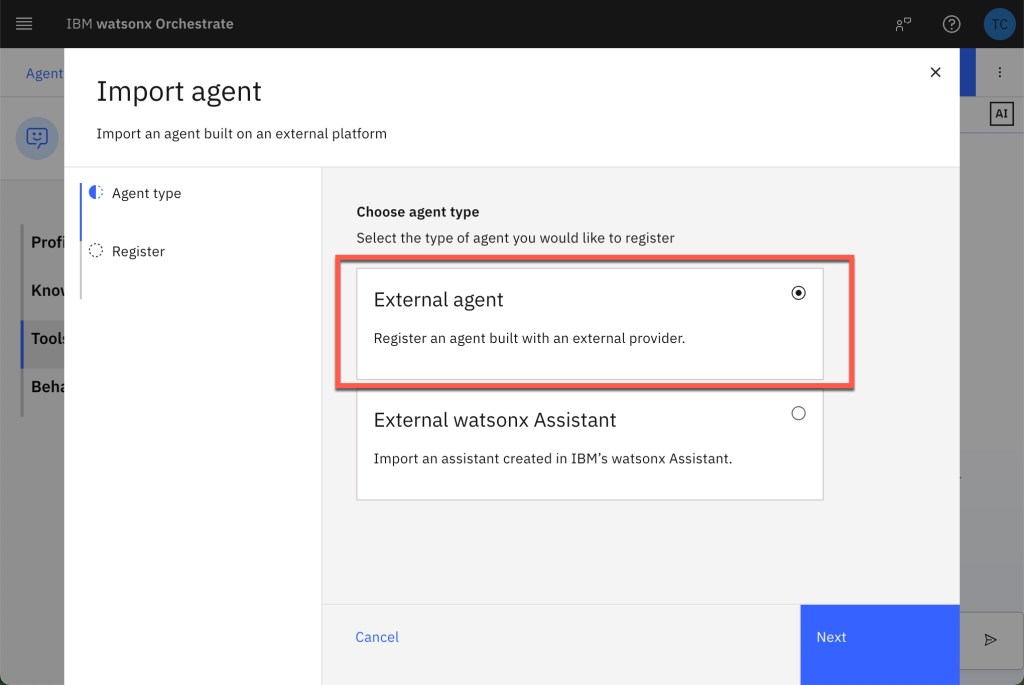
Step 6: Select “External agent”
Step 7: Insert the IBM Cloud API key
Choose watsonx.ai and enter your IBM Cloud API key for the watsonx Runtime service.
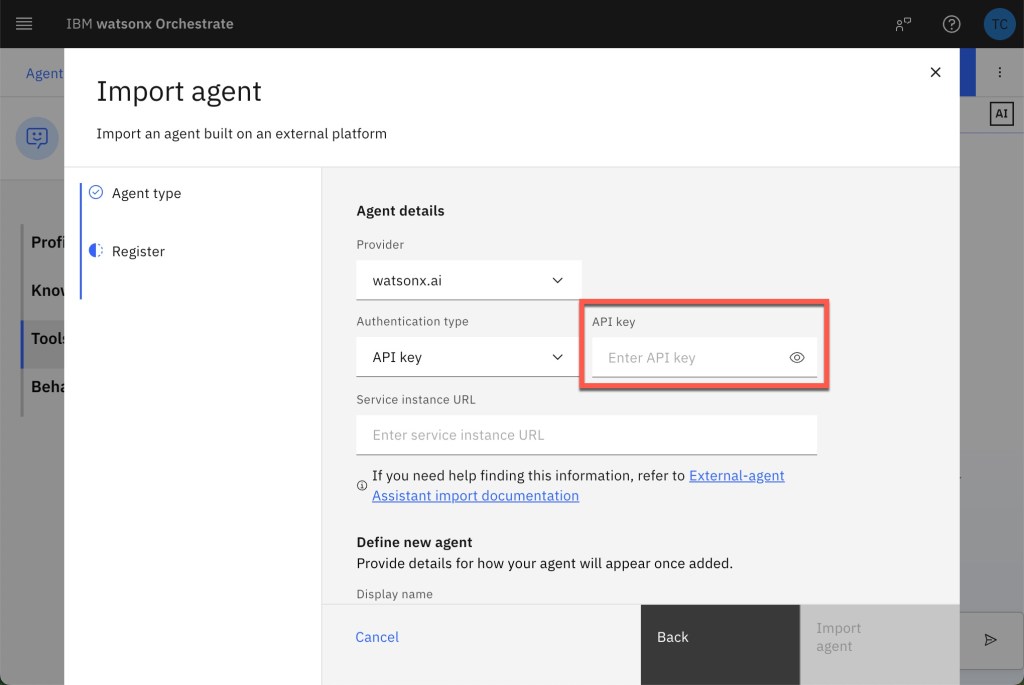
Step 8: Enter the Service instance URL
Paste the stream URL from your watsonx.ai agent deployment.

Step 9: Define your agent and import the agent
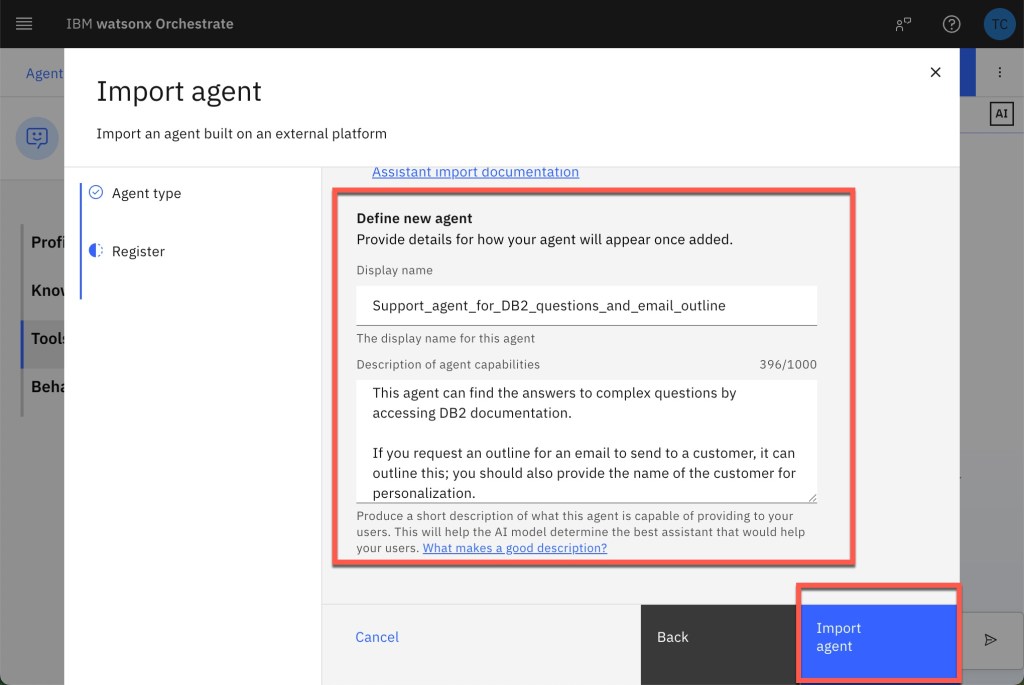
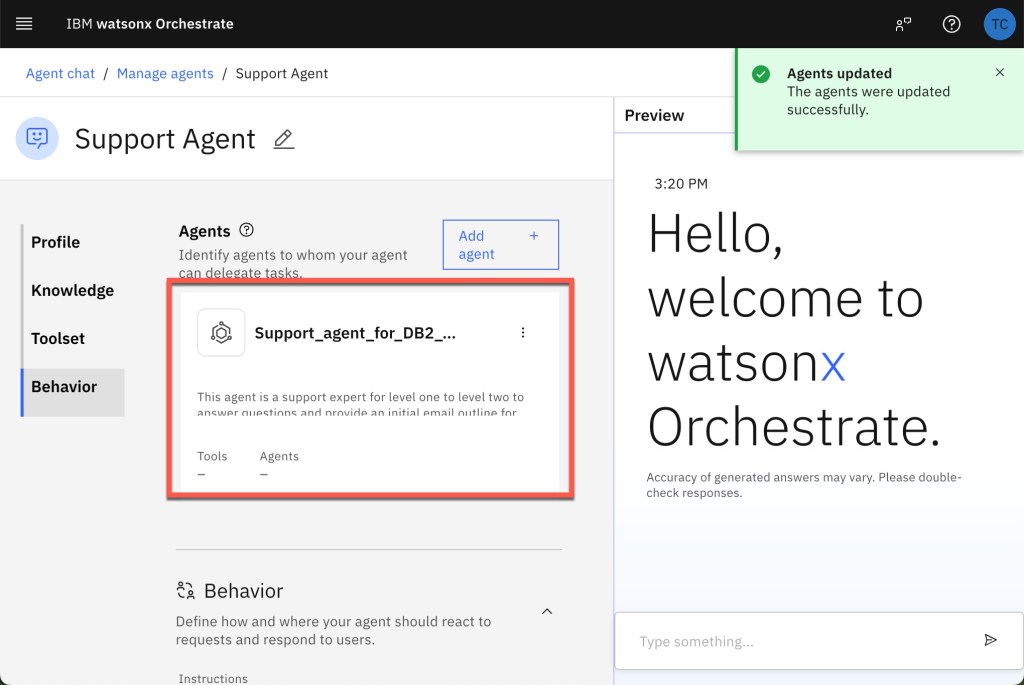
Step 10: Verify the agent is imported
Custom tools won’t appear in the tool listed but are ready to use for the DB2 agent.
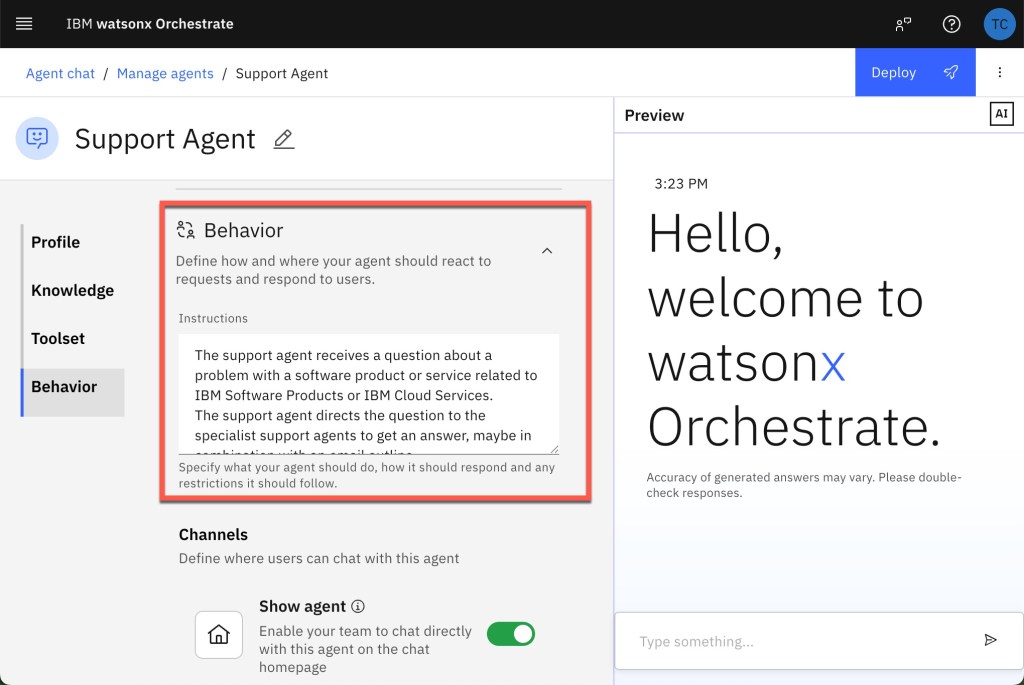
Step 11: Add the Behavior
Configure orchestrator agent instructions to interact with the user and use the DB2 agent.
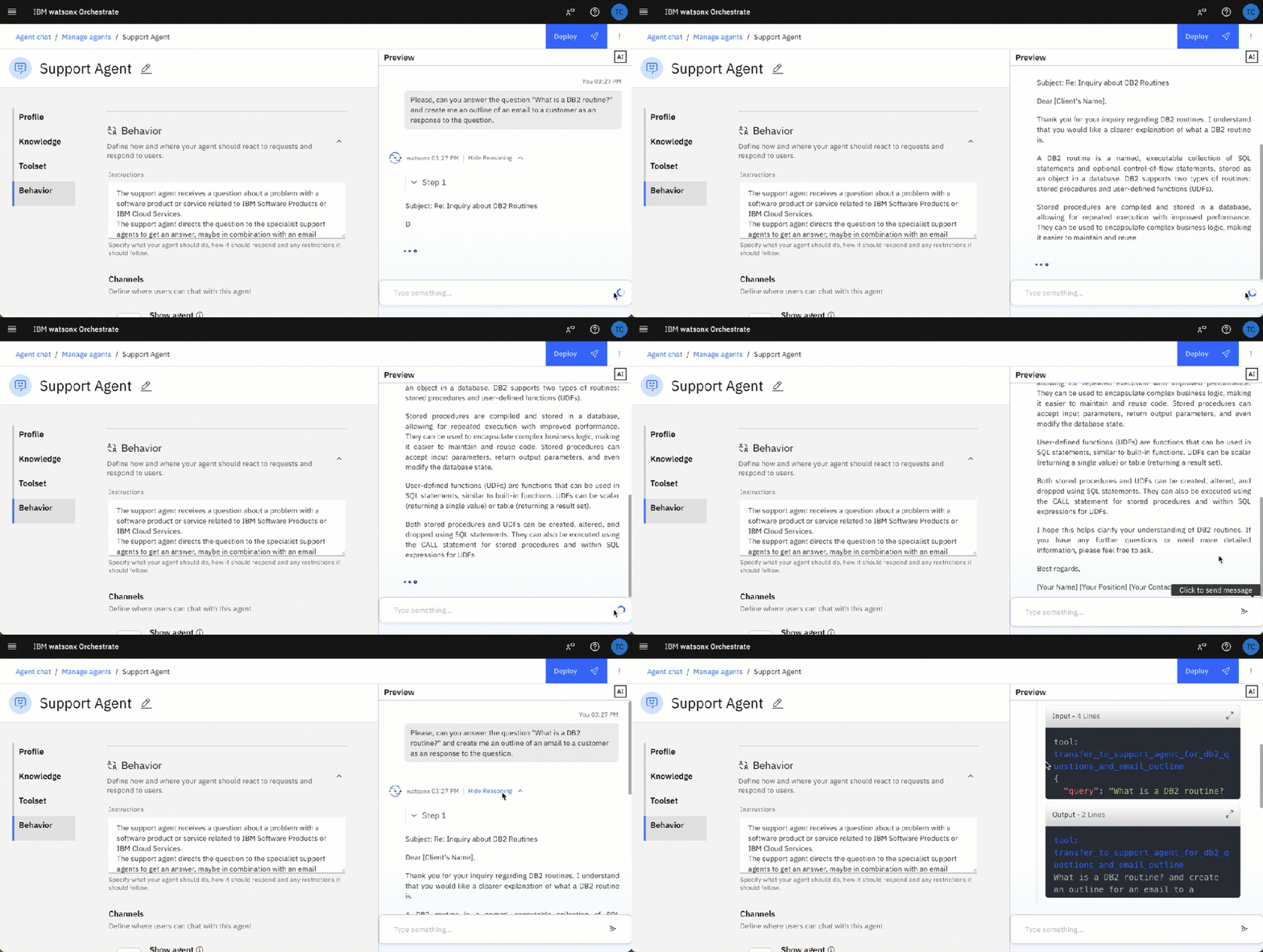
Step 12: Test the support agent (orchestrator)
As you can see the support agent uses our developed DB2 support agent and also spelling errors in the question. Now we are ready to use the multi agent implementation with the orchestrator agent in watsonx Orchestrate
6. Summary and Best Practices
This is a good Modular Design we were able to build a specialist agent focused on a single domain, then connect them through an orchestrator support agent.
By following these patterns, you can rapidly develop, deploy, and orchestrate custom AI agents in the watsonx ecosystem. bIntegrating agents locally developed based on the watsonx.ai Agent template made by the watsonx developer hub can easily be imported into watsonx Orchestrate that’s awesome.
But you should remember, when creating multi-agent systems, don’t expect they are always correct, because you introduce multiple time interactions with a large language model. The image below should visualize how many prompts are involved in different scenarios, for example an SQL response summarization using Supervisor and several agents and tools using four large language model interactions. Which is the maximum on accuracy to expect? When, at the moment, an accuracy for a large language model integration with 0.9 is seen as a good value? 😉
You should be aware of:
- Error handling: Multi-agent workflows introduce multiple LLM calls—monitor latency and accuracy. (Exploring the “AI Operational Complexity Cube idea” for Testing Applications integrating LLMs)
- Have the right performance expectations: Aim for at least 90% accuracy in each agent; orchestration adds complexity and potential error.
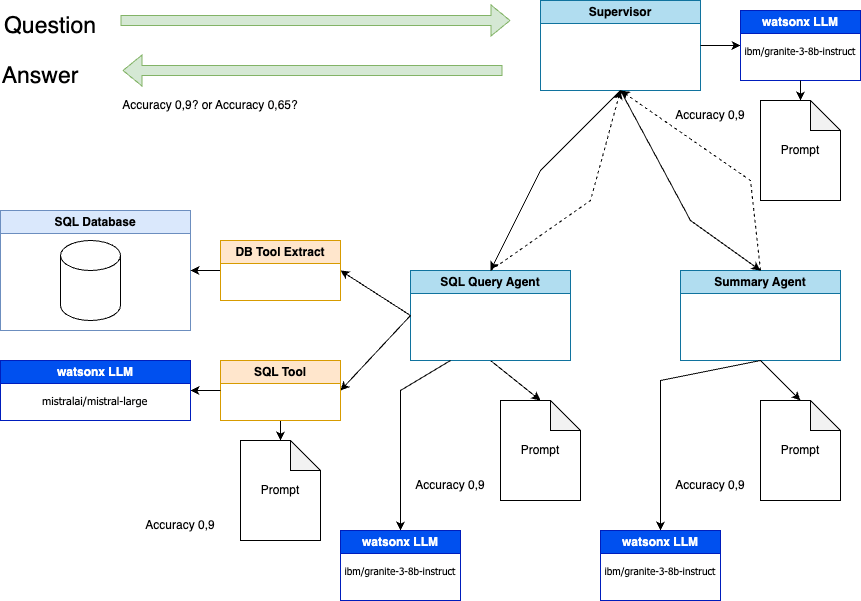
The diagram above illustrates a multi-agent supervisor pattern—how a top-level agent routes an incoming user question to two specialist agents (a SQL Query Agent and a Summary Agent), then aggregates their outputs into a final answer:
- Supervisor Agent (watsonx LLM “ibm/granite-3-bb-instruct”)
- Receives the user’s Question (green arrow in).
- Decides, based on its own prompting logic, which specialist agent(s) should handle the request. Dashed lines indicate possible routing decisions, each stamped with an estimated accuracy (e.g. 0.9 when it hands off to a given agent, or lower if uncertain).
- SQL Query Agent
- When tasked, it uses a DB Tool Extract component to read from an underlying SQL Database,
- Sends the extracted data to an SQL Tool (backed by another LLM instance, here “mistralai/mistral-large”) , which formulates and executes database queries according to a provided Prompt.
- Returns query results, again annotated with an accuracy estimate (0.9).
- Summary Agent
- Independently, another copy of the same watsonx LLM (“ibm/granite-3-bb-instruct”) ingests the raw question or intermediate data and produces a human-friendly summary or analysis per its Prompt, also at ~0.9 accuracy.
- Aggregation Back at the Supervisor
- The Supervisor collects the SQL results and the summary output, applies its own final prompting step (shown as the little “Prompt” icon next to the Supervisor), and emits the unified Answer (green arrow out).
- Accuracy annotations (e.g. “Accuracy 0.9? or Accuracy 0.65?”) hint at how confidence scores might guide whether the Supervisor trusts or re-routes tasks for re-execution.
This flow demonstrates how distinct “worker” agents—each with their own tools and LLM models are orchestrated by a Supervisor to handle complex, multi-step queries against data sources like a SQL database, then combine their outputs into a single coherent response.
I hope this was useful to you and let’s see what’s next?
Greetings,
Thomas
#AIAgents, #watsonxai, #IBMCloud, #AgentOrchestration, #LangGraph, #DB2Support, #watsonxOrchestrate, #CustomAIWorkflows, #DeveloperTutorial, #MultiAgentSystems
 Thomas Suedbroecker's Blog