
In this hands‑on post, you’ll see how to:
- Build an AI agent locally using the watsonx Orchestrate Agent Development Kit ADK (on GitHub).
- Export the agent from your local environment.
- Import he agent into your remote watsonx Orchestrate instance on IBM Cloud.
You can follow this alongside my previous blog post related to watsonx Orchestrate on IBM Cloud:
- Getting Started with Local AI Agents in the watsonx Orchestrate Developer Edition (Jun 25, 2025)
- Supercharge Your Support: Example Build & Orchestrate AI Agents with watsonx.ai and watsonx Orchestrate (May 15, 2025)
- Watch the video Unlock the New Flow Builder in IBM watsonx Orchestrate – Visualize, Debug & Deploy Tool Flows video on YouTube. 🚀 (July 02, 2025)
Table of content
- Build a local agent
- Start the server
- Start the lite chat for watsonx Orchestrate locally
- Generate your agent locally
- Activate the local ADK environment
- List the agents with the CLI
- Export the local agent
- Import the agent to the watsonx Orchestrate instance on IBM Cloud
- Enable the remote environment
- List the environment to verify what is the actual activated environment
- Re‑activate if required
- List the actually available agents in the remote watsonx Orchestrate instance
- Import your agent
- Open your watsonx Orchestrate instance in IBM Cloud and verify whether the agent exists
- Summary
1. Build a local agent
Step 1: Start the server
This initializes the watsonx Orchestrate server locally, using Docker containers.
orchestrate server start --env-file .env
Step 2: Start the lite chat for watsonx Orchestrate
This launches the lightweight chat interface at http://localhost:3000/.
orchestrate chat start
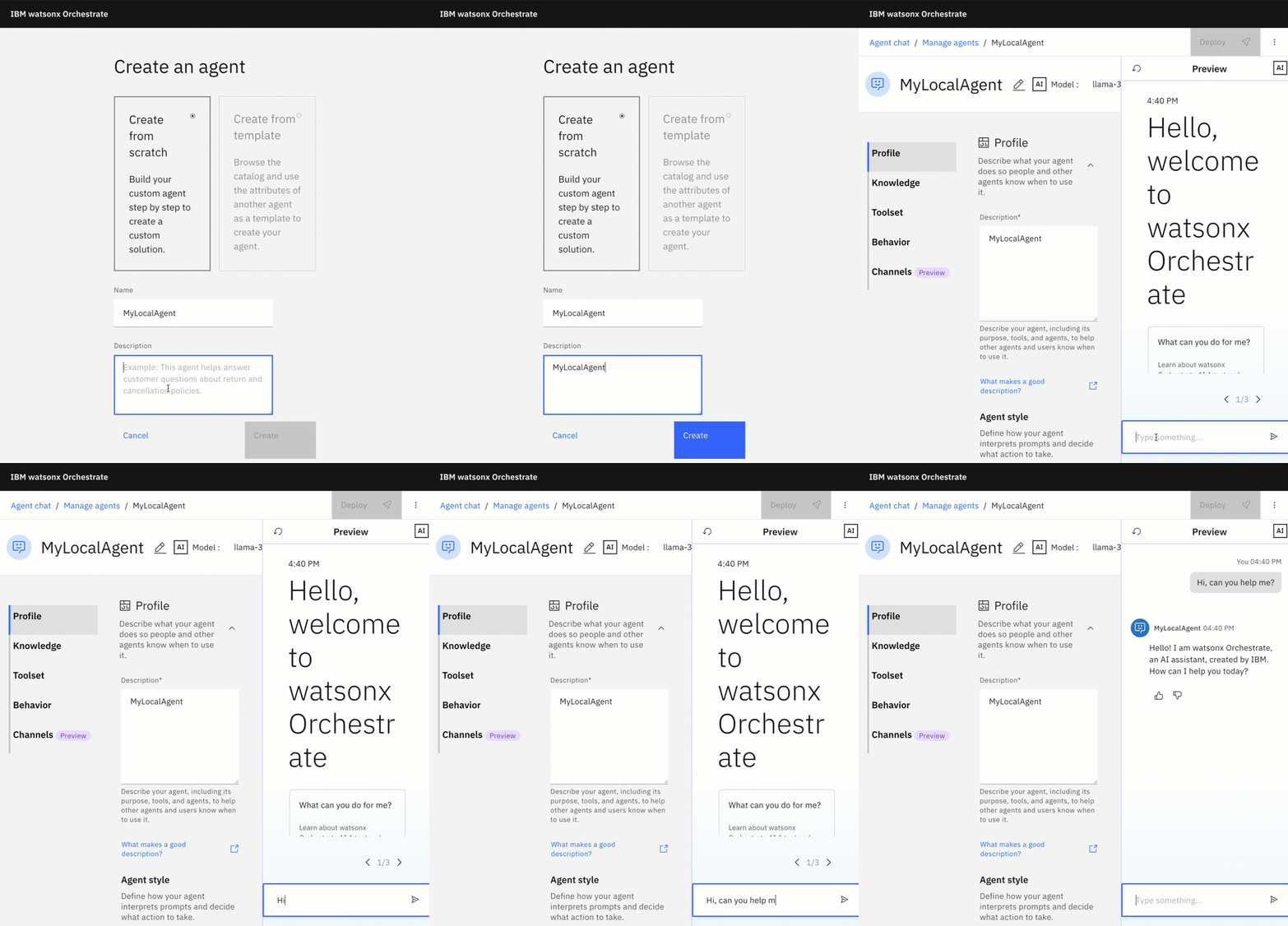
Step 3: Generate your agent locally
Use the UI to create a native agent. (Visual example shown in GIF.
Step 4: Activate the local ADK environment
orchestrate env activate local
- Example output:
[INFO] - local tenant found
[INFO] - Environment 'local' is now active
Step 4: List the agents with the CLI
orchestrate agents list
- Example output:
You’ll see something like:
Agents
┏━━━━━━━━━━━━━━━━━━━━━┳━━━━━━━━━━━━━━┳━━━━━━━━━━━━━━━━━━━━━━━━━━━━━━━━━━━━━━━━━━━━━━━━━┳━━━━━━━━━┳━━━━━━━━━━━━━━━┳━━━━━━━┳━━━━━━━━━━━━━━━━┳━━━━━━━━━━━━━━━━━━━━━━━━━━━━━━━━━━━━━━┓
┃ Name                ┃ Description  ┃ LLM                                             ┃ Style   ┃ Collaborators ┃ Tools ┃ Knowledge Base ┃ ID                                   ┃
┡━━━━━━━━━━━━━━━━━━━━━╇━━━━━━━━━━━━━━╇━━━━━━━━━━━━━━━━━━━━━━━━━━━━━━━━━━━━━━━━━━━━━━━━━╇━━━━━━━━━╇━━━━━━━━━━━━━━━╇━━━━━━━╇━━━━━━━━━━━━━━━━╇━━━━━━━━━━━━━━━━━━━━━━━━━━━━━━━━━━━━━━┩
│ MyLocalAgent_3448nD │ MyLocalAgent │ watsonx/meta-llama/llama-3-2-90b-vision-instruc │ default │               │       │                │ 42db7f18-XXXXXXXX │
│                     │              │ t                                               │         │               │       │                │                                      │
└─────────────────────┴──────────────┴─────────────────────────────────────────────────┴─────────┴───────────────┴───────┴────────────────┴──────────────────────────────────────┘
Step 5: Export the local agent
This exports just the agent configuration—no dependencies.
export AGENT="MyLocalAgent_3448nD"
export AGENT_TYPE="native"
orchestrate agents export -n ${AGENT} -k ${AGENT_TYPE} -o ./${AGENT}.yml --agent-only
- Example output:
[INFO] - Exported agent definition for 'MyLocalAgent_3448nD' to './MyLocalAgent_3448nD.yml'
2. Import the agent to the watsonx Orchestrate instance on IBM Cloud
Step 1: Enable the remote environment
Set up a new remote environment by following Follow IBM’s “Production import” guide to obtain the service instance URL and API_KEY.
Using “Profile/Settings” information:

export ORCHESTRATE_SERVICE_INSTANCE=https://api.us-south.watson-orchestrate.cloud.ibm.com/instances/90
export NAME=my-watsonx_orchestrate_remote-access
orchestrate env add -n ${NAME} -u ${ORCHESTRATE_SERVICE_INSTANCE} --type ibm_iam --activate
You’ll be prompted for your API key you have created before.
Please enter WXO API key:
Step 2: List the environment to verify what is the actual activated environment
orchestrate env list
- Example output:
my-watsonx_orchestrate_remote-access https://api.us-south.watson-orchestrate.cloud.ibm.com/instances/908b28c9-XXX (active)
Step 3: Re‑activate if required
Prompt and info messages confirm it’s ready.
orchestrate env activate my-watsonx_orchestrate_remote-access
Please enter WXO API key:
[INFO] - Environment 'my-watsonx_orchestrate_remote-access' is now active
Step 4: View existing agents
Now you should see all agents in of the remote watsonx Orchestrate instance. That confirms connection to your remote instance and shows current agents.
orchestrate agents list
 Agents
┏━━━━━━━━━━━━━━━━━━━━━━━━━━━┳━━━━━━━━━━━━━━━━━━━━━━━━━━━┳━━━━━━━━━━━━━━━━━━━━━━━━━━━┳━━━━━━━━━┳━━━━━━━━━━━━━━━┳━━━━━━━━━━━━━━━━━━━━━━━━━━━┳━━━━━━━━━━━━━━━━━━━━━━━━━━━┳━━━━━━━━━━━━━━━━━━━━━━━━━━┓
┃ Name                      ┃ Description               ┃ LLM                       ┃ Style   ┃ Collaborators ┃ Tools                     ┃ Knowledge Base            ┃ ID                       ┃
┡━━━━━━━━━━━━━━━━━━━━━━━━━━━╇━━━━━━━━━━━━━━━━━━━━━━━━━━━╇━━━━━━━━━━━━━━━━━━━━━━━━━━━╇━━━━━━━━━╇━━━━━━━━━━━━━━━╇━━━━━━━━━━━━━━━━━━━━━━━━━━━╇━━━━━━━━━━━━━━━━━━━━━━━━━━━╇━━━━━━━━━━━━━━━━━━━━━━━━━━┩
Step 5: Import your agent
export AGENT="./MyLocalAgent_3448nD.yml"
orchestrate agents import --file ${AGENT}
- Example output:
[INFO] - Agent 'MyLocalAgent_3448nD' imported successfully
Step 6: Open your watsonx Orchestrate instance in IBM Cloud and verify the imported agent exists
1. Open the watsonx Orchestrate instance in IBM Cloud.
2. Search for ‘MyLocalAgent_3448nD’

3. Run a quick test to ensure it works as expected

3. Summary
You’ve just:
- Run a local watsonx Orchestrate server;
- Built and exported a native agent;
- Connected ADK to a remote IBM Cloud instance; and
- Imported the agent into production.
This process keeps local development clean, safe, and production-ready. The ADK empowers you to build locally, import centrally—minimizing risk, maximizing agility.
3.1 Additional Tips
- You can export entire agent configurations or include tools too
- ADK version 1.6.0+ supports exporting agents with flow tool integrations
- For multi-agent orchestration, consider collaborator and flow tools (advanced)
I hope this was useful to you and let’s see what’s next?
Greetings,
Thomas
#watsonxOrchestrate, #AIAgents, #GenAI, #Automation, #Productivity, #HybridCloud
 Thomas Suedbroecker's Blog