
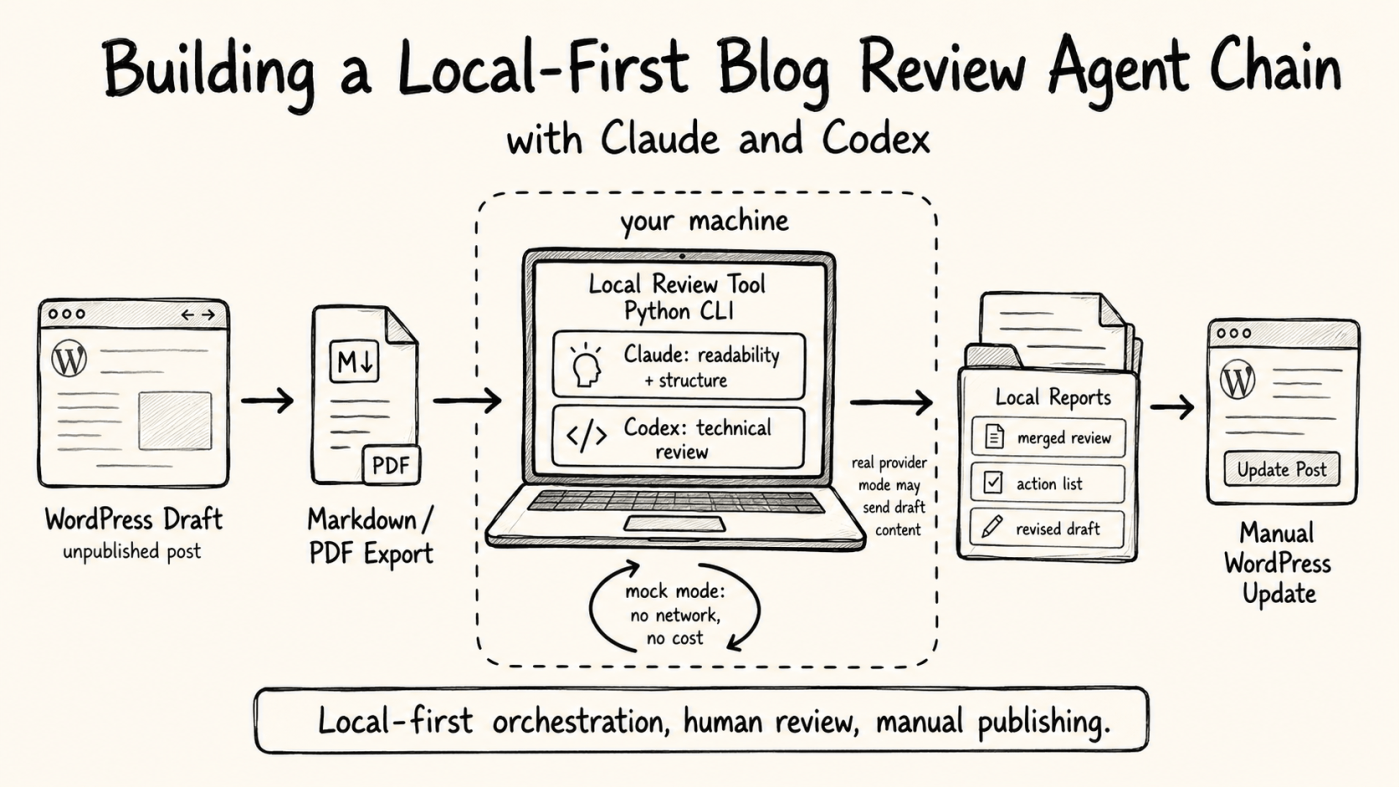
I write technical blog posts, and before I publish one I always want a second opinion. Does the structure work? Is the explanation clear? Did I claim something technical that I cannot actually back up? For a while I did this review by hand, and sometimes I pasted drafts into a chat tool. That last part always made me uncomfortable: an unpublished draft is sensitive content, and I did not want to hand it to a service I do not control. While I am not using local models for inference yet, this tool effectively automates the manual workflow I was already doing, giving me a much better overview.
So it was time for a weekend project. I built a small tool for myself, and this post is about how it started. The public repository is called blog_review_chain_public. The idea is simple: review a blog draft locally by running it through two AI assistants in a row, then merge their feedback into reports I can act on by hand.
- What it does
- Why local-first
- Mock mode first
- What I deliberately left out
- Which account does it use in VS Code?
- A few technical choices
- Two architectural trade-offs
- Where I am honest about limits
- What is next ?
- References
1. What it does
The tool is a local Python command-line app. You point it at a draft — a Markdown file, or a PDF exported from WordPress — and it runs the draft through two reviewers in sequence.
The orchestration flow runs on your machine, with WordPress as a manual step at each end:
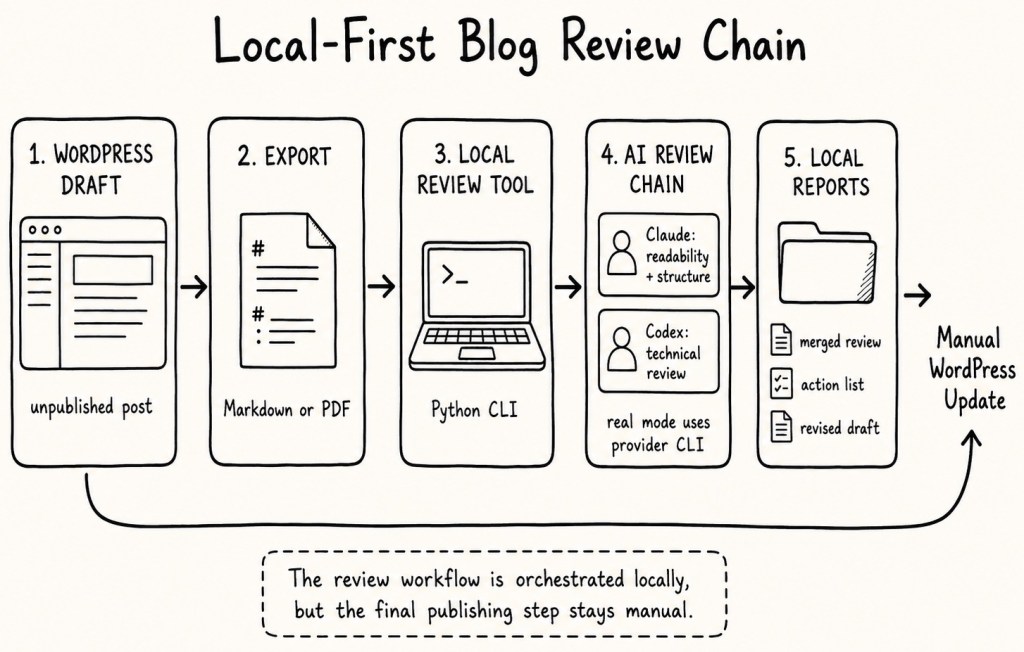
The two reviewers run like this:
- Claude reviews readability and structure: narrative flow, clarity, tone, and whether the post fits its audience.
- Codex then reviews the technical side: correctness of commands and architecture claims, privacy and security posture, and maintainability. It also receives Claude’s review as context, so the two stay consistent instead of contradicting each other.
After both reviews, the tool merges them into a single report and produces a prioritized action list and a revised draft. Each run writes a dated folder with the review reports, run information, and metadata:
00-review-info.md
01-input-summary.md
02-claude-review.md
03-codex-review.md
04-merged-review.md
05-action-list.md
06-revised-draft.md
review_metadata.json
I read the reports, decide what I agree with, and apply the edits myself.
One caution: that dated folder holds the full reports and the revised draft, so it can contain unpublished or private content. Treat the output directory as sensitive and keep it out of any public commits.
2. Why local-first
The design starts from one constraint: an unpublished draft should remain under my control as much as possible.
The application itself only reads and writes local files. It adds no telemetry, does not log in to WordPress, does not call a WordPress API, and does not publish anything automatically. It also stores no provider credentials. The real reviewers are the external claude and codex command-line tools, running under my own accounts.
There is one important distinction: local-first orchestration does not automatically mean local inference. In mock mode, the complete workflow runs without network access. In real provider mode, the selected CLI still sends the review request — including the draft content — to the provider service according to that provider’s authentication, billing, and privacy settings. So “local-first” describes where the orchestration runs, not a guarantee that nothing leaves the machine.
This does not make real provider mode magically private. If I use Claude or Codex in real provider mode, the draft content still leaves my machine and is processed by the selected provider. The difference is not that CLI usage is automatically safer than a web chat. The difference is that the workflow becomes explicit, repeatable, and controlled: the app stores no provider credentials, does not automate WordPress, writes local reports, and keeps the final publishing decision manual.
There may also be a data-handling difference depending on how the provider CLI is authenticated. API-key-based usage can have different privacy and training rules than consumer web-chat usage. For example, OpenAI documents that API content is not used for model training by default, while individual ChatGPT and Codex usage follows consumer data controls. Claude Code can use a Claude subscription or an ANTHROPIC_API_KEY, and Anthropic documents that the API key takes precedence when it is present. Because these policies and defaults can change, I treat provider mode as external processing and check the current provider documentation before relying on it.
So the current tool reduces uncontrolled manual copy-and-paste and improves workflow control. It does not yet provide complete local data isolation. That is exactly why a future local model adapter would be the cleanest next step for highly sensitive drafts.
A note on credentials and trust: the app manages none of its own credentials, but the provider CLIs may keep local authentication caches or read environment variables outside this tool. Therefore, you still need to secure your local Claude and Codex CLI authentication and environment. And because real provider mode shells out to local CLIs, run it only with trusted claude and codex binaries from the paths you expect.
WordPress stays a manual step on purpose:
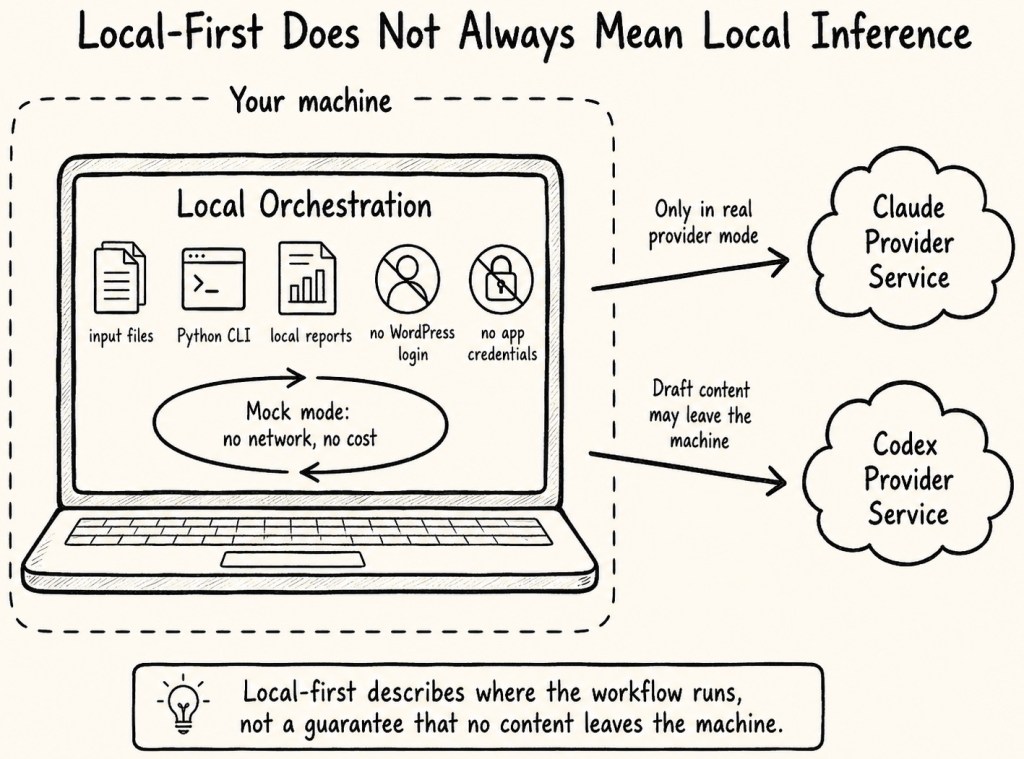
No login handling, no scraping, no automatic upload. That is a feature, not a missing one.
3. Mock mode first
The part I am most happy with is that you can run the entire workflow without any AI account at all.
The tool ships a deterministic mock mode. The mock providers generate the full set of reports without calling Claude or Codex, with no network and no cost. That sounds like a small thing, but it shaped the whole project:
- I could build and test the input handling, the merge step, and the report writing before wiring in a single real model call.
- The test suite is hermetic. It uses mocked subprocesses and deterministic mock providers, so it needs no Claude account, no Codex account, no network access, and no credentials.
- Anyone can clone the repo and see the workflow end to end in one command.
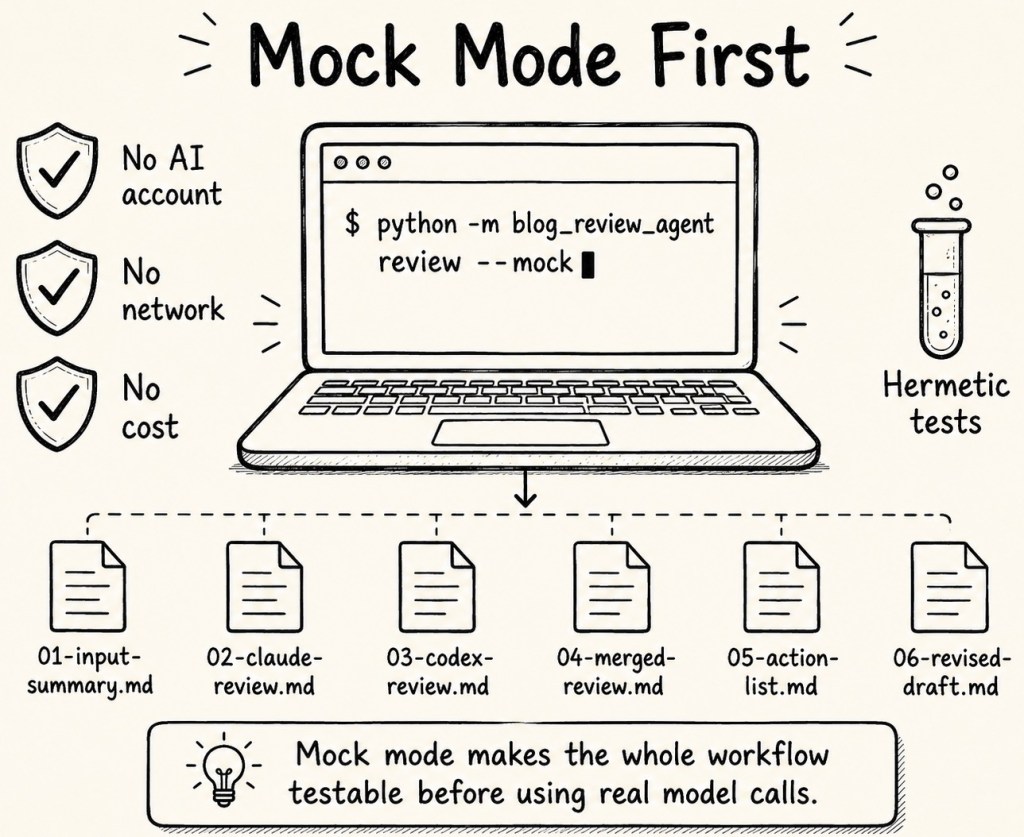
Real reviews are opt-in, per provider:
# Try the whole workflow with no AI accounts
python -m blog_review_agent review input/example-blog-post.md --mock

# Real Claude, mock Codex
python -m blog_review_agent review input/example-blog-post.md \
  --claude-provider cli \
  --codex-provider mock

# Full real chain
python -m blog_review_agent review input/example-blog-post.md \
  --claude-provider cli \
  --codex-provider cli
4. What I deliberately left out
For this first version I wrote down what I am not building, so the scope stays honest:
- No WordPress API integration, scraping, or auto-publishing.
- No database.
- No orchestration framework until something actually needs it.
The repository is licensed under MIT, includes a DCO sign-off check for pull requests, and has a GitHub Actions test workflow that runs the pytest suite. That makes the project easier to inspect, test, and contribute to without adding more runtime complexity.
5. Which account does it use in VS Code?
A question I had to answer for myself early on: when Claude and Codex generate code for me in VS Code, do they use my personal account, or some separate API key? This matters here because, as I said in section 2, the tool stores no provider credentials of its own — so whatever those tools use is whatever you signed them in with.
The short answer is: it uses whatever authentication state the installed CLI already has. That can be a subscription-based sign-in or an API-key-based setup, depending on how the tool was configured.
- Claude Code can use a Claude Pro or Max subscription, depending on the authenticated setup. Anthropic documents that Claude Code works in the terminal and supported IDEs with the same Claude credentials, and that IDE usage counts toward the same shared usage limits. Anthropic also documents that an
ANTHROPIC_API_KEYenvironment variable takes priority over an authenticated subscription and causes API pay-as-you-go billing instead. [2] - Codex supports two OpenAI authentication methods: ChatGPT sign-in for subscription access and API-key sign-in for usage-based access. OpenAI documents that Codex cloud requires ChatGPT sign-in, while the Codex CLI and IDE extension support both methods. OpenAI also documents that the CLI and IDE extension share cached login details. [3]
- That is why my tool needs no provider secrets. In CLI mode it only runs the local
claudeandcodexcommands and stores no credentials of its own. It uses whatever account those tools are already authenticated with. For Codex, I also need to remember that the CLI and IDE extension can share cached login details. Depending on the local configuration, credentials may be stored in the operating system credential store or in a local auth file. That file must be treated like a password and must never be committed or shared. Keeping authentication inside the provider tools is the whole point. - One caveat: plans, defaults, and usage limits change, so check the current provider documentation before relying on a specific tier.
6. A few technical choices
I kept the stack boring on purpose, because boring is easy to maintain:
- Python 3.12 with a Typer CLI, Pydantic for typed config and models, and Rich for terminal output.
- Docling to convert a PDF export into text. Docling documents local execution capabilities for sensitive data and air-gapped environments, but the privacy behavior still depends on how the tool is configured and whether optional services are enabled. [4]
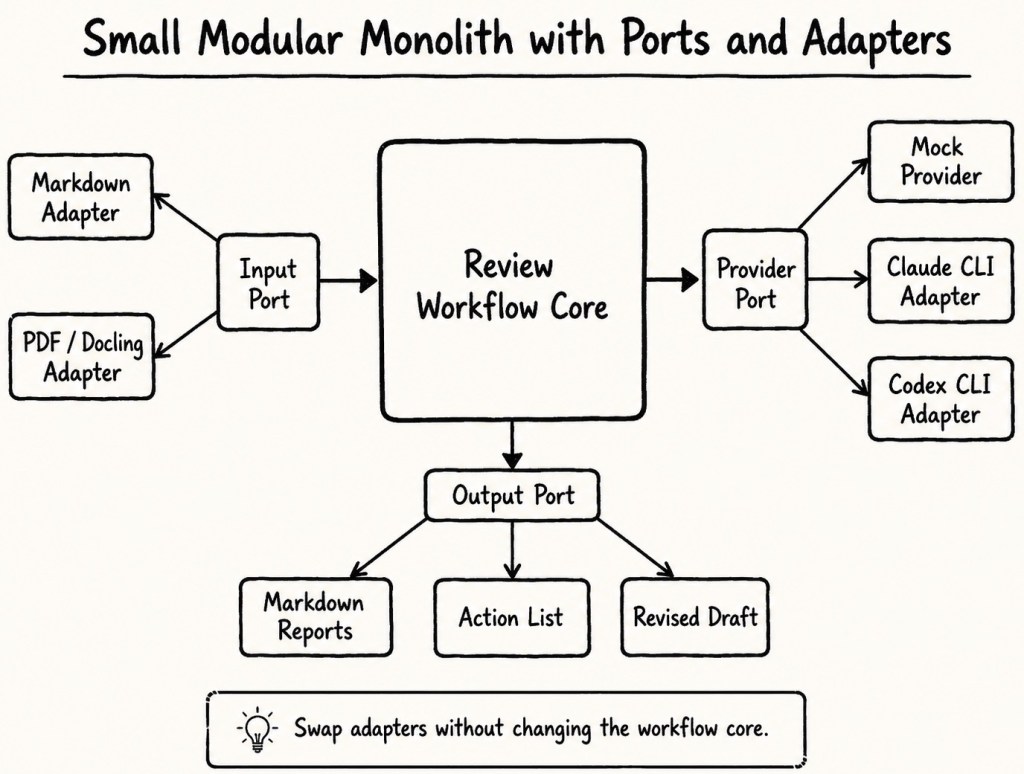
The shape is a small modular monolith with ports and adapters: an input port for Markdown/PDF, a provider port that all the provider implementations (mock, Claude CLI, and Codex CLI) sit behind, and an output port for the reports. Swapping a provider does not touch the workflow.
One concrete lesson already showed up. The Codex CLI changed its flags in a release and removed a flag the adapter was passing, which broke the real run. The Codex adapter now feature-detects the codex exec flags supported by the installed CLI version and only passes supported flags, with a safe fallback. Pinning to a fixed flag list felt fine until it was not.
7. Two architectural trade-offs
This tool also has two architectural trade-offs that are important to name clearly.
7.1 CLI dependency risk
The first one is the CLI dependency risk. The current version calls the local claude and codex command-line tools via subprocesses instead of using provider SDKs directly. That makes the tool simple to use with the accounts I already use in my development environment, but it also makes the adapters dependent on CLI behavior, installed versions, command flags, and local authentication state.
That is not as stable as integrating against a versioned API through an official Python SDK. Anthropic provides a Python SDK for the Claude API, and OpenAI provides official SDKs for application code. Those are usually the cleaner integration points when you want stronger API contracts, typed request handling, retries, and clearer version control. [2][3]
For this first version, I still chose local CLIs on purpose. The goal was not to build a production review platform. The goal was to orchestrate the same tools I already use manually, without storing provider secrets in my own application and without building another credential management layer. In other words: the CLI approach reduced project complexity, but increased adapter fragility.
It mainly improves control, repeatability, and transparency of the review workflow; it does not remove provider-side processing when real Claude or Codex mode is used.
7.2 Local-first is not full local isolation
The second trade-off is the meaning of “local-first.” This tool improves my control over the workflow: input handling, report generation, output folders, WordPress updates, and publishing decisions stay local and manual. But real Claude or Codex provider mode still sends draft content to external services. It reduces uncontrolled copy-and-paste workflows and avoids WordPress automation, but it does not provide complete local data isolation.
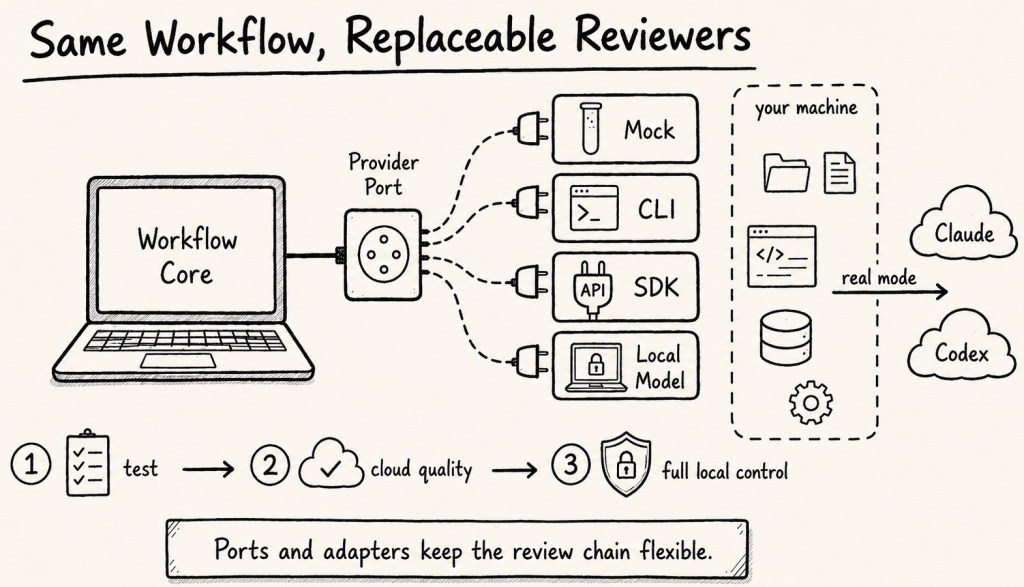
For complete isolation, the next logical step would be a local inference adapter, for example using a local model through Ollama or another local runtime. That would make the same review chain usable in three modes:
- Mock mode for deterministic testing
- Cloud provider mode for Claude and Codex quality
- Local model mode for maximum data control
This is also why I prefer the ports-and-adapters structure. It gives me a clean place to add a future local reviewer without rewriting the workflow.
8. Where I am honest about limits
Section 4 was about what I chose not to build. This section is different: it is about what the tool does today but does not do well yet.
- Mock output is deterministic. It is great for testing the workflow, but it is not a real model review.
- Real review quality, latency, cost, and usage limits depend entirely on the provider CLIs and the underlying subscriptions or API keys. Because plans change, always check the current provider documentation before relying on a specific tier.
- PDF conversion can lose links, tables, code formatting, and headings, so I prefer a Markdown export when fidelity matters — especially for posts where command accuracy or links need to survive.
9. What is next ?
The first milestone—the architecture baseline and the real two-provider chain—works end to end. This post was reviewed with the current state of the public repository.
If you write technical posts and care about keeping drafts on your own machine, this is the kind of tool you can build in a weekend and actually keep using. The repository is the starting point, and it reviews its own drafts—including this one.
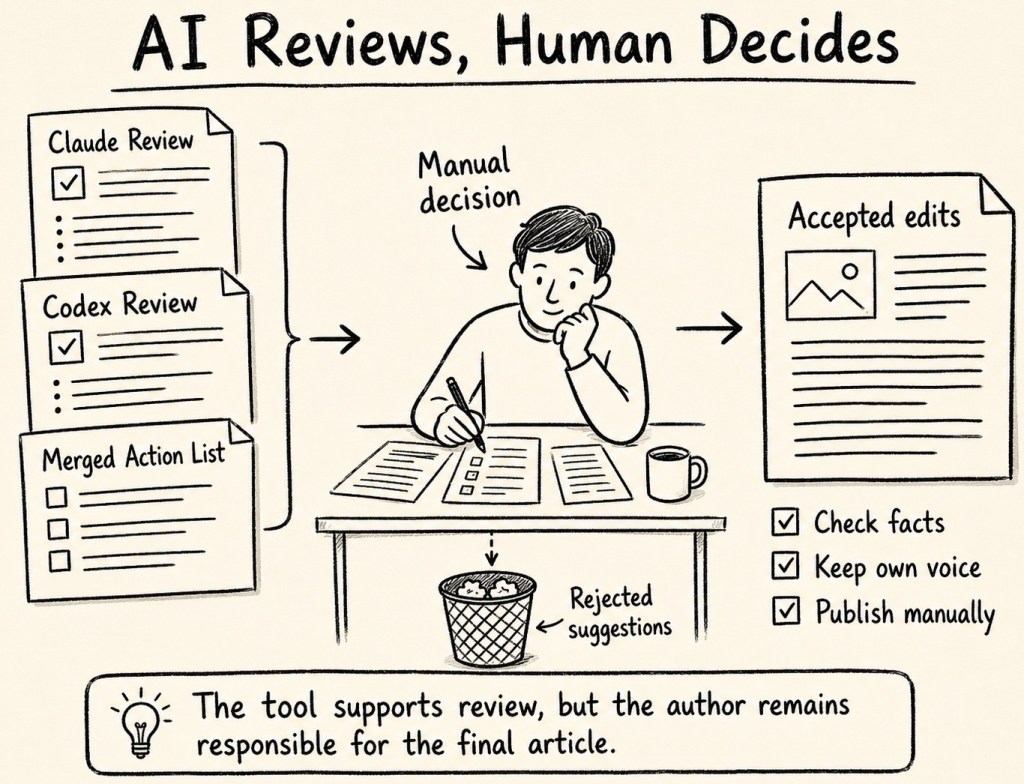
For me, the useful part is that the tool does not replace my review process. It gives me structured feedback, keeps the publishing step manual, and makes the review workflow repeatable. The next logical step is a local model adapter, so the same chain can run not only in mock mode and cloud-provider mode, but also in a stronger local-isolation mode.
References
- Rich documentation: https://rich.readthedocs.io/
- Anthropic Support — Use Claude Code with your Pro or Max plan: https://support.claude.com/en/articles/11145838-use-claude-code-with-your-pro-or-max-plan
- OpenAI Developers — Codex authentication: https://developers.openai.com/codex/auth
- Docling documentation: https://docling-project.github.io/docling/
- Typer documentation: https://typer.tiangolo.com/
- Pydantic documentation: https://docs.pydantic.dev/
- GitHub repository — blog_review_chain_public:
https://github.com/thomassuedbroecker/blog_review_chain_public - OpenAI Help — How your data is used to improve model performance:
https://help.openai.com/en/articles/5722486-how-your-data-is-used-to-improve-model-performance - OpenAI Policies — How your data is used to improve model performance:
https://openai.com/policies/how-your-data-is-used-to-improve-model-performance/
Note: This post reflects my own ideas, implementation work, and experience. AI was used as a writing and thinking aid to help structure and clarify the arguments, but not to define the conclusions.
#LocalFirstAI, #AIAgents, #AgenticAI, #ClaudeCode, #OpenAICodex, #PythonCLI, #TechnicalWriting, #BloggingWorkflow, #AIReview, #HumanInTheLoop, #PrivacyByDesign, #DeveloperTools, #SoftwareEngineering, #Automation, #AIEngineering


Leave a Reply